E-935-1-E
(5)“START”Pushbutton Switch
The checker produces a pulse train of the frequency selected by the switches“FREQUENCY”,
“RATING”and“% SETTER”for the number of pulses selected by the“PRESET”switch upon button
depression.
The“OUTPUT COUNTER”counts the output pulses being produced and the green LED on this
button lights up, indicating“COUNTING”.
(6)“STOP”Pushbutton Switch
At touch of this button, pulse output may be interrupted before the number of pulses established by
the“PRESET”switch is reached.
While pulse generation is interrupted, the“STOP”red LED on this button lights.
(7)“RESET”Pushbutton Switch
Resets the“OUTPUT COUNTER”to zero upon actuation of the button. It is inhibited while the
green“COUNTING”LED is illuminated, however.
When the accumulated total count on the“OUTPUT COUNTER”has reached the“PRESET”count,
the checker shuts off pulse output generation automatically; a buzzer sounds for about 1.5 seconds
and the yellow“END”LED on the button comes on. It remains illuminated until this button is pressed.
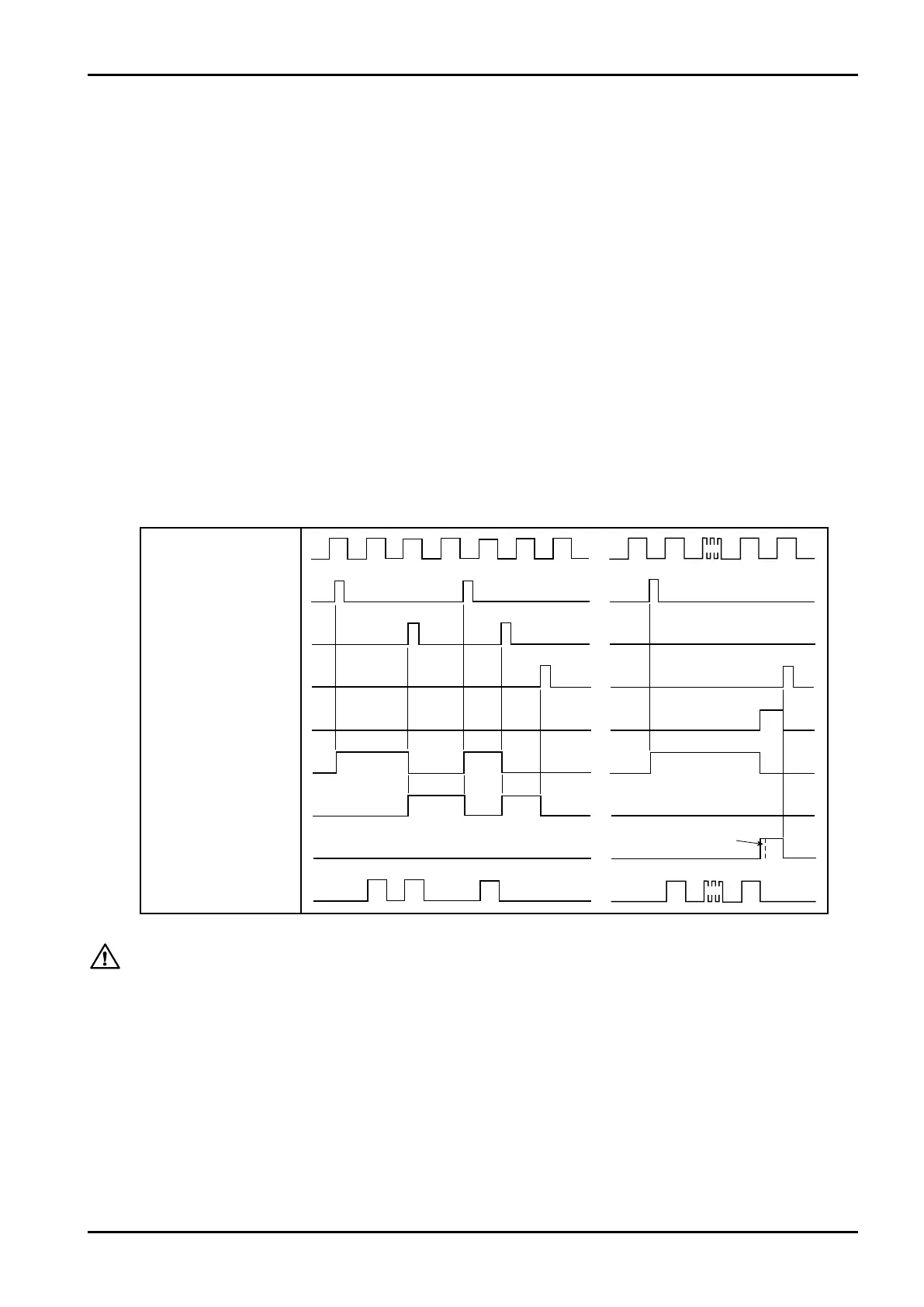
[Operations Sequence Time Chart]
(8)“OUTPUT COUNTER”
Counts the number of output pulses with an 8-digit accumulated total counter.
SIGNALPULSE
"START"BUTTON
"STOP"BUTTON
"RESET"BUTTON
ENDSIGNAL
"COUNTING"
"SUSPENDED"
"END"
OUTPUTPULSES
BUZZERSOUNDSFOR1.5SEC.APPROX.
The circuitry is so configured that definitely a single output pulse is always secured when the
“START”or“STOP”button is depressed at any state, any instant of signal pulses. Under no
circumstances, therefore, the checker produces spiky or otherwise distorted pulses.
CAUTION:



 To Next Page