EasyManua.ls Logo

Overmax multipic 3.1 - Page 12

Overmax multipic 3.1
88 pages
Print Icon
To Next Page IconTo Next Page
To Previous Page IconTo Previous Page
Loading...
English
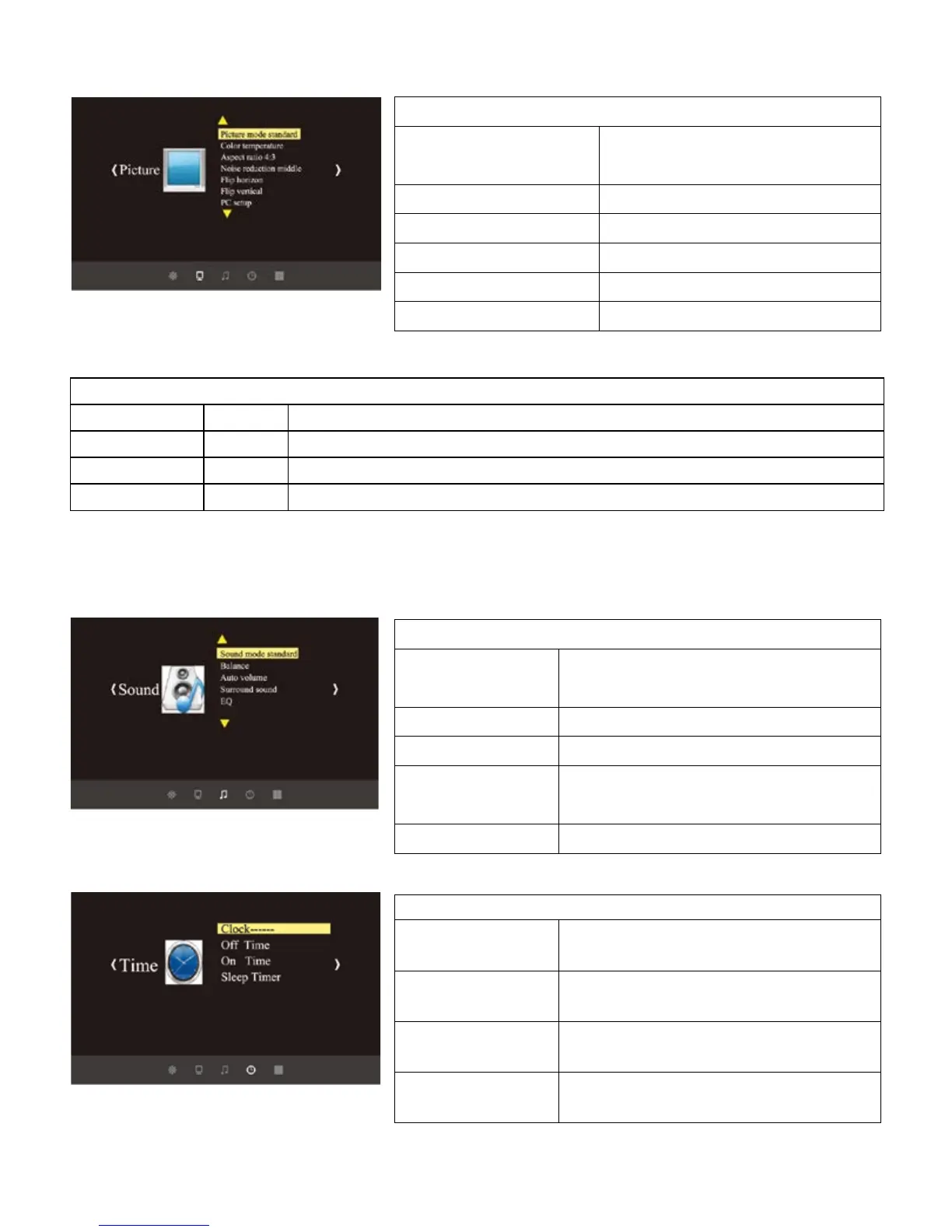
3. Picture menu
User mode of picture
Contrast
0-100
Adjust the dark and brightness area difference
Brightness
0-100
Adjust the full picture brightness
Color
0-100
Adjust the picture color
Sharpness
0-100
Adjust the picture sharpness
4. Sound menu
5. Time menu
Picture menu
Picture mode
Standard / Soft
User / Dynamic
Color temperature
Standard / warm / cool
Aspect ratio
4:3 or 16:9 /zoom1 / zoom2
Noise reduction
Off / low / middle / high
Flip horizon
On / off
Flip vertical
On / off
Sound mode
Sound mode
Music / Movie / Sport /
User / Standard
Balance
-50 to 50
Auto volume
On / Off
Surround
sound
On / Off
EQ
(120/500/1.5K/5K/10K)Hz 50
Time menu
Clock----
Date--/month--/year--/hour--
/min--
Off time
Off/one time/everyday /
Monday Friday
On time
Off/one time/everyday /
Monday - Friday
Sleep timer
Off/10mins / 20mins /30mins /
60mins / 90mins

Related product manuals