EN
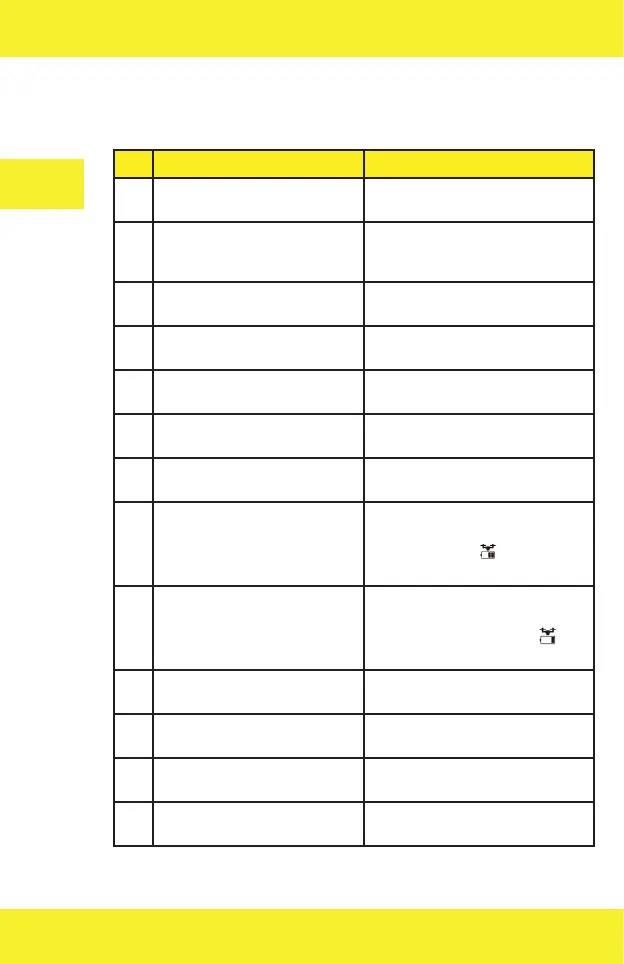
Drone indicators
Drone status Description
1 Front and rear lights flash fast
in yellow.
The drone is not connected to the
remote control.
2 Front and rear lights flash
alternately: in red, green and
yellow.
The drone tries to connect to the
remote control.
3 Front lights glow in red and
rear lights in yellow
The drone is not connected to GPS.
4 Front lights glow in red and
rear lights in green.
The drone is connected to GPS.
5 Front and rear lights flash in
green.
The drone calibrates the gyroscope.
6 Front and rear lights flash
alternately in yellow.
The drone is in the horizontal
compass calibration mode.
7 Front and rear lights flash
alternately in green.
The drone is in the vertical compass
calibration mode.
8 Front lights glow in red, rear
lights flash slowly in red.
The drone battery goes flat
gradually, there is about 1/6 of the
capacity. The icon shows up on
the controller.
9 Front lights glow in red, rear
lights flash fast in red.
Bateria drona jest wyczerpana, The
drone battery is flat, there is about
1/9 of the capacity. The icon
shows up on the controller.
10 Front and rear lights flash once
every 1,5 sec.
Gyroscope issue.
11 Front and rear lights flash
twice every 1,5 sec.
Barometer issue.
12 Front and rear lights flash
three times every 1,5 sec.
Compass issue.
13 Front and rear lights flash four
times every 1,5 sec.
GPS issue.


 To Next Page