2
2.
Learn about the phone
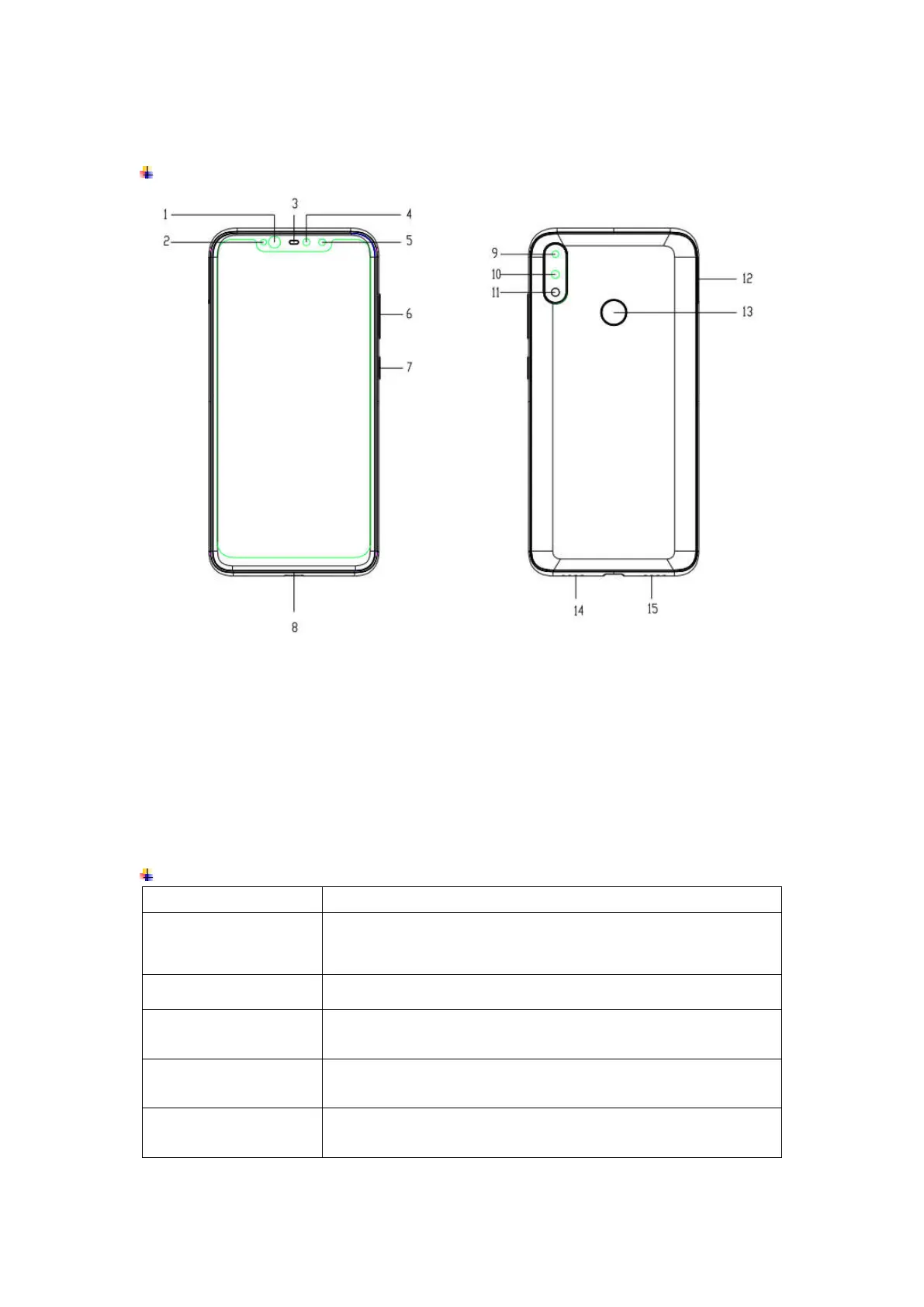
Overview
1
Infrared Lamp 9 Rear Camera 1
2
Light Sensor 10 Rear Camera 2
3
Receiver 11 Flash lamp
4
Front Camera 12 Card tray
5
Infrared Camera 13 Fingerprint Sensor
6
Volume key 14 Speaker
7
Screen Lock / Power Key 15 Microphone
8
Type-C port
Function Keys
Keys Functions
Screen Lock /
Power Key
Press to turn on/off the screen.
Press and hold to reboot, power off the phone, and turn
airplane mode or silent.
Volume Key
Press to adjust the volume of device.
Multi Task Key
(on the screen)
Tap to open the list of recently used apps.
Click the circle button to clean all of recently used apps.
Home Key
(on the screen)
Tap to return to Home screen.
Long press to access Google™ search.
Back Key
(on the screen)
Tap to return to the previous screen.


 To Next Page