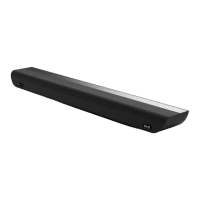
This document serves as the user manual for the OXS 3.1.2 Dolby Atmos Soundbar, providing comprehensive instructions for its setup, operation, and maintenance. It emphasizes safety precautions, connectivity options, and troubleshooting tips to ensure optimal performance and longevity of the device.
The manual begins with crucial safety information, highlighting the importance of not opening the back plate to prevent electric shock, as there are no user-serviceable parts inside. It advises that any maintenance should be carried out by qualified service personnel. Various symbols are explained, including those for AC Voltage, DC Voltage, and cautionary notes for user reference regarding safety. A prominent warning advises against exposing the unit to rain or wet conditions to prevent fire or electric shock. It also states that the equipment is intended for indoor use with information technology audio and video equipment and should not be disassembled due to dangerous voltage. The device should not be exposed to excessive heat or humidity, and contact with liquids should be avoided. The product is suitable for use in non-tropical climates and at altitudes below 2000 meters above sea level.
Cleaning and Maintenance
Before cleaning, users are instructed to turn off the system and unplug the power adapter from the power outlet. Dust and stains should be removed immediately from the surface. For dust, hand marks, and other stains, a vacuum cleaner or removable adhesive roller brush is recommended. The manual warns that some cleaning brushes may damage the product and that towels or cleaning cloths might leave lint. Fingernails or other sharp tools should not be used to scrape dust, as this can damage the fabric. For oil or water stains, a clean white cloth dipped in water is suggested. For stubborn stains, a clean cloth with a neutral detergent diluted with water is recommended, followed by drying with a dry cloth. Users are cautioned against using non-neutral cleaners or stain removers, which can cause discoloration or fabric damage, and to avoid excessive force during cleaning to prevent fading or damage.
Important Considerations
The manual outlines several important considerations for users. It stresses verifying that the AC power supply matches the product's requirements and ensuring proper ventilation (7-10 cm clearance) around the soundbar, avoiding placement on heat-generating devices. For safety, the AC power plug should be unplugged from the wall socket during thunderstorms or if the device will not be used for an extended period. Direct exposure to sunlight or other heat sources should be avoided to prevent overheating and malfunction. The product should also be kept away from damp environments, strong magnetic fields, or electric fields. If the equipment malfunctions, the power cord should be unplugged. The soundbar is intended for personal, not industrial, use. If stored at low temperatures, condensation may occur, and the device should be allowed approximately two hours to reach room temperature before use. The battery used in the product contains environmentally harmful chemicals and should not be disposed of as general household garbage. Batteries should not be exposed to high temperatures, short-circuited, disassembled, or overheated. Only the same or equivalent type of battery should be used for replacement.
Product Overview and Controls
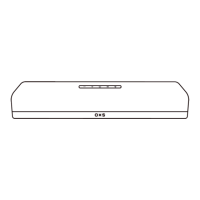
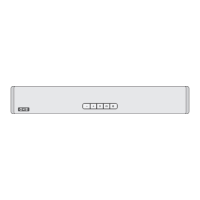
The soundbar features a top panel with several controls: a Standby button to turn the system on/off, Volume Up/Down buttons, and an Audio Source Selection button (TV->HDMI1->-USB->Optical->BT->AUX). A Bluetooth button allows switching to Bluetooth mode or initiating pairing. The display shows the system status and current mode. When plugged in, the power button becomes active within 3 seconds, and there's a 3-second delay before sound is produced upon turning on. If sound is heard from both the TV and the soundbar, the TV's audio settings should be adjusted to external speaker output.
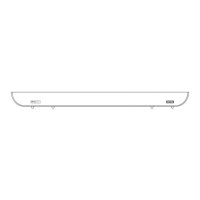
The soundbar's interface panel includes ports for DC power, AUX input, USB (for playback and service), OPT (optical digital output), HDMI1 (digital video and audio input), and HDMI Out (eARC/ARC) for connecting to a TV. Users are advised to unplug the power cord by the plug, not the cord itself, and to connect components to the DC socket only after all other connections are complete.
Remote Control Functions
The remote control offers extensive functionality. The power button turns the soundbar on/off and activates auto-standby after 15 minutes of no audio signal in AUX/OPT/TV/HDMI/BT modes. A dedicated button allows selection of sound modes: Standard, Voice (enhanced sound field for human voice), Music, Cinema (cinema sound effects), and Night (reduced sound intensity for subtlety and softness). Navigation buttons (Up/Down/Left/Right/OK) are used to select and set functions, including skipping music tracks and pausing playback. The Source button selects the input signal. A Settings button cycles through options like BASS, TREBLE, CENTER LEVEL, FRONT TOP LEVEL, and Sync. Bass and Treble volumes can be adjusted from -6 to +6. Individual speaker levels (Center Level, Front Top Level) can also be adjusted from -6 to +6. The Sync function, supported only for HDMI, allows audio delay adjustment (0-200 milliseconds) to synchronize with video. Volume Up/Down and Mute/De-mute buttons are also present. Bass volume can be adjusted separately with BASS +/- buttons.
Output Configuration and TV Remote Control
The manual provides a detailed table of output configurations for different sound modes (Standard, Voice, Music, Movie, Night) based on the input source channel (2.0, 5.1, 7.1, 3.1.2). It notes that if the input source is Dolby Atmos®, the output is 3.1.2 channel. The soundbar supports adjustment of its volume using the TV remote control, provided the TV speaker is set to external speaker mode. This feature is supported by various TV manufacturers, including LG, Sony, Sharp, Philips, Panasonic, Toshiba, Hisense, and TCL.
Connectivity
Connecting Subwoofer and Rear Surround Speakers: The manual instructs users to connect the soundbar speaker to a power outlet using the provided power cord, referring to the product label for power supply and consumption details. If the power cord is unplugged and reconnected while the product is on, the soundbar will turn on automatically.
General Operations: Upon initial connection to a power outlet, the unit enters standby mode, indicated by "--" on the screen. Pressing the unit's power button or the remote control switches it to ON mode, displaying the current source input. Pressing the power button again shuts down the system to standby. The soundbar automatically enters standby after 10 minutes of no input, no operation, and silence. To completely turn off the unit, the mains plug should be disconnected from the power outlet.
LED Screen Activity: The manual explains the display indicators for different modes: "BT" for Bluetooth mode, "PAIRING" for Bluetooth pairing, "PAIRED" for paired Bluetooth, "AUX" for AUX IN, "OPT" for Optical, "HDMI" for HDMI, "ARC" for ARC, and "USB" for USB.
Adjusting Volume: Master Volume can be adjusted from 0-100 using the VOL+/- buttons on the unit or remote. The mute button silences the sound, and pressing it again resumes normal listening. Bass level can be adjusted from -6 to +6 using the BASS +/- buttons on the remote.
Cable Connection to TV:
- HDMI ARC Connection: For TVs supporting HDMI ARC, users connect an HDMI cable between the TV's HDMI IN (ARC) port and the soundbar's HDMI Out (eARC/ARC) port. After turning on both devices, "TV" appears on the soundbar display, and TV sounds play. If no sound, the source input mode should be selected via the multifunction button on the soundbar or the remote. For eARC-enabled TVs, "EARC" will appear, and the eARC function must be enabled in the TV menu. If "TV" doesn't appear, the HDMI cable connection should be checked. The TV remote can then control the soundbar's volume.
- Optical Cable Connection: An optical cable connects the soundbar's OPTICAL port to the TV's OPTICAL output port. After turning on both devices, "Opt" mode is selected via the multifunction button on the soundbar or the remote, and TV sound is output from the soundbar.
Connecting External Devices:
- HDMI Cable (Dolby Atmos decoding and playback): Dolby Atmos® is supported only in HDMI mode. If the audio output option includes Auxiliary Audio, it should be set to Off. The content must support Dolby Atmos®. An HDMI cable connects the external device's HDMI OUT port to the soundbar's HDMI IN port. Another HDMI cable connects the TV's HDMI IN port to the soundbar's HDMI TO TV (eARC/ARC) port. After turning on all devices, "HDMI" mode is selected, and the soundbar plays sounds. When Dolby Atmos® is active, "Dolby Atmos" is displayed, and 3.1.2 channels are output. The sound effect mode is unavailable when Dolby Atmos® is active. Dolby Atmos® must be configured on the BD player or other device, ensuring "No Encoding" is selected for Bitstream in audio output options.
- Optical Cable: An optical cable connects the external device's "Optical Out" port to the soundbar's "Digital Audio In (Optical)" port. After turning on both devices, "OPT" mode is selected, and the soundbar plays sounds from the external device.
Connecting Mobile Devices (Bluetooth): To connect a mobile device wirelessly, the Source button on the remote (under BT source) is long-pressed to enter "PAIRING" mode. Alternatively, the Bluetooth button on the top panel is pressed to select "BT" mode. "BT" automatically changes to "PAIRING" or blinks if a device was previously connected. If "BT" appears without blinking, a device is already connected; long-pressing the Bluetooth button for 3 seconds disconnects it and displays "PAIRING". On the mobile device, "OXS S5" is selected from the Bluetooth device list. Once connected, "BT" is fixed on the soundbar display. The soundbar supports active reconnection after initial disconnection.
Disconnecting Soundbar from TV: Long-pressing the Bluetooth button on the soundbar or the source button on the remote disconnects it from the TV. The disconnection time may vary depending on the TV model.
Note about Bluetooth Connection: Bluetooth communication works within 1 meter. If a PIN code is required, "0000" should be entered. The soundbar automatically shuts down after 15 minutes in the ready state. Bluetooth search or connection may fail due to strong electric fields, multiple Bluetooth devices paired simultaneously, or if the Bluetooth device is off or malfunctioning. Electronic equipment (e.g., microwave ovens, wireless LAN devices) can cause radio interference.
USB Playback
The soundbar supports playing music files from a connected USB device. The USB device should be FAT16 or FAT32 format, use a Type-A interface, and comply with USB 2.0 specifications. Supported file formats are WAV and MP3. The USB device is connected to the USB port. The source button on the remote or soundbar is used to switch to "USB" mode. Audio programs stored on the USB device can be played using the remote control. To exit USB playback, another media source is selected. Users are advised not to remove the USB device during operation to prevent data corruption; the speaker system should be turned off first. Some files may not play due to format, encoding, or recording conditions. Files edited on a PC may also not play. Fast forward/reverse may not be available for some files. The system does not play coded files like DRM and may not recognize files/folders based on name/metadata. Some USB devices may not work, but Mass Storage Class (MSC) devices (like flash memory) are recognized.
Wall-mounted Soundbar
Wall-hanging accessories are optional. If the TV is wall-mounted, the soundbar should be placed at least 5 cm below the TV. Two wall-mount brackets are installed on the bottom of the soundbar using two screws. The center line of the wall-hanging bracket guide drawing is aligned with the TV's center, positions are marked, expansion screws are installed, and the bracket is slid downward. The manual warns that rear speaker wall mounts must support over 5.0 kg, and OXS is not responsible for damage due to improper installation. Rear speakers should not be installed on the side or upside down.
Troubleshooting
The manual includes a troubleshooting section with common issues and their solutions:
- Power not turned on: Check power cord connection and verify the electrical outlet.
- Function not working properly: Remove and reinsert the power cord, unplug/replug external device cords. If no signal, the soundbar automatically shuts down after a period.
- Remote control not working: Check if the active speaker responds to remote commands, replace batteries.
- No output sound: Adjust soundbar volume, adjust external device volume. Choose soundbar for TV's sound output, check cable connections, unplug/replug power cord, initialize product.
- TV not connected via HDMI TO TV (eARC/ARC): Check HDMI cable connection to ARC terminals, direct connection to active speakers, activate HDMI-CEC on TV, enable eARC function in TV menu.
- No sound when connected TO TV in HDMI TO TV (eARC/ARC) mode: Device cannot play input signal; change TV's audio output to PCM or Dolby Digital.
- Bluetooth connection not available: Switch to "PAIR" mode for new devices, disconnect from other devices, remove soundbar from device's Bluetooth list, unplug/replug, initialize product.
- Bluetooth sound is discontinuous: Keep soundbar away from radio frequency interference sources (e.g., microwave ovens), move device closer to soundbar, avoid body contact with Bluetooth transceiver or mounting on metal furniture.
License and Warranty
The manual states that the product is manufactured under license from Dolby Laboratories, with Dolby, Dolby Atmos, Dolby Audio, Dolby Digital Plus, and the double D symbol being trademarks of Dolby Laboratories. HDMI terms and logo are trademarks of HDMI Licensing LLC. Bluetooth® word mark and logo are owned by Bluetooth SIG, Inc., with Rayleigh Labs authorized to use them.
The product comes with a 12-month warranty from the date of initial purchase for manufacturing defects. The warranty does not cover products out of warranty, damage from abuse, damage from chemicals, fire, radioactive materials, poisons, liquids, or natural disasters. For questions, users can contact service.oxs@outlook.com for a response within 24 hours.
Legal & Compliance
The device complies with FCC Class B Radio Interference Statement, Part 15 of FCC Rules, designed to provide reasonable protection against harmful interference. Users are advised to reorient/relocate receiving antennas, increase separation between equipment and receiver, connect equipment to a different circuit, or consult a technician if interference occurs. Any unauthorized modifications could void the user's authority to operate the equipment. Shielded interface cables and AC power cords must be used for compliance. The manufacturer is not responsible for interference caused by unauthorized modifications. FCC RF Radiation Exposure Statement indicates that the transmitter must not be co-located or operating with other antennas/transmitters and should be installed with a minimum distance of 20cm between the radiator and the body.
Software Licenses
All software is subject to license agreements, and users agree to be bound by them. OXS products are subject to customs and export control laws in the United States and other countries where they are manufactured or received.
The product has an "environmentally friendly use life" of 10 years. The eco-life of replaceable parts may differ. The "Eco Use Period" is valid under normal conditions. Waste recycling tips advise users to comply with national waste electrical and electronic product recycling laws and hand over the product to a state-recognized recycling and processing manufacturer at the end of its life.


 To Next Page
 General