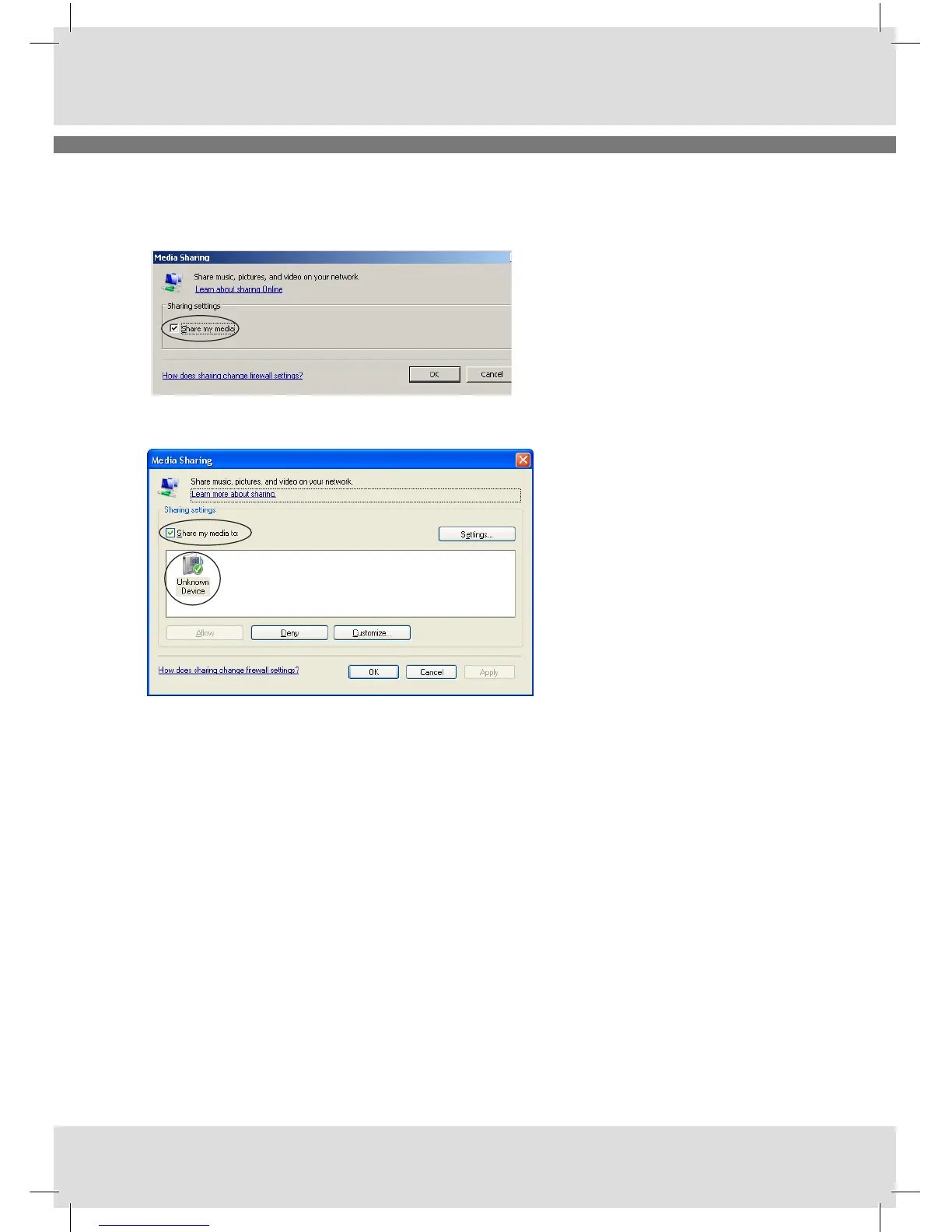
2. In the Media Sharing dialogue box, select the Share my media check box.
3. Check the “Share my media to” : box.
In the list, your radio will be visible as Unknown Device.
4. Click Allow – the selected device (your internet radio) will now show a green tick
5. Click OK.
Note:
If your internet radio is not present in the device list, please try to connect your radio by entering
<MAIN MENU> <SHARED MEDIA> “Name of your server”.
The radio sends a request to the server and the radio should become visible in the device list, where-
after you can give it permission it to connect to the UPnP server.
For further information please refer to the help file and the homepages below:
http://www.microsoft.com/windows/windowsmedia/knowledgecenter/howto/mp11/sharemedia.aspx
http://www.microsoft.com/windows/windowsmedia/player/faq/sharing.mspx#q20_3



 To Next Page