6
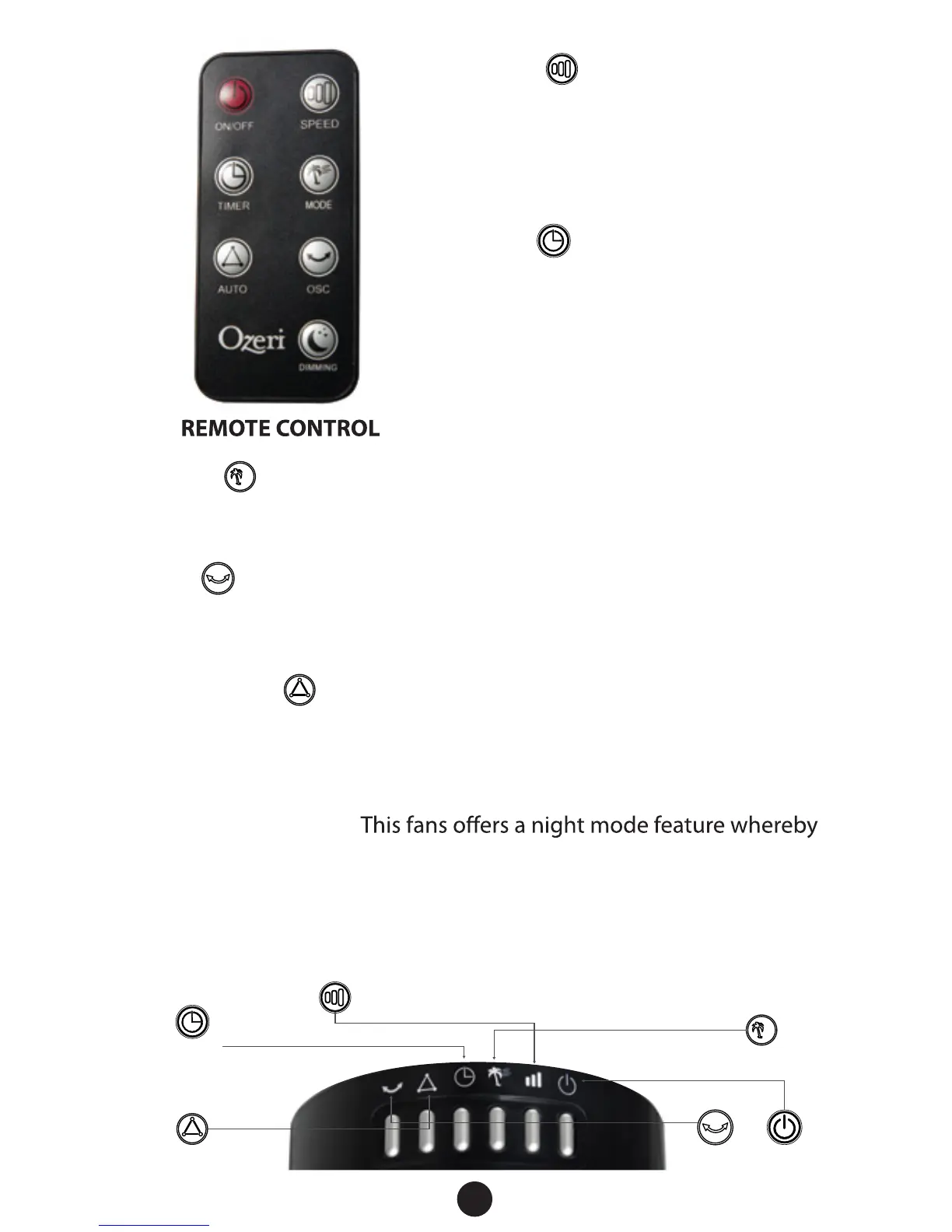
Timer: This button sets the
duration of operation before
the fan automatically turns OFF.
Pressing this button will increase
the time of operation in 30 minutes
increments to a maximum of 8
hours. The time selected will be
displayed on the LED screen.
Night Mode Display:
all icons on the LED screen are dimmed except for the mode icon.
To activate the night mode feature, press the dimming button
on the remote control. Alternatively press and hold the Mode
button on the fan's control panel for 3 seconds. To deactivate,
press any button briey and the screen will awake to its full display.
Mode: Choose from 3 dierent breeze patterns (Normal,
Nature, Sleep) by pressing this button until the type of breeze
desired is indicated on the LED display.
Osc: Activates oscillation at 60, 90, 120, or 360 degrees for
partial to complete air circulation. The LED display on the fan will
illuminate to indicate the oscillation selected.
Thermostat: When engaged the fan will select the proper
speed setting to achieved the target room temperature, and
automatically turn on or o based on the target room
temperature chosen.
Speed: Choose from 3
comfort settings (HIGH, MED,
LOW) by pressing this button
until the speed you want is
indicated on the LED display.
Timer
Wind Speed: Slow, Med, High
Mode
Thermostat
On/OffOsc


 To Next Page