OPERATION
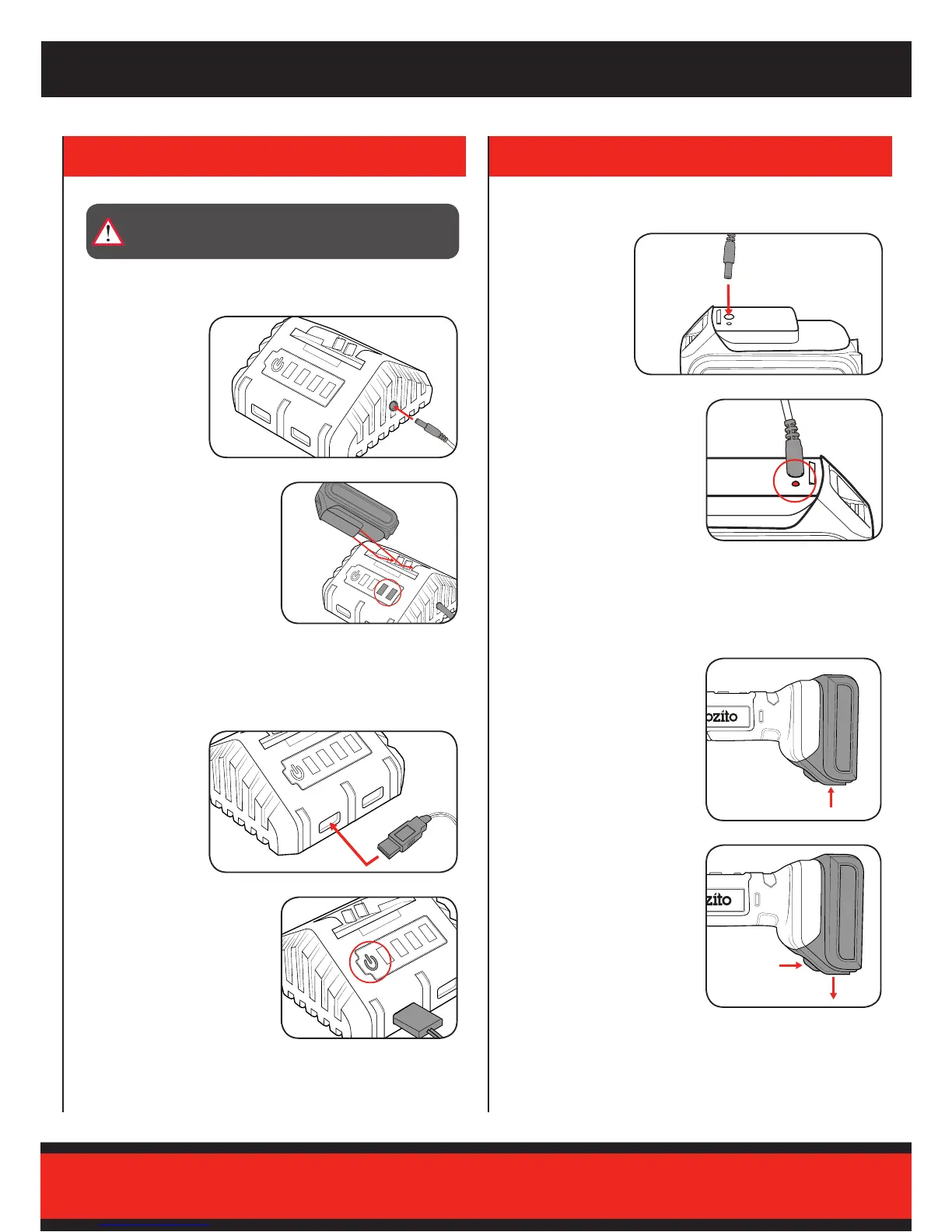
1 Totthebatteryslideitinto
the base of the tool until it
clicks into place.
2 To remove the battery, press
the battery release button and
then remove the battery.
Fitting and Removing the Battery
4. BATTERY & CHARGER
Note: Once fully charged, all green lights will be illuminated.
WARNING! THE POWER SUPPLY FOR THIS CHARGER IS
RECOMMENDED FOR USE WITH A RESIDUAL CURRENT
DEVICE (RATED AT 30mA OR LESS).
Charging the Battery Using the Charging Stand
Charging a USB Device
2 Slide the battery onto the
cradle.Therst2lightswill
illuminate when battery is
properly connected and is
charging.
2 To start charging the USB
device, press the power button
on the charging cradle.
1 Plug charging
jack into the fast
charging cradle.
Therstgreen
light will illuminate
when connected.
1 While connected
to power, USB
devices can be
plugged into the
front of the cradle
for charging.
Note: Once fully charged, the green LED light will be illuminated.
Charging the Battery Directly
2 The red LED light will
illuminate while charging.
1 Plug charging jack
directly into the
top of the battery


 To Next Page