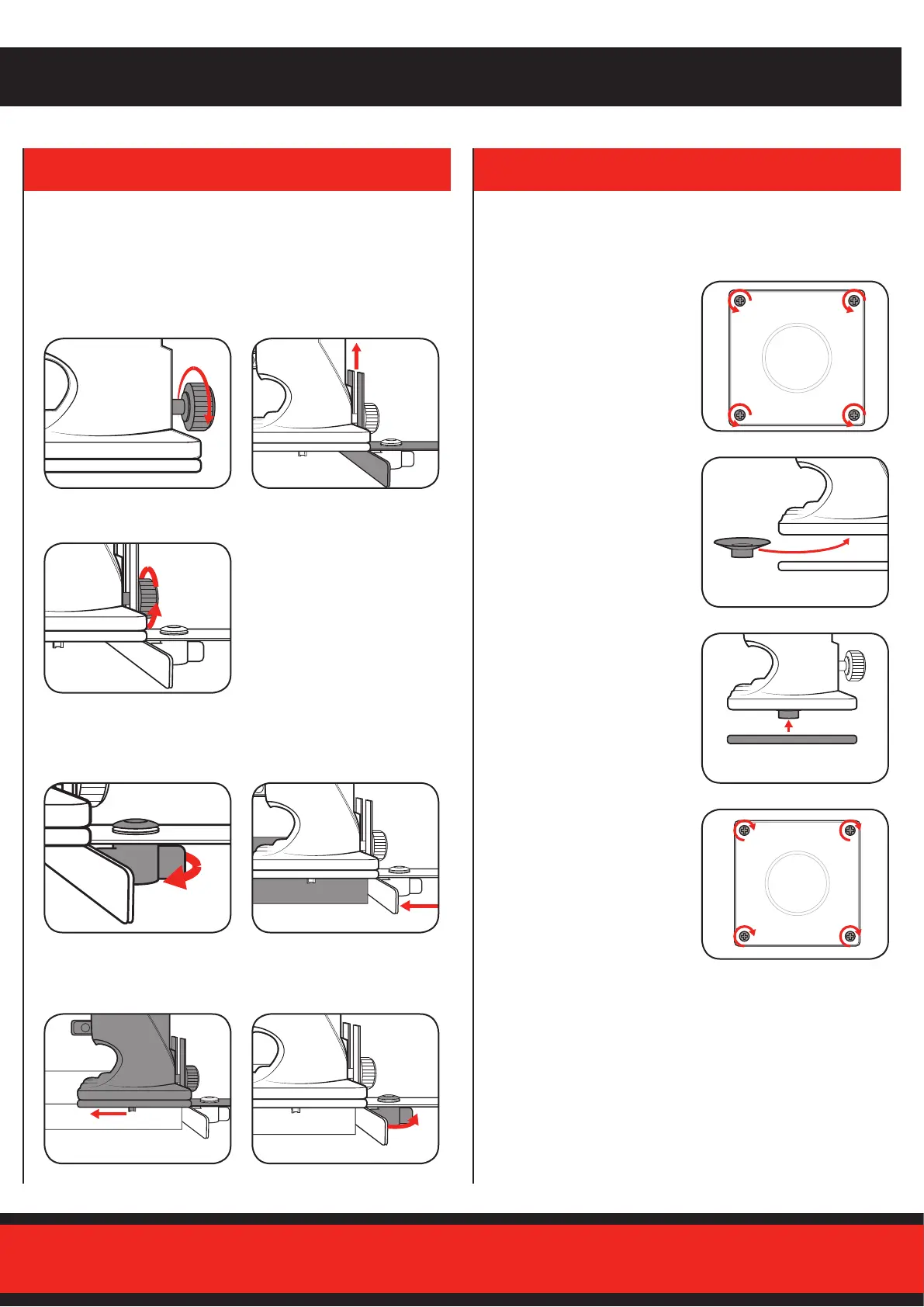
Thestraightfenceisaneectiveaidwhencuttinginastraightline
when chamfering or grooving.
The template guide allows you to easily follow the contour of a template
when cutting copies of a pattern.
Fitting the Straight Fence Fitting the Template Guide
Adjusting the Straight Fence
5. TEMPLATE GUIDE4. STRAIGHT FENCE
1 Loosen the fence/guide
locking screw and insert the
straight fence.
1 Loosen the fence locking knob
to allow it to slide.
3 Set the cutting distance by
sliding the trimmer to the
desired cutting position.
3 Secure in place by tightening
the fence/guide locking screw.
2 Slide the straight fence all the
way up so that the bottom of
the“L”shapeisushwiththe
base of the trimmer.
2 Place the fence along the side
of the workpiece.
4 Secure in place with the fence
locking knob.
1 Undo the four screws on the
base of the safety guard and
remove the lower plate.
2 Insert the template guide into
the cutout in the upper plate of
the safety guard.
3 Place the lower plate back
onto the upper plate, securing
the template guide in between
the two plates.
4 Fasten the four screw on the
base of the safety guard.


 To Next Page