LTM-3000
6. CONTROLS 7. MAKING A CUT
OPERATION
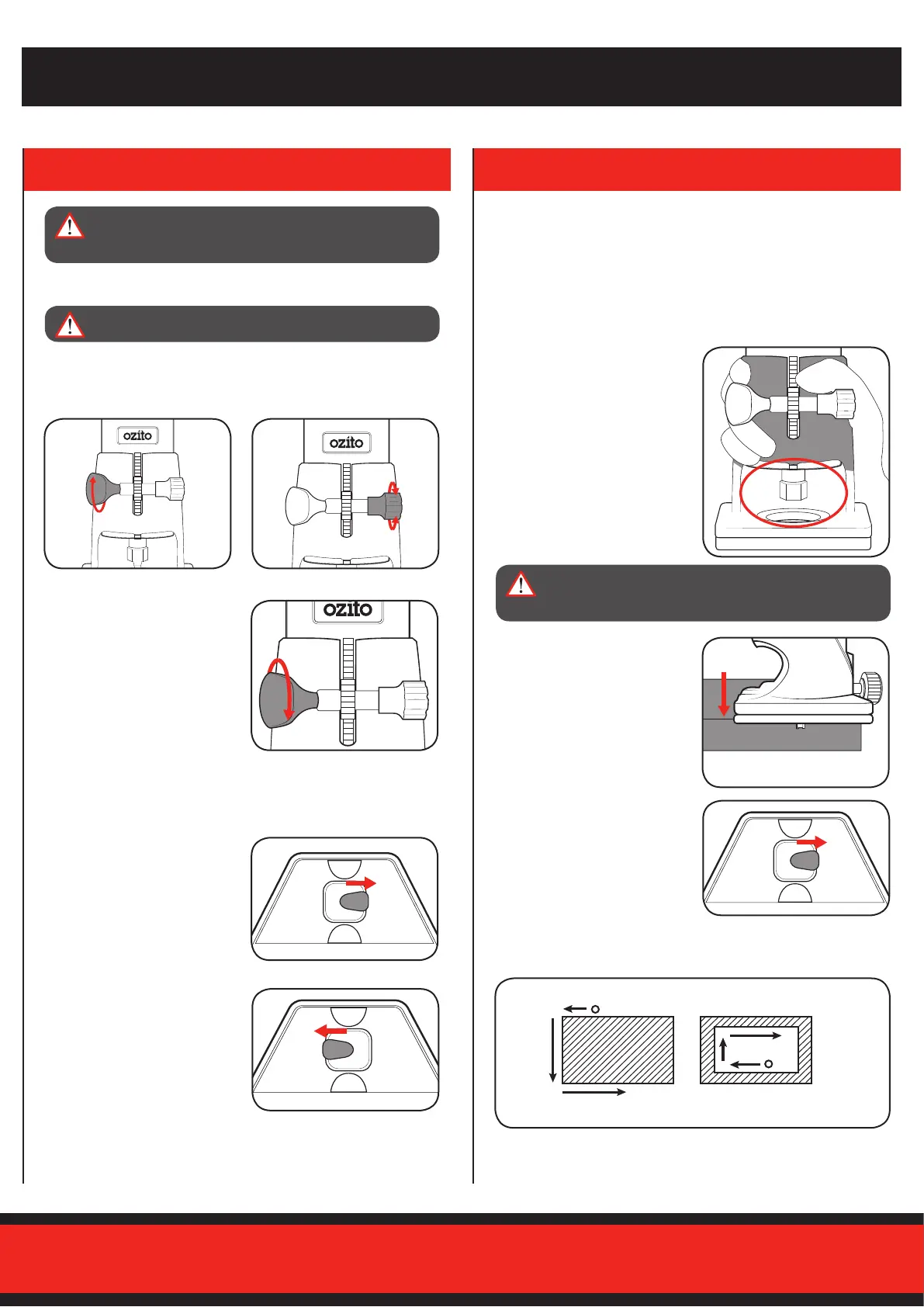
Adjusting the Cutting Depth
1 Loosen the guard locking
knob.
3 Secure in place by tightening
the guard locking knob.
2 Adjust the cutting depth by
rotating the depth adjusting
screw.
Switching On and O
1 To start the trimmer, push
theon/oswitchintotheon
position.
2 To stop the trimmer, push
theon/oswitchintotheo
position.
1 Hold the laminate trimmer,
makingsureyourngersare
clear of the opening in the
trimmer guide base.
2 Place the trimmer guide base
onto the workpiece so that the
router bit overhangs the edge.
3 Switch the laminate trimmer
onbypushingtheon/oswitch
into the on position.
4 Follow the below guide to assist you when cutting or trimming your
workpiece. This is to ensure the chips are removed away from the
operator.
Note: On harder woods it may be necessary to make more than one
pass at progressive cutting depths until the desired depth is
achieved.
Direction of the router travel
When routing the outside
of your workpiece
When routing the inside of
your workpiece
Before starting, perform a few quick checks:
* Ensure the correct router bit is installed.
* Ensure the trimmer guide base is secure.
* Check the depth of cut is set to your desired depth.
* If using any of the guides or fences, check they are properly fixed
to the laminate timmer.
* Make sure the workpiece is secure and won’t move during
operation.
WARNING! TO REDUCE THE RISK OF ELECTRICAL
SHOCK, WE RECOMMEND THE USE OF A RESIDUAL
CURRENT DEVICE (RATED 30mA OR LESS).
WARNING! INJURY MAY OCCUR IF YOU HOLD THE
TRIMMER INCORRECTLY. KEEP FINGERS CLEAR OF
THE ROUTER BIT AT ALL TIMES.
WARNING! ENSURE THE TRIMMER IS SWITCHED OFF
BEFORE ADJUSTING THE CUTTING DEPTH.


 To Next Page