C
R
2
4
5
0
3
V
+
LOW BAT
SENSITIVITY
WELDGRIND
LOW
MID
HIGH
DELAY
SHORT
MID
LONG
TEST
OZITO ADWH-011
SHADE: 4 / 11
OPERATING TEMP.: -5 TO 55°C
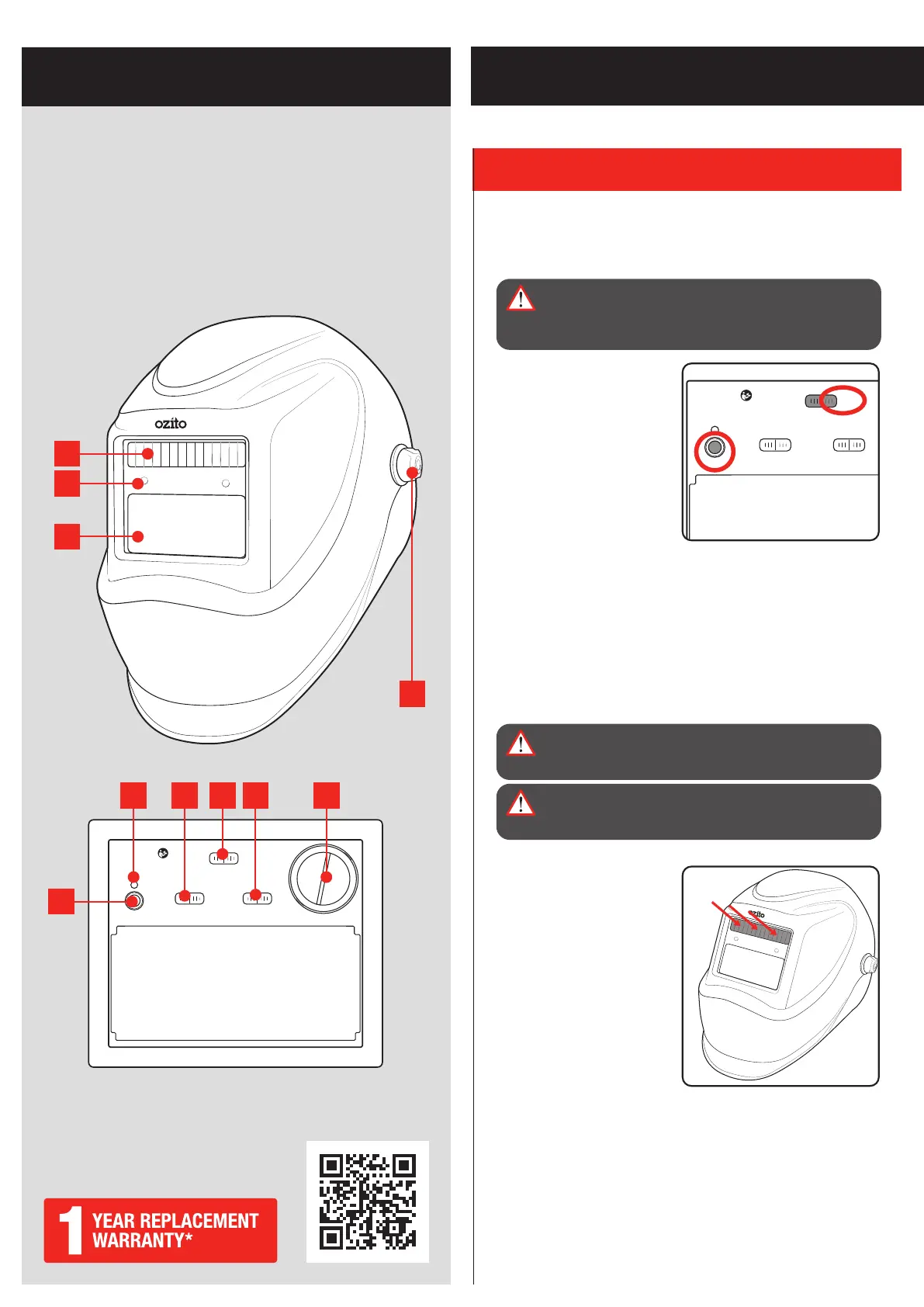
KNOW YOUR PRODUCT
1. UV/IR FILTER
SETUP & PREPARATION
ONLINE MANUAL
Scan this QR Code with your mobile
device to take you to the online manual.
1. Solar Panel
2. Arc Sensor
3. UV/IR Filter
4. Locking Knob
5. Auto Darkening Test Button
6. Low Battery Indicator
7. Sensitivity Selector
8. Mode Selector
9. Delay Time Selector
10. Lithium Battery Cover
AUTO DARKENING WELDING HELMET
Checking The Battery
Before first use, pull and remove the plastic tab to engage the
battery contact.
WARNING! ALWAYS CHECK THAT THE AUTO
DARKENING FEATURE IS FUNCTIONING AS NORMAL
BEFORE ATTEMPTING TO WELD. FAILURE TO DO SO
MAY RESULT IN INJURY TO YOUR CORNEAS.
1. Set the mode selector to
‘WELD’.
Note: The test function will
not work if the slider is set to
‘GRIND’.
2. Press the ‘TEST’ button.
The viewing window should
darken briefly before
returning to normal.
Note: The timing between dark state to light state will correspond
with the delay setting. Refer to Delay time in 3. Controls section.
Note: Remove the protective film from the lenses before use.
Solar Panel
WARNING! ENSURE THAT ALL OPERATING PARTS ARE
CLEAN & UNDAMAGED BEFORE USE. SCRATCHED OR
BROKEN PARTS SHOULD BE REPLACED IMMEDIATELY.
WARNING! DO NOT USE AUTO DARKENING WELDING
HELMET IF THE SOLAR PANEL IS DAMAGED OR
COVERED.
The solar panel works in
conjunction with the battery to
provide power to the welding
helmet. The helmet will not
work with the solar panel
blocked.
C
R
2
4
5
0
3
V
+
LOW BAT
SENSITIVITY
WELDGRIND
LOW
MID
HIGH
DELAY
SHORT
MID
LONG
TEST
OZITO ADWH-011
SHADE: 4 / 11
OPERATING TEMP.: -5 TO 55°C
1.
2.
4
6 7 8 9 10
1
2
3
5


 To Next Page