Mode Selection
Before use, peel off the protective film from the front and
inner lens.
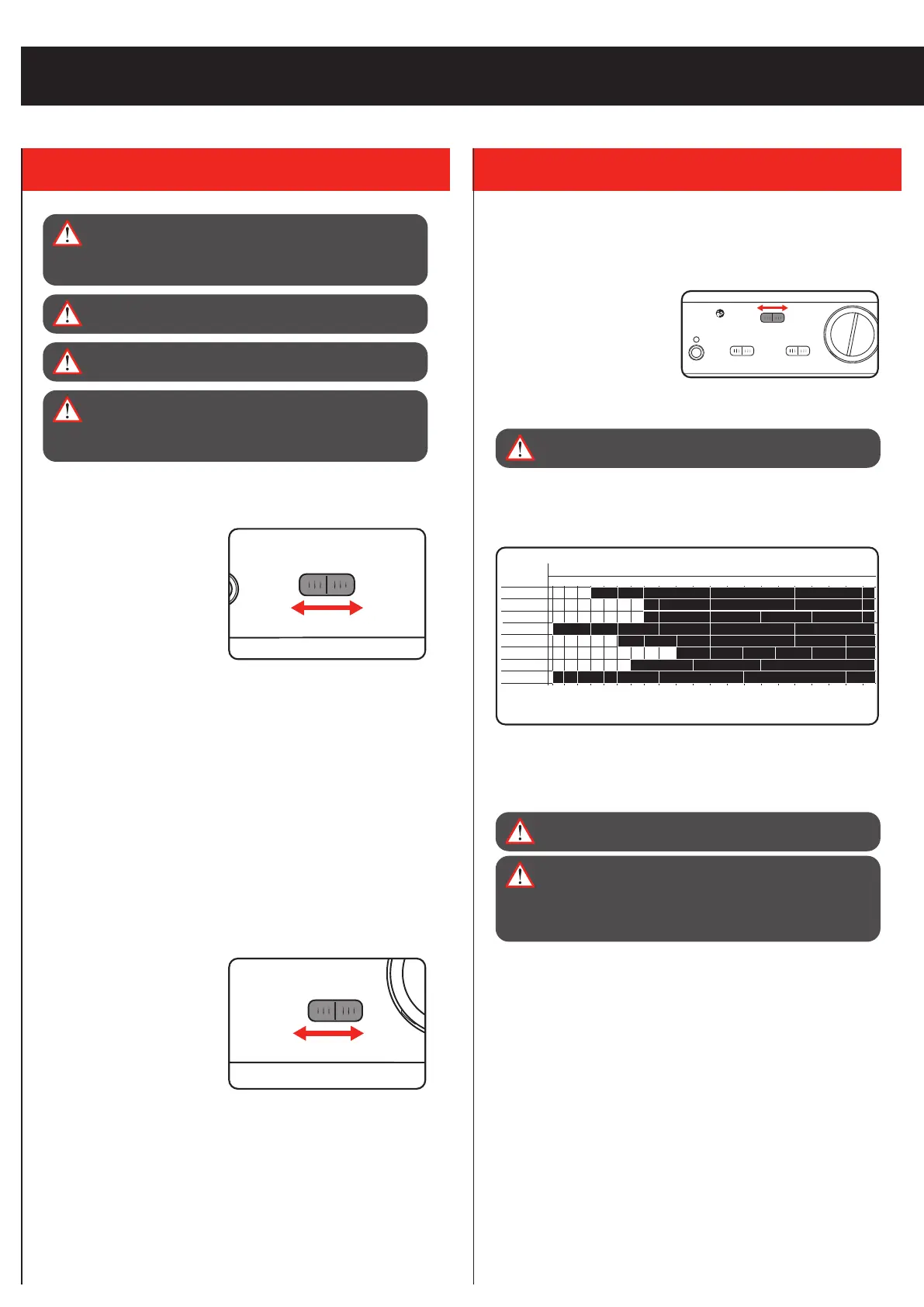
Set the slider to ‘WELD’ or
‘GRIND’ depending on the
application.
This welding helmet has a
fixed dark mode of Shade
11. Refer to the label on the inside of the mask for appropriate
welding currents and processes.
WARNING! ALWAYS ENSURE THE CORRECT MODE
AND SHADE IS SELECTED BEFORE WELDING.
Note: Shade level should be based on the welding process and
arc current being used. Refer to the lens shade level guide on the
inside of the mask for guidance.
Note: Set the mode to ‘GRIND’ if using the helmet while grinding.
The auto darkening function does not activate in GRIND mode.
WARNING! DO NOT WELD IN GRIND MODE, THE LENS
WILL NOT DARKEN.
WARNING! ARC RAYS FROM THE WELDING PROCESS
PRODUCE INTENSE VISIBLE AND INVISIBLE
(ULTRAVIOLET & INFRARED) RAYS THAT CAN BURN
EYES AND SKIN. SPARKS CAN ALSO FLY OFF FROM
THE WELD, CAUSING BURNS.
3. CONTROLS
OPERATION
5 350100 175 400125 200 450150 225 500250 275 30010 15 20 30 40 60 80
ARC CURRENT (A)
SAW
MIG (LIGHT)
PAC
PAW
MIG (HEAVY)
TIG, GTAW
MAG / CO2
ARC (SMAW)
9 10
9 10
11 12 13 14
10
10
8 9 11
11 12 13 14
11 13 14
14
11
12
12 13
11 1412
12 13 14
10
10
10 11 12 13 14
11 12 15
15
15
13
14
15
WELDING
PROCESS
SHADE LEVEL GUIDE
*The shade levels listed are only a recommendation for various working applications.
Depending on the conditions of use, the next shade level up can be used.
WARNING! ENSURE THE LOW BATTERY INDICATOR
LIGHT IS OFF & YOU HAVE VERIFIED THE WELDING
HELMET IS WORKING PROPERLY WITH THE “TEST”
FUNCTION BEFORE PROCEEDING TO WELD.
WARNING! WELDING HELMETS DO NO PROVIDE
UNLIMITED EYE, EAR AND FACE PROTECTION.
WARNING! NEVER WELD WITH ANY OF THE LENS OR
FILTERS REMOVED.
ADWH-011
C
R
2
4
5
0
3
V
+
LOW BAT
SENSITIVITY
WELDGRIND
LOW
MID
HIGH
DELAY
SHORT
MID
LONG
TEST
OZITO ADWH-011
SHADE: 4 / 11
OPERATING TEMP.: -5 TO 55°C
Sensitivity
Adjust this to suit ambient and welding light levels.
Low sensitivity is best for
high current welding, whilst
the high setting is suited for
welding with small currents.
The medium setting is suitable
for the majority of indoor and
outdoor welding activities.
1. To adjust, turn the dial to the lowest setting and face the helmet
in the direction of use, exposing it to the surrounding light
levels.
2. Gradually increase the sensitivity until the lens darkens.
3. Then lower the sensitivity just slightly below the setting in step
2.
Note: Slight re-adjustment may be necessary for certain
applications or if the lens is flashing on and off.
Delay Time
The delay time controls the
time taken for the helmet to
switch between full dark and
full light.
The short delay time (0.1s) is suitable for spot, seam or short
welding sessions. The medium setting (0.4s) is suitable for the
majority of indoor and outdoor welding. Use the long delay time
(0.8s) for high current welding or to prevent eye fatigue during
long welding sessions.
C
R
2
4
5
0
3
V
+
LOW BAT
SENSITIVITY
WELDGRIND
LOW
MID
HIGH
DELAY
SHORT
MID
LONG
TEST
OZITO ADWH-011
SHADE: 4/11
HIGH
CURRENT
LOW
CURRENT
C
R
2
4
5
0
3
V
+
LOW BAT
SENSITIVITY
WELDGRIND
LOW
MID
HIGH
DELAY
SHORT
MID
LONG
TEST
OZITO ADWH-011
SHADE: 4/11
SPOT,
SEAM,
SHORT WELDS
HIGH
CURRENT
WARNING! BEFORE WELDING, ADJUST THE AUTO-
DARKENING LENS SENSITIVITY SETTING TO MEET THE
APPLICATION. ENSURE THE CORRECT SHADE IS USED
FOR THE APPLICATION.


 To Next Page
 Loading...