2. ADJUSTING THE HEADBAND
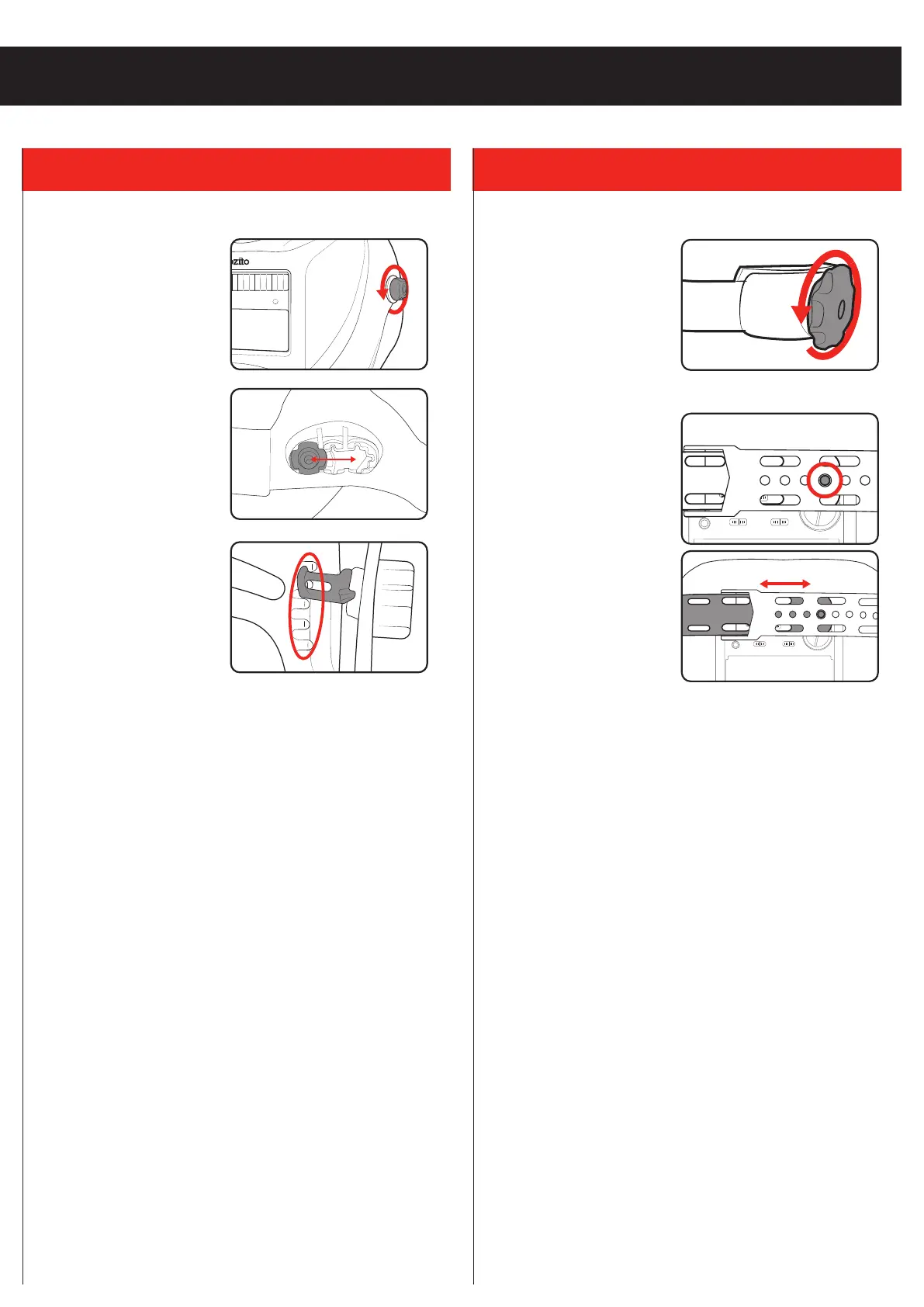
Changing The Distance & Tilt Angle
1. Loosen the locking knobs
on both sides of the helmet
by turning it anti clockwise.
2. To change the helmet
distance from your face,
slide the cross pin forward or
backwards in relation to the
headband slots.
3. To change the tilt angle of
the helmet, hook the tab
onto one of the 5 pin options.
Note: Ensure the cross pins
and tilt angle on both sides of
the helmet match.
4. Retighten the locking knobs. Set the screw tightness so that
the mask can be flipped up or down easily when nudged, but
remains in position otherwise.
Note: When properly adjusted, your line of sight and the locking
knobs should be connected by a straight line perpendicular to the
viewing window.
Adjusting The Tightness
1. To loosen the headband, turn
the band adjuster counter-
clockwise.
2. To tighten the headband, turn the knob clockwise.
3. Disengage the tab from the
top strap of the headband.
4. Loosen or tighten the band
as required, then press the
tab back into one of the
holes to lock the setting in
place.
C
R
2
4
5
0
3
V
+
LOW BAT
SENSITIVITY
WELDGRIND
LOW
MID
HIGH
DELAY
SHORT
MID
LONG
TEST
OZITO ADWH-011
SHADE: 4 / 11
OPERATING TEMP.: -5 TO 55°C
C
R
2
4
5
0
3
V
+
SENSITIVITY
DELAY
LOW HIGH
MIN
MAX
OZITO ADWH-913V
SHADE: 4 / 5-9 / 9-13
AS/NZS 1337.1 V & 1338.1
MADE IN CHINA
LOW
BATTERY
TEST
WELD (9-13)
GRIND (4)
( 5 - 9 )
C
R
2
4
5
0
3
V
+
LOW BAT
SENSITIVITY
WELDGRIND
LOW
MID
HIGH
DELAY
SHORT
MID
LONG
TEST
OZITO ADWH-011
SHADE: 4 / 11
OPERATING TEMP.: -5 TO 55°C


 To Next Page