EasyManua.ls Logo

Ozobot EVO - Drawing Color Codes; Marker Recommendations; Color Code Placement Rules; Sticker Usage Guidelines

Ozobot EVO
3 pages
Print Icon
To Next Page IconTo Next Page
To Previous Page IconTo Previous Page
Loading...
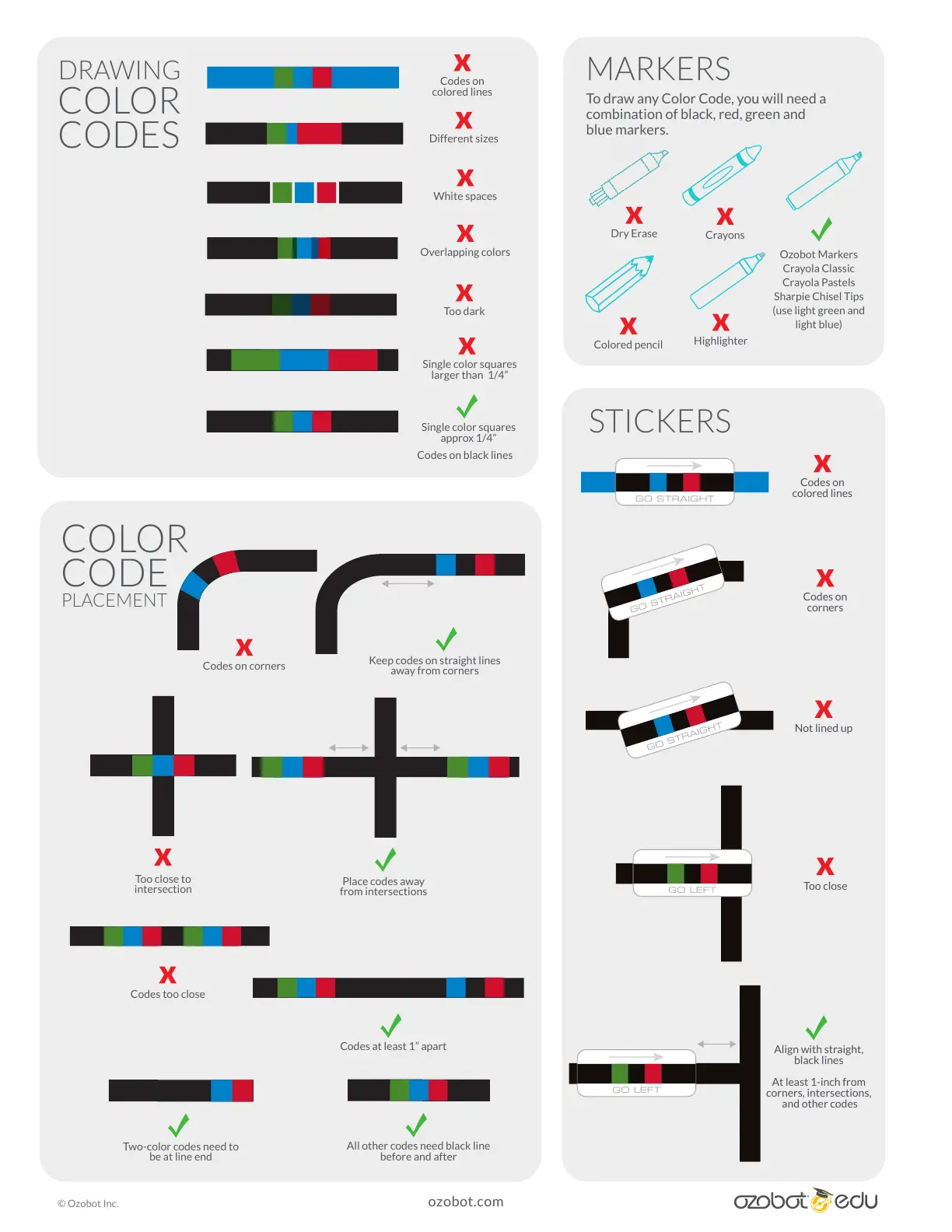
Codes on black lines
Ozobot Markers
Crayola Classic
Crayola Pastels
Sharpie Chisel Tips
(use light green and
light blue)
Single color squares
approx 1/4”
All other codes need black line
before and after
Two-color codes need to
be at line end
White spaces
Codes on
colored lines
Too dark
Single color squares
larger than 1/4”
Overlapping colors
Different sizes
Codes on corners
Keep codes on straight lines
away from corners
Codes too close
Too close to
intersection
Codes at least 1” apart
Place codes away
from intersections
Dry Erase
Colored pencil
DRAWING
COLOR
CODES
MARKERS
STICKERS
COLOR
CODE
PLACEMENT
To draw any Color Code, you will need a
combination of black, red, green and
blue markers.
Crayons
Highlighter
Codes on
colored lines
GO STRAIGHT
Not lined up
GO STRAIGHT
Codes on
corners
GO STRAIGHT
Align with straight,
black lines
At least 1-inch from
corners, intersections,
and other codes
Too close
GO LEFT
GO LEFT
ozobot.com
© Ozobot Inc.

Other manuals for Ozobot EVO

Related product manuals