-2-
AIO-OZONE Installation & Programming Guide
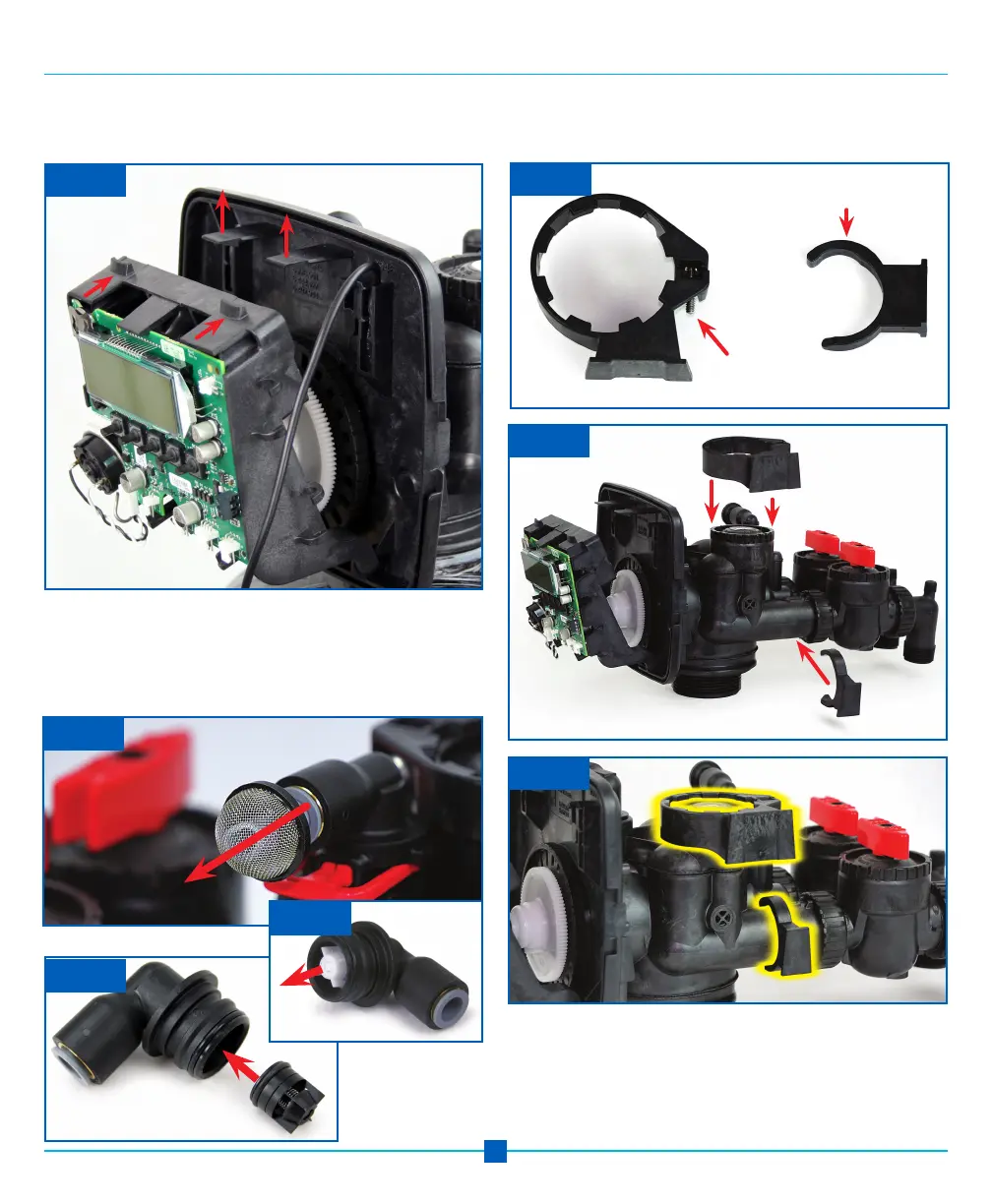
Step 7: Remove the Domed Screen from the Brine Fitting
and remove the Brine Fitting from the Control Valve.
Remove the white Check Valve from the Brine Fitting and
install the Black Ozone Compatible Check Valve in the fit-
ting as shown and replace Brine Fitting, Photos F, G & H.
Step 6: If you have not already done so. Unsnap the top
of the drive bracket using your thumbs and forefingers to
expose the backplate. Photo E.
Photo E
Thumbs Push Up on Tabs
Forefingers
Here
Photo I
Photo J
Photo K
Photo F
Top of bracket
Screw goes to back of bracket
Step 8: Install the EOG brackets, Photo I, to the control
valve, Photos J & K and tighten the screw to secure
bracket in place.
Photo H
Photo G
Installation of EOG Unit continued


 To Next Page