Oil Filter Installation
NOTE
If the PACCAR part you are installing
includes instructions or drawings that
appear to conflict with this manual, fol-
low the instructions included with the
part. The instructions found with your
part supersede this manual. Always
refer to online service instructions for
up-to-date service instructions.
Use the following procedure to install oil
filters.
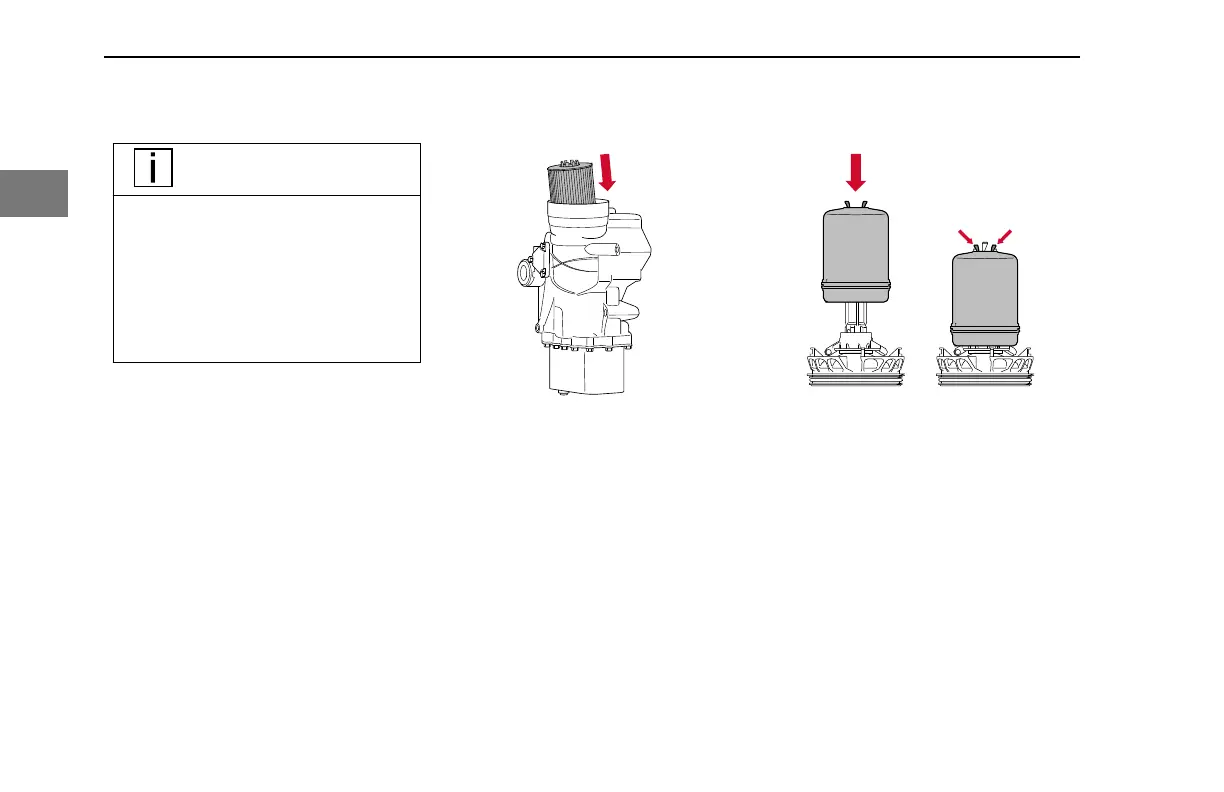
1. Install the new full-flow oil filter
element into the oil module.
Installing Full-flow Oil Filter
2. Lightly lubricate the new O-ring for
the lower cap with clean engine oil.
3. Install the new O-ring onto the
lower cap.
4. Tighten the lower cap 1/4 turn to
lock the full-flow oil filter in place.
5. Install the new centrifugal oil filter
element onto the centrifuge base.
Installing Centrifugal Oil Filter into Base
6. Mount the screw cap on the
centrifuge base.
ENGINE MAINTENANCE - Maintenance Procedures
72 Y53-1166-1M1 (10/2020)
2


 To Next Page