34
Using your FOXTEL Personal Digital Recorder
❖ Watching programmes you have recorded
You use your Personal Planner (see page 21) to choose recorded
programmes you want to watch.
1. Press planner.
2. Use U and D to choose a recorded or recording programme.
Note that these may be marked as Recorded, Part recorded,
Recording or Viewed.
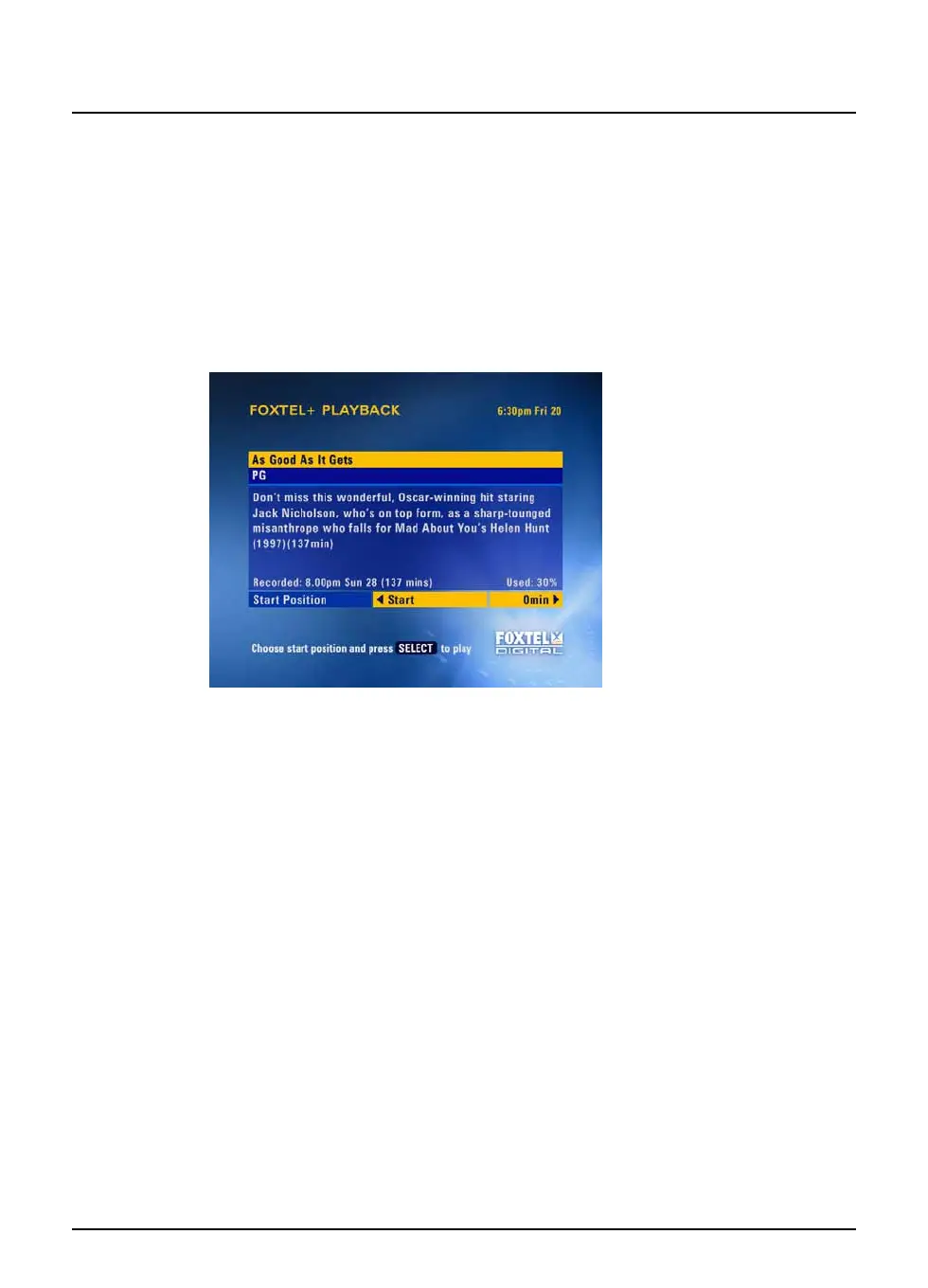
3. Press play or select. The Playback screen displays.
This shows you the i-box information about the programme, including
when the programme was recorded and how much disk space it uses.
This screen also allows you to choose the Start Position - the point
from which you want to start watching the recorded programme.
You can choose between:
◆ Start - to begin playback from the start of the recording.
◆ Last Viewed - to continue playback from the point where you
last stopped it.
◆ Viewer Defined - to start playback from any point in the
programme. You use the number buttons to enter a time, in
minutes, from the beginning of the recording.
◆ Viewer Bookmark - to start playback from a ‘bookmark’
(marker point) that you have previously set (see ‘Using
Bookmarks’ on page 37).
◆ End - to start playback a few moments before the end of the
recording, for example if you want to rewind to a particular
point.
4. When you have chosen your start position, press play or
select. The programme starts playing back from your chosen
point.
Watching recordings



 To Next Page