2. Setting the Date & Time
Install 4 AA batteries:
If you installed the batteries during set up, and the left hand digit of the time display is still flashing (see below),
proceed as outlined below. If the left-hand digit of the time display is NOT flashing remove one battery, wait 10
seconds reinstall the battery and proceed as outlined below “Setting the Time”
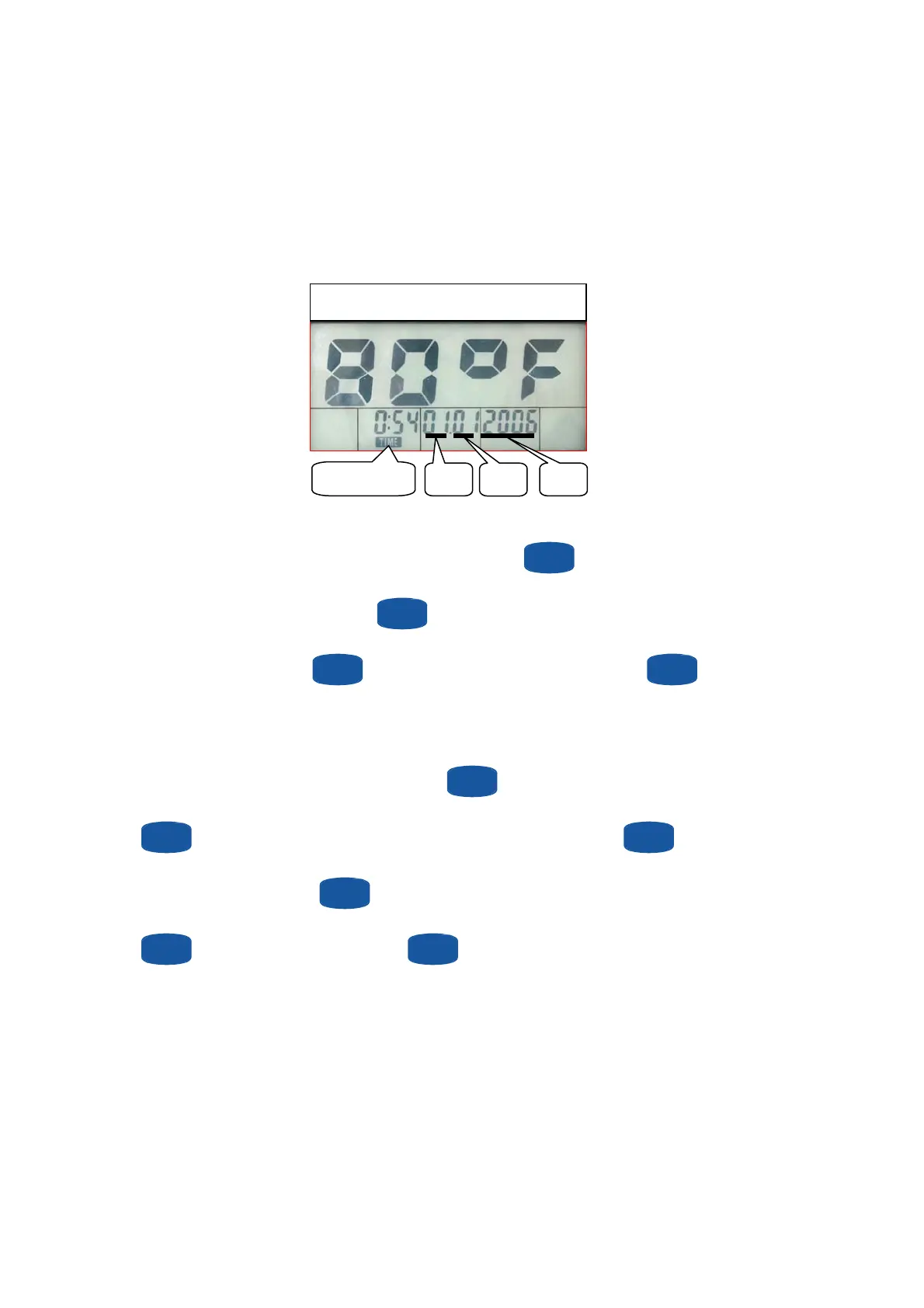
Display appearance after battery installation
Day
Month
Year
Time Display
Setting the Time
With the left-hand (Hours) digit of the time display flashing, use the
SET
button to enter the hours (24 hour
format, 8 am = 8, 5 pm = 17), then press
MODE
button to enter. With the right-hand (Minutes) digits of the
time display flashing, use the
SET
button to enter the minutes (0 – 60), then press
MODE
button to
enter.
Setting the Date
With the day display flashing (see fig above), use the
SET
button to enter the day (1 – 31), then press
MODE
button to enter. With the month display flashing (see fig above), use the
SET
button to enter
the month (1 – 12), then press
MODE
button to enter. With the year display flashing (see fig above), use the
SET
button to enter the year, then press
MODE
button to enter.
19


 To Next Page
 Loading...