10
PDL/ADL/SDL User's Guide
SETTING UP THE PDL LOW POWER BASE/REPEATER (PDL LPB)
Overview of PDL LPB Radio Modem
Front Panel
Buttons
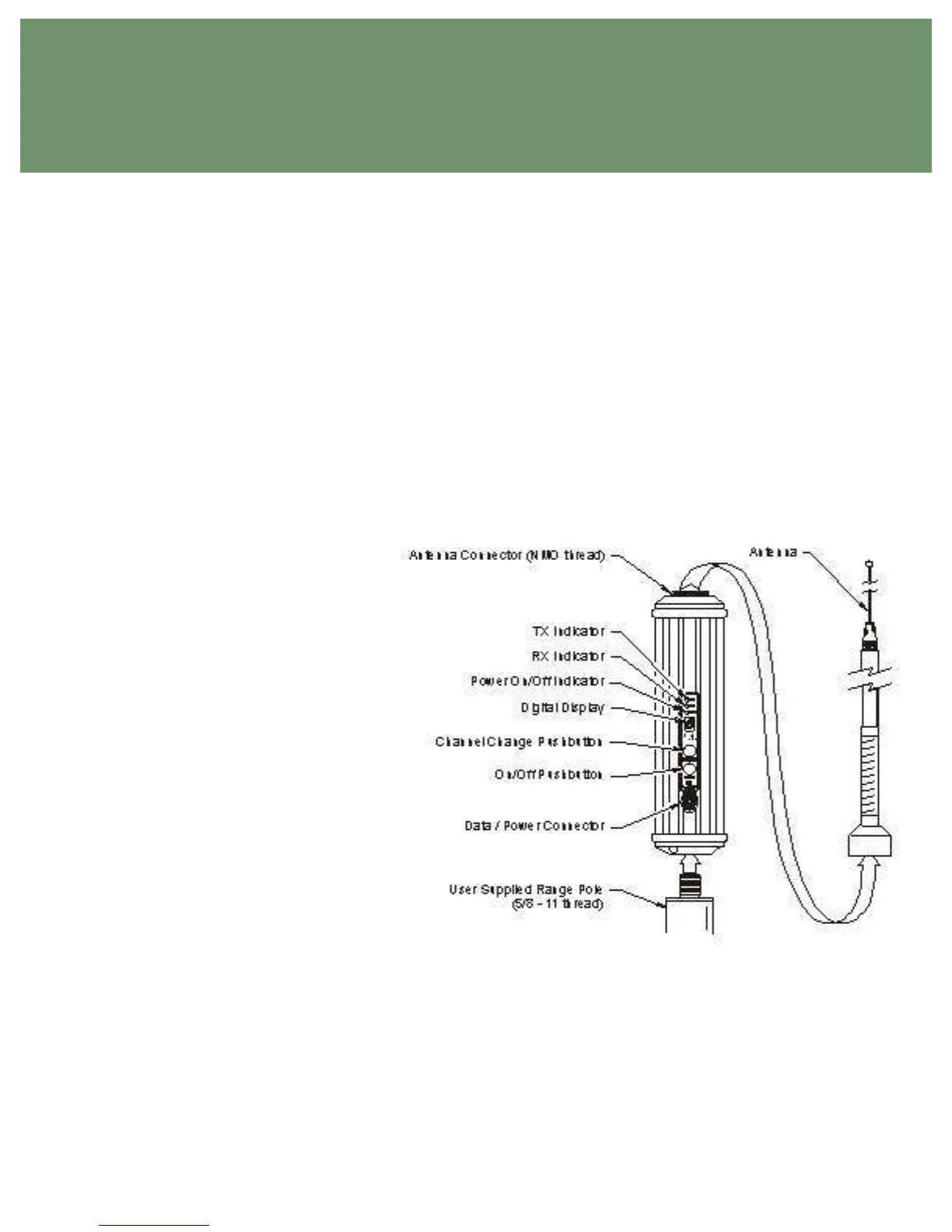
The ON/OFF button is used to turn the PDL LPB modem on and off. Turn the unit on by pressing the
ON/OFF button and holding it until the channel display indicator is lit. Turn off the PDL LPB by pressing
the ON/OFF button until the display goes blank. There is a one-second turn-off delay in the power button
to prevent inadvertent turn off.
The CHANNEL button is used to display and change the channel. Press the CHANNEL button
momentarily to display the selected channel. To change the channel, press the CHANNEL button once to
light the display, and then again to change the channel. Release the CHANNEL button when the desired
channel is indicated.
The PDL LPB can be used as a base, rover or repeater. When used as a base, you have access to
AutoBase mode that will aid in the selection of the channel. Use the CHANNEL button to select the " b "
setting. With " b " selected, the PDL LPB
will be placed in AutoBase mode. This
mode selects the channel for transmission
automatically.
When used as a rover or repeater, you may
wish to use AutoRover mode. Press the
CHANNEL button to select the "r" setting.
With "r" selected, the PDL LPB will be
placed in AutoRover mode. This mode
automatically selects the channel being
used by the PDL Base. If you are
operating in an area with more than one
PDL Base station active, you should
manually select the channel of operation
to assure proper
operation.
Display
The seven-segment, numeric display is used
to indicate the channel or mode selection.
To conserve power, the display is only lit
for a short period following the pressing of
the CHANNEL or ON/OFF buttons.
Channel selections range from Channel 0 to
Channel 15. Two digit channel numbers are displayed by alternately flashing a "1" followed by the
second digit.
Indicator LEDs
The power LED indicates the power status and also provides a low external voltage supply indicator.
When lit, power is turned on. The power LED will blink to indicate if the external voltage supply is
approaching the minimum value. If the power LED does not respond to the ON/OFF button, then the
level of the external voltage supply should be inspected.
Figure 4 - PDL Low Power Base


 To Next Page