6 -
Packard Bell DVD DivX 300/350 User's Guide
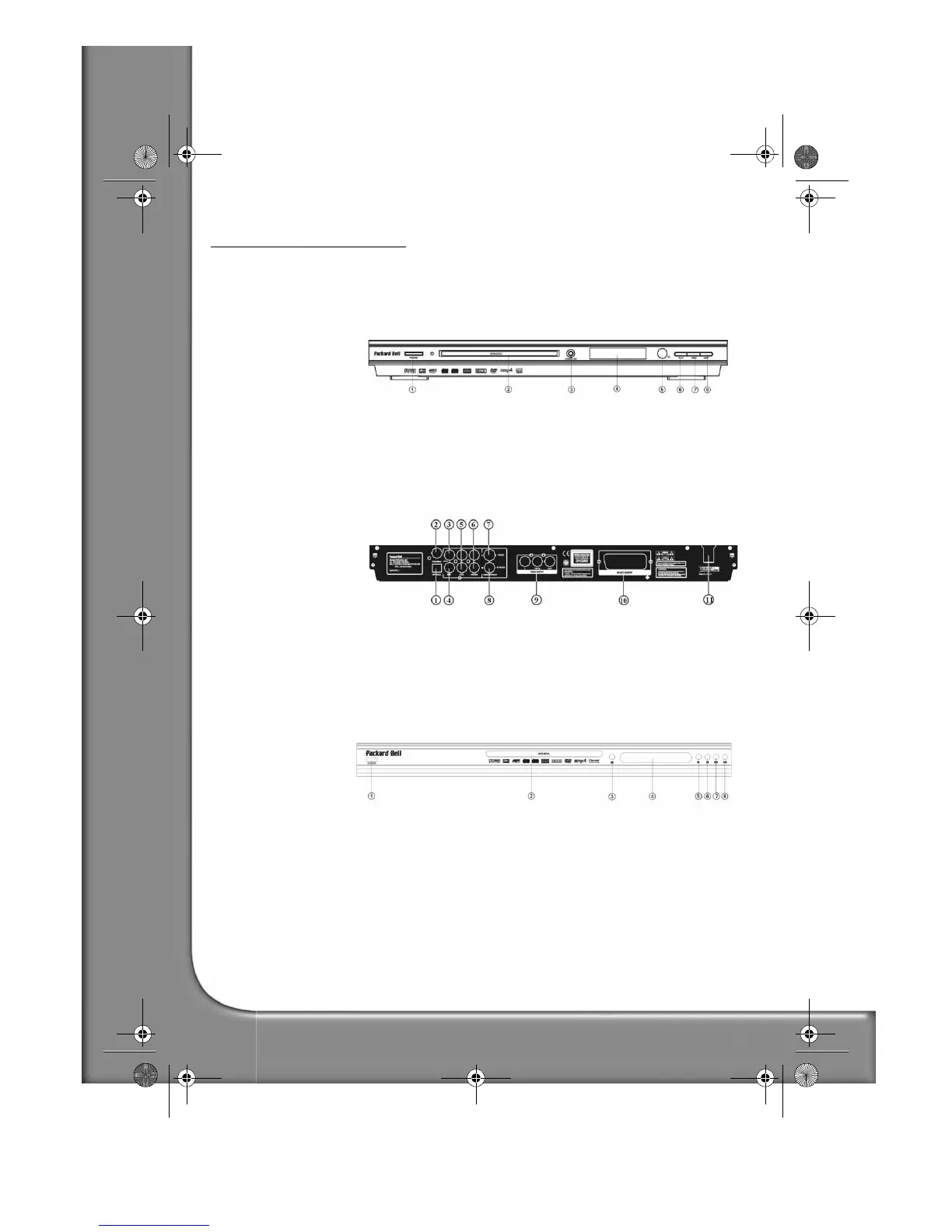
BUTTONS AND CONNECTORS
DVD DivX 300
Front panel diagram
1. Power button
2. DVD disc holder
3. VFD display
4. Open/Close button
5. I.R. receiver
6. Play button
7. Previous button
8. Next button
Back panel diagram
1. Optical output jack
2. Coaxial output jack
3. Centre output jack
4. Sub-woofer output jack
5. Left and right surround
output jack
6. Left and right front output
jack
7. Video output jack
8. S-video output jack
9. Y Cb/Pb Cr/Pr
10. Scart output jack
11. Power cable
DVD DivX 350
Front panel diagram
1. Power button
2. DVD disc holder
3. Open/Close button
4. VFD display
5. Play button
6. Stop button
7. Previous button
8. Next button
DVD DivX 350 6940100200.book Page 6 Wednesday, May 25, 2005 2:18 PM



 To Next Page