EasyManua.ls Logo

Packard Bell DIVX 300 - Remote Control

Packard Bell DIVX 300
156 pages
Print Icon
To Next Page IconTo Next Page
To Previous Page IconTo Previous Page
Loading...
English -
7
English -
7
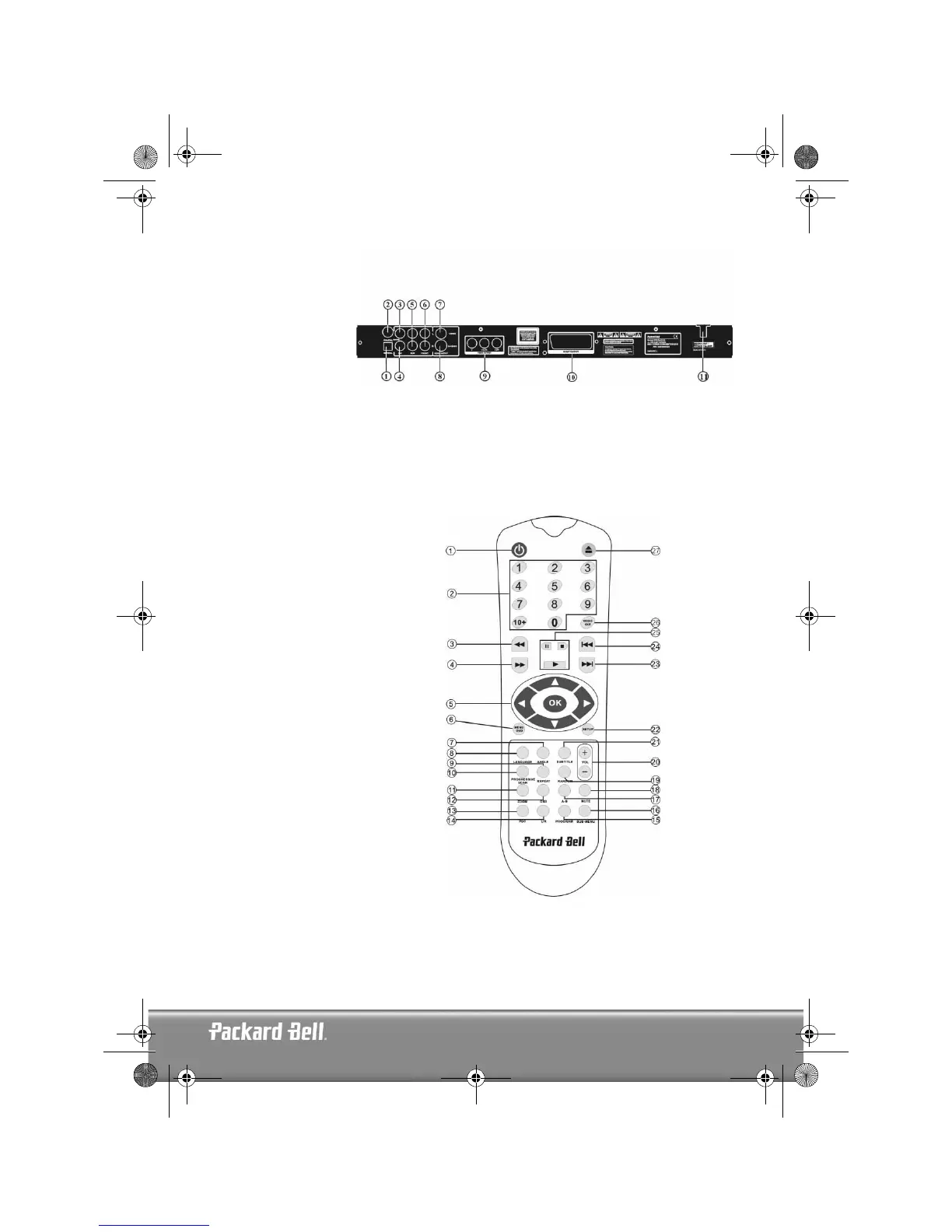
Back panel diagram
1. Optical output jack
2. Coaxial output jack
3. Centre output jack
4. Sub-woofer output
jack
5. Left and right sur-
round output jack
6. Left and right front
output jack
7. Video output jack
8. S-video output jack
9. Y Cb/Pb Cr/Pr
10. Scart output jack
11. Power cable
Remote Control
1. Power
2. Numeric Buttons
3. Fast Forward
4. Rewind
5. Cursor Control
(up, down, left, right, OK/Enter)
6. Menu DVD
7. Angle
8. Language
9. Repeat
10. Progressive Scan
11. Zoom
12. OSD
13. PBC
14. L/R
15. Program
16. Sub-menu
17. A-B
18. Mute
19. Random
20. Vol +/-
21. Subtitle
22. Setup
23. Next
24. Previous
25. Pause, Stop, Play
26. Video Out
27. Open/Close
DVD DivX 350 6940100200.book Page 7 Wednesday, May 25, 2005 2:18 PM

Table of Contents