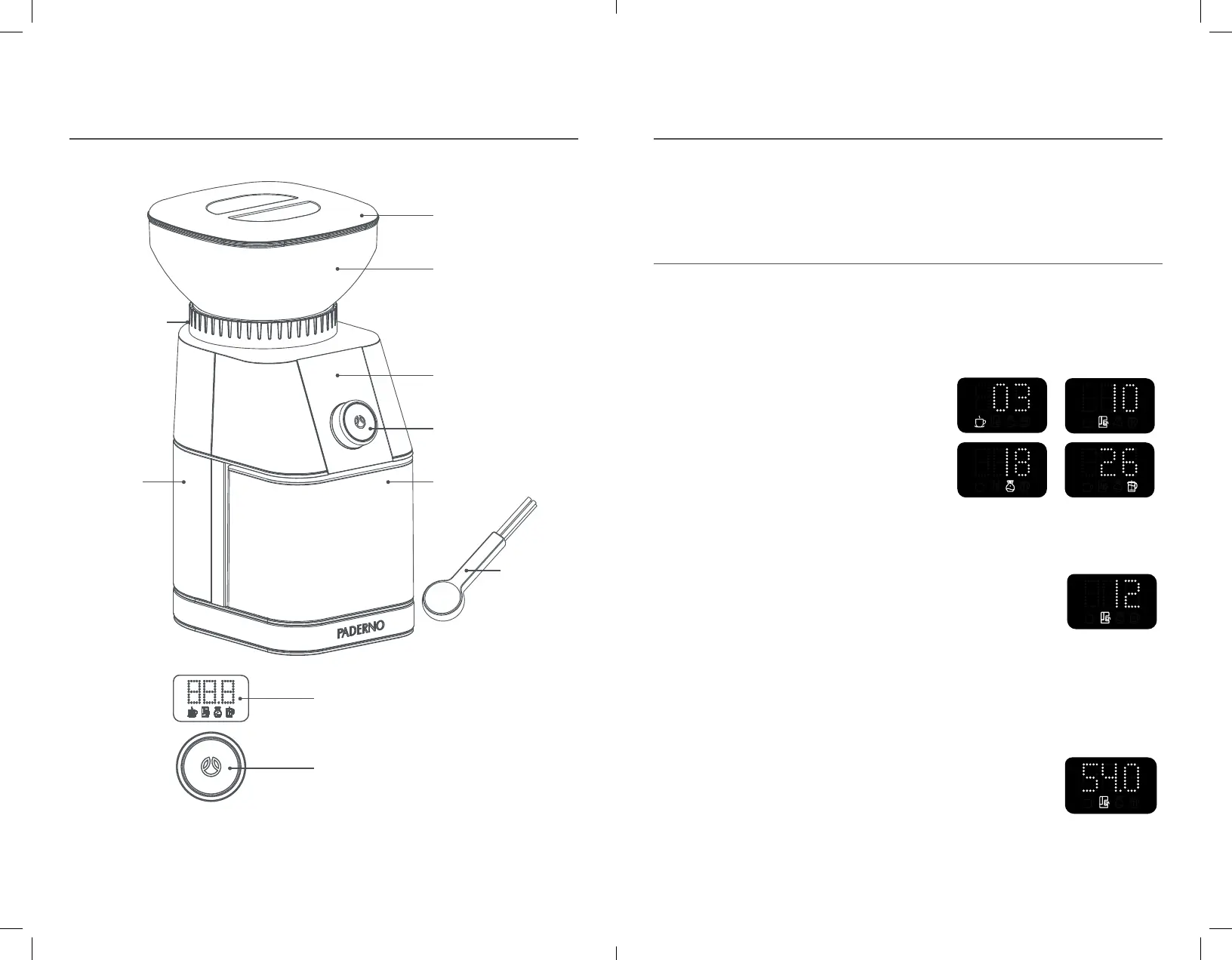
Hopper Lid
Bean Hopper
Cleaning Tool
Grind Size Collar
Digital Display Screen
Dynamic Control Dial
Sealable Coffee
Grounds Bin
Secret-Until-Lit Display Screen
Dynamic Control Dial
Burr Grinder
Housing
Note: Product may vary slightly from illustration.
1-800-263-9768 www.paderno.comProduct No. 043-2736-6
6 7
Technical Information
Before First Use
Refer to the Cleaning & Maintenance
section of this manual. Clean the
appliance thoroughly before irst
use. Remove all packing material
and accessories.
HOW TO USE
1. Place appliance on a lat surface
and plug in.
NOTE: Digital Display will go into
Sleep mode after 2 minutes of
inactivity. Rotate the Dynamic
Control Dial or click the Dial to wake
the Burr Grinder up.
2. Remove the Bean Hopper by
rotating counter-clockwise and
lifting o the Burr Grinder Housing.
Secure the Bean Hopper back on
to the Burr Grinder Housing by
aligning it with the Grind Size Collar
and rotating clockwise until it locks.
NOTE: The Burr Coee Grinder will
not operate if the Bean Hopper is
not correctly locked onto the Burr
Grinder Housing.
3. Pour up to 340 g (12 oz) of freshly
roasted Coee Beans into the
Bean Hopper.
4. Secure the Coee Grounds Bin in
the Burr Grinder Housing. Ensure the
Grounds Bin Lid is on but the outlet
hole is not covered by the cap.
5. Rotate the Grind Size Collar to
select the desired grind size from
1-30 (see Figure 1). Refer to the
Tips section to see the best grind
sizes for the type of coee you are
looking to make.
6. Rotate the Dynamic Control Dial to
select the number of cups you would
like to brew. Grind sizes 1–5 can be
adjusted to grind
1–6 cups while
grind sizes 6–30
can be adjusted
to grind 1–12
cups (see Figure 2). Click the Dial to
conirm the selection.
7. Rotate the Dynamic Control Dial to
micro-adjust the pre-set grinding
time by up to 3 seconds, if desired
(see Figure 3). Click the Dial
to conirm the
selection and
begin grinding.
NOTE: Press and
hold the Dial
for 2 seconds to return to the cup
selection setting.
Using Your Coee Grinder
Precisely grind fresh coee beans in your PADERNO
TM
Conical Burr Coee Grinder for a lavourful,
delicious cup of coee.
Fig. 1
Figure 1 Images
Figure 2 Image
Figure 4 Image Warning Modes
Fig. 2
Figure 1 Images
Figure 2 Image
Figure 4 Image Warning Modes
Fig. 3
Figure 1 Images
Figure 2 Image
Figure 4 Image Warning Modes
w03a_0432736_6_CoffeeGrinderManual_ENG.indd 6-7 2020-10-15 12:32 PM


 To Next Page
 Loading...