Tungsten™ E2 Handheld 40
CHAPTER 4 Managing Your Calendar
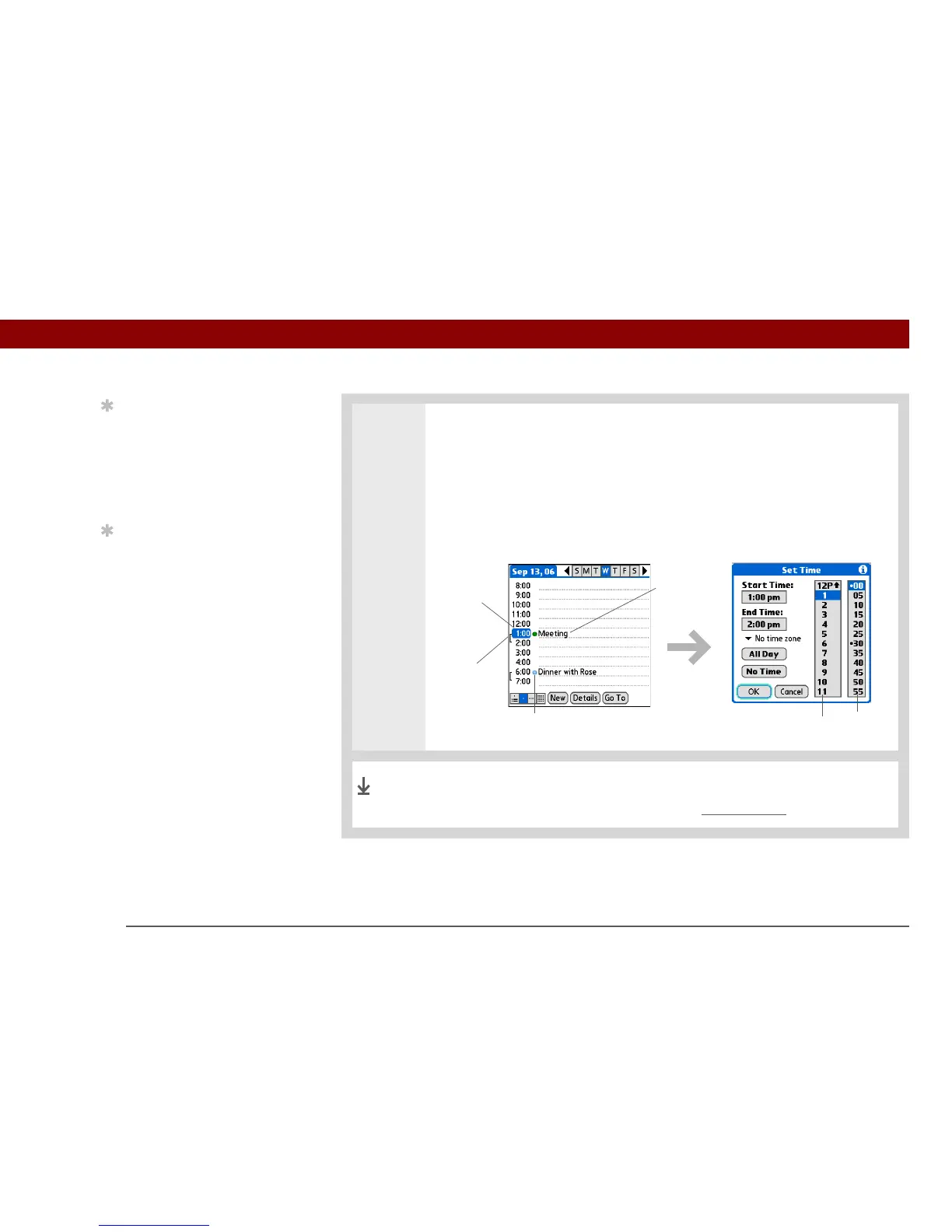
4 If the appointment is longer or shorter than an hour, set the duration:
a. In Day View, tap the start time.
b. In the Set Time dialog box, tap End Time.
c. Tap the hour and minute lists to select the time the appointment ends.
d. Select OK.
That’s it. Your handheld automatically saves the appointment.
Make sure you have a current backup. Synchronize often.
Tip
To enter reminders,
holidays, anniversaries,
and other events that take
place on a particular date
but not at a particular
time, select No Time.
Tip
Color-code your calendar.
Tap the bullet next to the
description to file the
appointment in a
category. Each category
has its own color.
Hour
list
Minute
list
Duration
Start time
Description
Color-coded bullet
Done



 To Next Page