8
Channel Adjustment
County
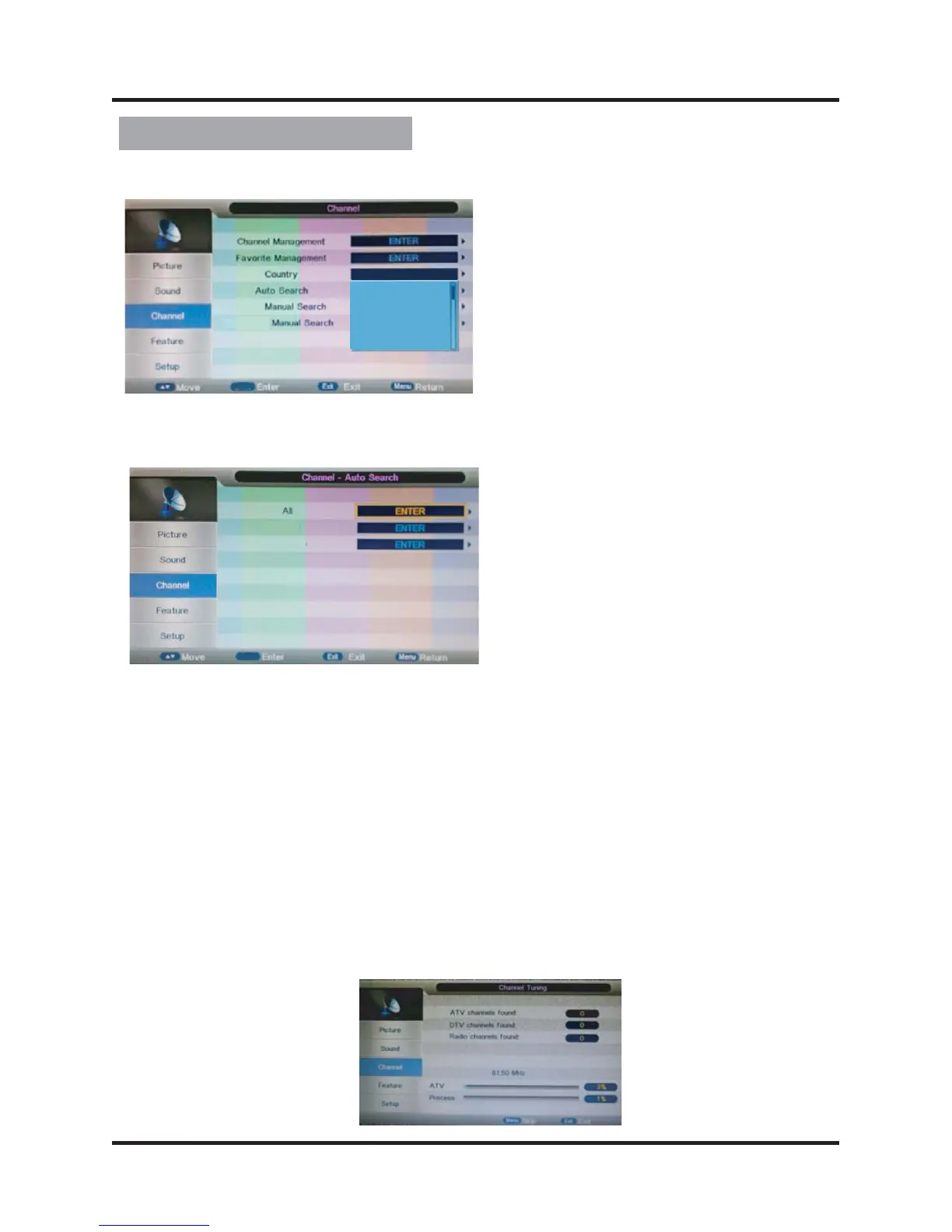
Auto Search
All search mode processing interface display as following:
Analog Mode: Select “Analogue” item to search all digital channels in selected
country carried by current signal mode. User can stop search
directly by entering “EXIT” or “MENU” key.
Press
All Mode: Select “All” item to scan all digital channels carried by current signal
mode firstly and then switch to scan all analog channels in selected
country automatically. User can skip digital search to analog search
directly by entering “EXIT” or “MENU” key and can also stop auto
scan directly by entering “EXIT” or “MENU” during analog scanning.
Digital Mode: Select “Digital” item to search all digital channels in selected country
carried by current signal mode. User can stop search directly by
entering “EXIT” or “MENU” key.
▲/▼ button to select the county that you want.
OK
OK
DTV
ATV
DTV
ATV
Portugal
Sweden
Finland
Czech Repbulic
Austradia


 To Next Page
 Loading...