2
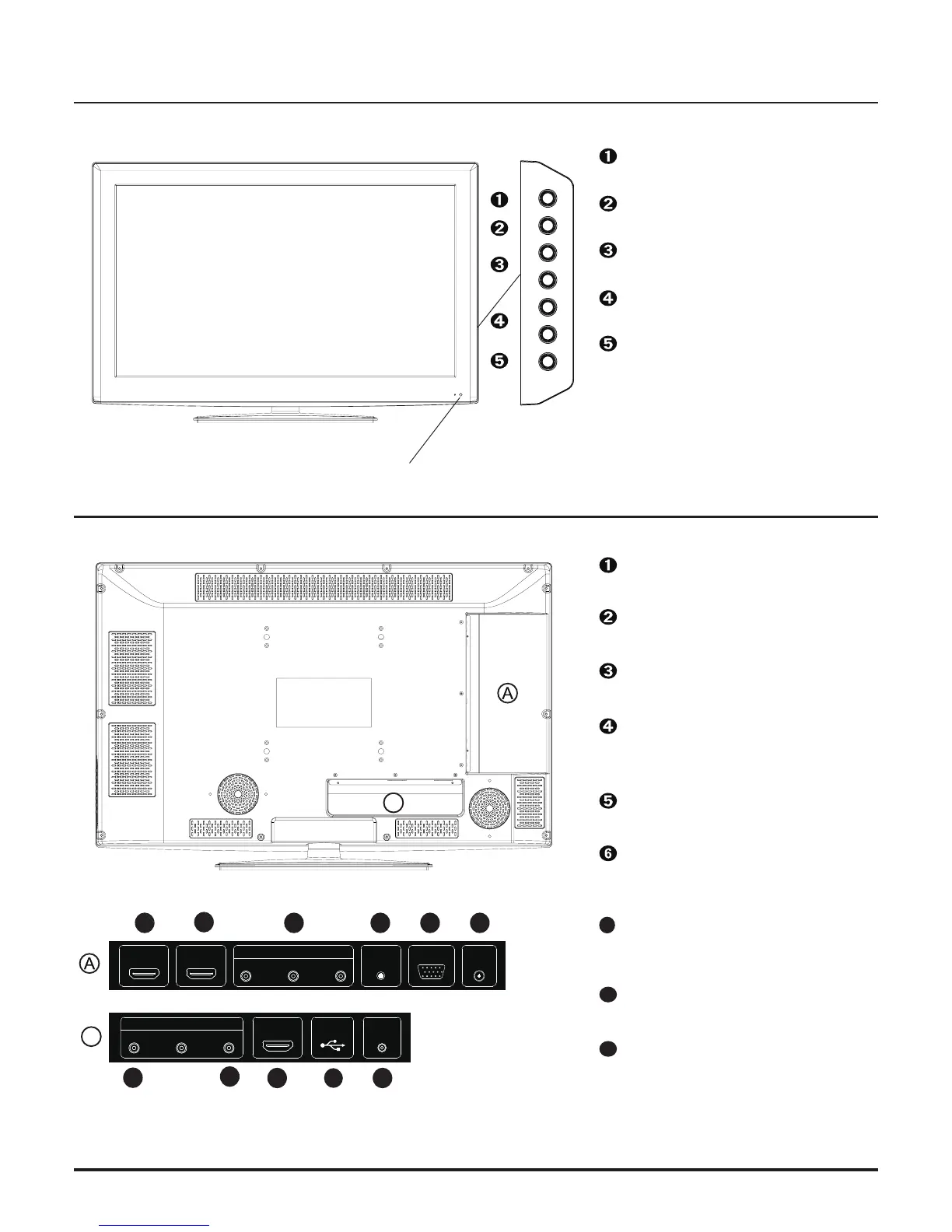
Front view
Remote control sensor and Power Indicator
Product Components
INPU T — Switch the input
sources.
MENU — Press the button to
enter On Screen Display (OSD).
CH +/- — Increase or decrease
channel numbers.
VOL +/- — Increase or decrease
the volume.
POWER — Turn the TV ON or
OFF to Standby.
Rear view
1
L / R Audio — Connect to audio
receiver.
CVBS — Connect to video
receiver.
PC AUDIO IN — Connect to the
audio output from your PC or
portable computer.
PC IN — Connect to the VGA
output of your device.
HDMI IN — Connect to the
HDMI enabled devices.
COAXIAL OUT— Connect audio
input to your AV device.
USB — Connect to USB device
such as USB Drive, Portable
Hard Drive etc.
YPbPr — Connect to the
component output of A/V de
-
vice.
RF IN — Connect to the
antenna or to wall plate antenna
connection for local TV
8
9
B
2
3
4
5
6
7
8 9
B
7
POWERVOL-VOL+CH-CH+MENUINPUT
HDMI 1 IN HDMI 2 IN
PC IN
COMPONENT
Pr
Pb
Y
PC AUDIO
IN
RF IN
COAXIAL
OUT
HDMI 3 IN
USB
R
L
AV IN
CVBS
3
3


 To Next Page