8
CAUTION
• Before moving the air fryer, ensure it’s not in use, it’s at room temperature, and the
door is closed.
• Do not use excessive force with this unit. It could damage the unit or injure the user.
• Never remove the door to clean while the heat is on. Allow the unit to cool completely
before cleaning.
• Do not store the unit in direct sunlight. This appliance is intended for use at altitudes
not exceeding 2,000 m.
• When cooking in high-altitude areas, adjust the cooking time/temp as needed.
• Do not remove, bend, or stretch the silicone door seal, as this may cause the unit
to malfunction.
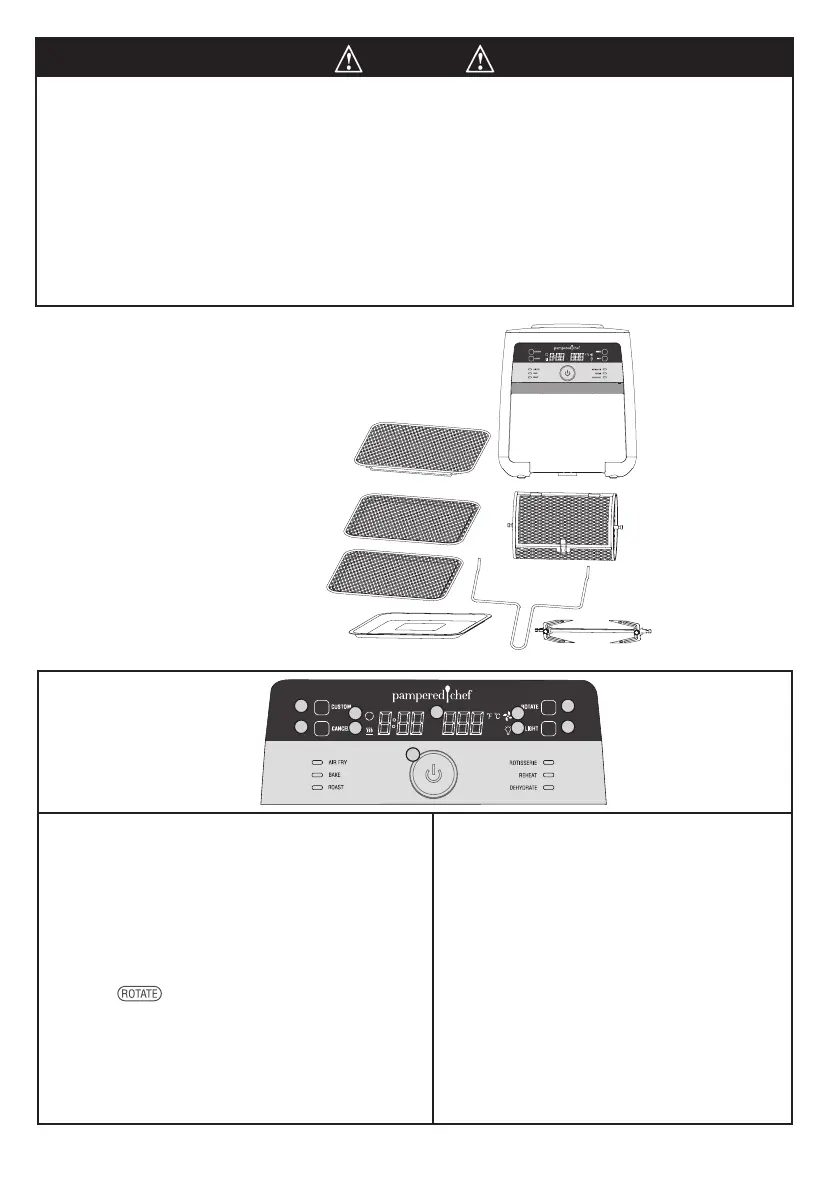
PARTS
A. Air Fryer unit
B. Door
C. Drip tray
D. Cooking trays (2)
E. Basket
F. Rotisserie set (includes spit,
2 forks, and 2 tightening
screw sets)
G. Retrieval tool
H. Removable Shield
A
B
C
D
E
F
G
H
1
2 4
3 5
6
8 10
7 9
1. Display
• Shows the cooking time, cooking temperature, and
standby mode.
2. Custom Button
• Lets you manually select the cook time and temperature.
3. Cancel Button
• Cancels any operation at any time while the air fryer is
in use. The air fryer will go into standby mode and the
display will have 6 center lines blinking.
4. Rotate Button
• Press when using the basket or rotisserie set
accessories. (When using the Rotisserie setting, the
accessories will automatically rotate.)
5. Light Button
• Press to turn on the light inside air fryer. Press again
to turn the light off. Note: The Light button will not
work when the air fryer is in standby mode.
6. Wheel
• Turn the wheel to change settings, cook time, or
temperature. Press the wheel to start or pause an
operation.
7. Rotate Icon
• When the rotisserie is spinning, the rotate icon
will be lit.
8. Heat Icon
• Anytime the heating coil is on, the heat icon will
be lit.
9. Fan Icon
• The fan will automatically run during and after
cooking cycles. While running, the fan icon will
be lit.
10. Light Icon
• Anytime the light is on in the air fryer, the light
icon will be lit. Once a program is done, the
light will turn off.
100461-092021-u&c-146x209mm.indd 8100461-092021-u&c-146x209mm.indd 8 3/25/21 6:21 PM3/25/21 6:21 PM


 To Next Page