Need help?
Do you have a question about the Panasonic AK-HRP1010G and is the answer not in the manual?
Crucial safety warnings, FCC compliance, and Canadian notification for safe operation.
Details on EMC standards, directives, and proper disposal of electronic waste.
Provides product compliance information and specific warnings in Russian.
Guidance on viewing the manual, understanding trademarks, copyright, and abbreviations.
Lists unit model numbers as used within the manual for clarity.
Describes the unit's role in controlling cameras and CCUs, and connection methods.
Specifies PC requirements and outlines the product warranty disclaimer.
Details network security measures and user authentication for device protection.
Covers network segment recommendations, memory card compatibility, and usage guidelines.
Information on obtaining software updates and the file types handled by the unit.
Highlights control of cameras/CCUs, file saving, serial/network connectivity, and PoE support.
Covers careful handling, operating temperature, dust/humidity avoidance, and cleaning procedures.
Advises on LCD panel characteristics, potential issues, and methods to prevent deterioration.
Details dedicated ROP cable requirements and information on PoE power supply.
Explains system grounding and general handling precautions for the unit.
Specifies suitable indoor locations, surface stability, ventilation, and environmental factors.
Instructions for removing and installing rack mount brackets, including screw torque.
Procedure for setting the unit's operation mode (Serial or IP connection).
Methods to switch between serial and IP connection modes using ROP menu or software.
Details serial and IP connection configurations for connecting to Camera Control Units (CCUs).
Steps for establishing an IP connection, including network hub and PC setup.
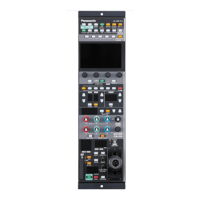
Description of buttons and indicators on the first front panel section.
Explanation of buttons and indicators on the second front panel section.
Details of LCD panel, menu dials, and navigation buttons on the third front panel section.
Information on scene file management buttons and indicators on the fourth front panel section.
Description of ND/CC filter settings, ECC, and M.GAIN controls on the fifth front panel.
Explanation of shutter controls and indicators on the sixth front panel section.
Details on gain, pedestal, flare, and DTL adjustment controls on the seventh front panel.
Explanation of extender, iris, and pedestal controls on the eighth front panel section.
Description of camera number display, warning indicators, and call/preview functions on the ninth front panel.
Details the pin assignment for the CCU connector and the LAN connector specifications.
Step-by-step guide for performing the auto setup function for optimal camera configuration.
Instructions for storing and opening scene files, enabling quick recall of camera settings.
Explains how to lock paint control operations to preserve current settings.
Guidance on displaying and adjusting ND and CC filter settings for image control.
Procedures for setting color temperature (ECC) and master gain (M.GAIN) for image tuning.
Instructions for setting shutter speed and master pedestal levels for optimal exposure.
Details manual and automatic iris adjustment methods, including lever and dial controls.
How to use the SELECT dial to navigate and adjust various camera functions.
Steps for selecting the target camera for control via the unit.
How to display and interpret the status screen, and navigate between pages.
Details on OPT LEVEL, CAM INFO, SCENE, and ASSIGN information displayed on screen.
How to access and navigate the ROP menu, including transitions and basic operations.
A comprehensive list of ROP menu items, sub-items, and their corresponding page references.
Steps to download, install, and run the ROP Setup Software on a personal computer.
Guide to configuring unit and CCU for IP connection, including equipment and PC setup.
Detailed pinout information for CCU, LAN, and Preview connectors.
Diagrams and measurements showing the physical layout and dimensions of the unit.
Details power supply, current consumption, operating/storage temperatures, and weight.
Information on the LCD monitor capabilities and the specifications of input/output connectors.
 General
| Control Interface | Ethernet |
|---|---|
| LAN Connector | RJ-45 |
| Power Supply | DC 12 V |
| Operating Temperature | 0 °C to 40 °C |
| Storage Temperature | -20 °C to 60 °C |
| Interface | Ethernet |

 To Next Page