in the field and studio.
for superb results.
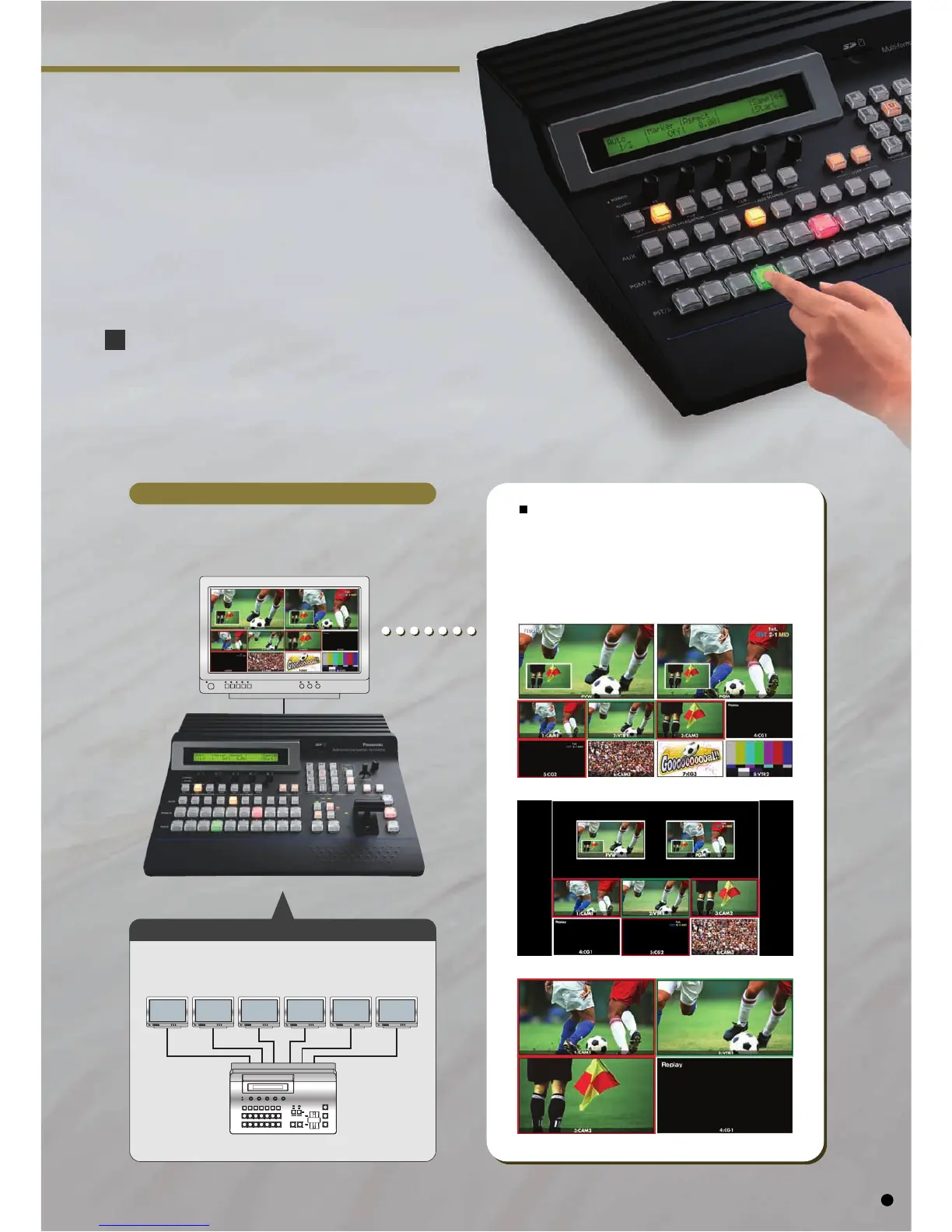
Example of an AV-HS400A monitor system
Simultaneous split-screen preview
with a single monitor.
Connection of separate monitors is required
for each input, PVW and PGM.
*
The image shows loop-through outputs connected to switcher inputs.
Ten Split Pictures (images)
• The number of split-screens can selected from 10,8, and 4.
• Display of red/green tally indications in frame can be displayed.
• Split-screen labels may customized or selected from menus.
• When splitting screens into 10/8 sections, the upper 2 windows
may be selected from PGM/PVW/AUX/BUS/KEYOUT images.
Eight Split Pictures (images)
Four Split Pictures (images)
Example of conventional monitor system
Selectable Split-screen Quantity
and Location
Use the Multi-view Display Function to Preview
Materials and Production Screen on a Single Monitor
Multi-view display enables simultaneous split-screen preview with a single monitor, so you can reduce
the number of monitors required. Split-screen segments labels may now be selected or edited.
Labels may also be turned off or adjusted for 5 levels of brightness. The label background "band" and
frame outline may also be turned of, and the frame brightness is adjustable through 5 levels.
5













 To Next Page