EasyManua.ls Logo

Panasonic C1381 - Page 17

Panasonic C1381
51 pages
Print Icon
To Next Page IconTo Next Page
To Previous Page IconTo Previous Page
Loading...
4.
Sub
Contrast
Adjustment
(See
A-3
of
Page
31)
a)
Apply
220V
AC
to
the
unit.
b)
Apply
a
VGA
signal
with
white
pattern
to
the
unit.
c)
Fully
turn
screen
control
of
FBT
counterclockwise.
d)
Turn
R3116
(BRIGHT)
and
R3115
(CONTRAST)
controls
fully
clockwise.
e)
Connect
a
oscilloscope
between
TP47G
and
ground.
f)
Adjust
R3124
(SUB.CONT.)
to
set
the
oscilloscope
42V
+
1.0Vp-p.
.
Video
Bias
Adjustment
(See
D-1
of
Page
31)
a)
Apply
220V
AC
to
the
unit.
b)
Apply
a
VGA
signal
with
black
pattern
to
the
unit.
c)
Turn
R3116
(BRIGHT)
and
R3115
(CONTRAST)
controls
fully
clockwise.
d)
Turn
R3511
(G.
CUT
OFF)
to
center
position.
e)
Connect
a
digital
voltmeter
between
TP47G
and
ground.
f)
Adjust
R3580
(VIDEO
BIAS)
to
set
the
voltmeter
at
70V.
.
White
Balance
Adjustment
(See D-1,
C-3,
E-1,
E-2
of
Page
31)
a)
After
adjusting
VIDEO
BIAS,
adjust
Bright
control
(R3116)
to
set
the
voltmeter
75V
+
1V.
b)
Connect
GND
and
TP401
with
short
wire.
c)
Slowly
turn
the
screen
control
clockwise
until
a
dim
green
horizontal
line
appears
on
the
picture
tube.
d}
Make
the
horizontal
line
white
by
turning
R3510
(R-CUT
OFF)
and
R3512
(B-CUT
OFF).
e)
Remove
the
short
wire
connected
at
step
(b).
f)
Apply
a
full
white
field
signal
to
the
unit.
g)
Turn
Bright
control
(R3116)
and
Contrast
control
(R3115)
fully
clockwise.
h)
Adjust
R3501
(R-DRIVE)
and
R3503
(B-DRIVE)
to
produce
a
normal
white
pattern.
i)
Check
that
the
uniform
white
pattern
is
achieved
from
low
brightness
to
high
brightness
levels.
Proper
tracking
at
all
brightness
levels
can
be
obtained
when
the
screen
control,
cutoff
controls
and
drive
controls
are
properly
adjusted.
If
the
results
are
unsatisfactory,
repeat
all
the
above
steps.
X
=
0.284
(+
0.01
at
25
ft-L,
+
0.01
at
3
ft-L)
Y
=
0.294
(+
0.01
at
25
ft-L,
+
0.01
at
3
ft-L)
25ft-L
=
85.6
nit
(cd/m?)
3ft-L
=
10.3
nit
(cd/m?)
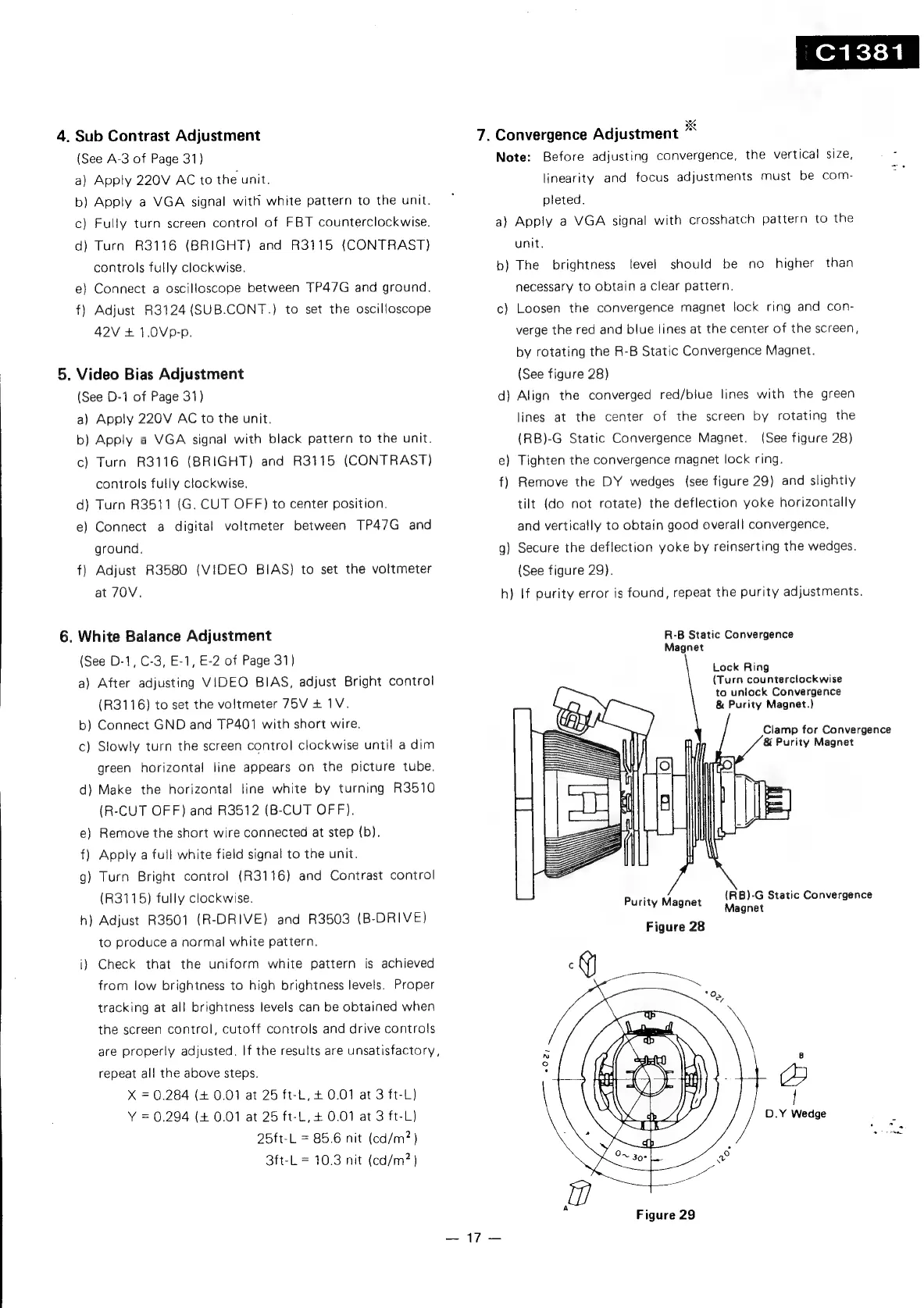
7.
eta
ee
Convergence
Adjustment
a
Note:
Before
adjusting
convergence,
the
vertical
size,
linearity
and
focus
adjustments
must
be
com-
pleted.
a)
Apply
a
VGA
signal
with
crosshatch
pattern
to
the
unit,
b)
The
brightness
level
should
be
no
higher
than
necessary
to
obtain
a
clear
pattern.
c)
Loosen
the
convergence
magnet
lock
ring
and
con-
verge
the
red
and
blue
lines
at
the
center
of
the
screen,
by
rotating
the
R-B
Static
Convergence
Magnet.
(See
figure
28)
d)
Align
the
converged
red/biue
lines
with
the
green
lines
at
the
center
of
the
screen
by
rotating
the
(See
figure
28)
Tighten
the
convergence
magnet
lock
ring.
(RB)-G
Static
Convergence
Magnet.
e
f)
Remove
the
DY
wedges
(see
figure
29)
and
slightly
tilt
(do
not
rotate)
the
deflection
yoke
horizontally
and
vertically
to
obtain
good
overall
convergence.
g)
Secure
the
deflection
yoke
by
reinserting
the
wedges.
(See
figure
29).
h)
If
purity
error
is
found,
repeat
the
purity
adjustments.
R-B
Static
Convergence
Magnet
Lock
Ring
(Turn
counterclockwise
to
unlock
Convergence
&
Purity
Magnet.)
&
Purity
Magnet
Purity
Magnet
Figure
28
Magnet
Figure
29
(RB)-G
Static
Convergence
Clamp
for
Convergence
f,

Related product manuals