EasyManua.ls Logo

Panasonic C1381 - Page 19

Panasonic C1381
51 pages
Print Icon
To Next Page IconTo Next Page
To Previous Page IconTo Previous Page
Loading...
14.
15.
16.
V-Center
Adjustment
(See
B-2
of
Page
31)
a)
Turn
R444
(V.
CENT.)
to
center
position.
b)
Apply
a
VGA
signal
with
full
white
pattern
to
the
unit.
And
turn
R3116
(BRIGHT)
and
R3115
(CONTRAST)
controls
fully
clockwise.
c)
Adjust
R4060
(V.
CENT.
PRE.)
to
set
the
vertical
image
position
to
center.
V-Size
Adjustment
(See
B-3
of
Page
31)
a)
Apply
a
VGA
signal
to
the
unit.
b)
Turn
R445
(V.
SIZE)
control
to
set
click
position.
c)
Turn
R3116
(BRIGHT)
fully
clockwise.
d)
Adjust
R408
(SUB.
V.
SIZE)
to
set
the
vertical
width
of
the
image
is
7.2
in.
(183
mm).
Raster
Center
Adjustment
(See
E-5
of
Page
31)
ATTENTION:
This
adjustment
is
not
necessary
for
ordinary
servicing.
Do
this
adjustment,
when
you
find
that
the
Raster
center
position
is
not
in
normal
position,
a)
Apply
a
VGA
signal
with
full
black
pattern
to
the
unit,
b)
Turn
R3116
(BRIGHT)
fully
clockwise.
c)
Adjust
using
optional
couplers
to
set
the
Raster
center
position.
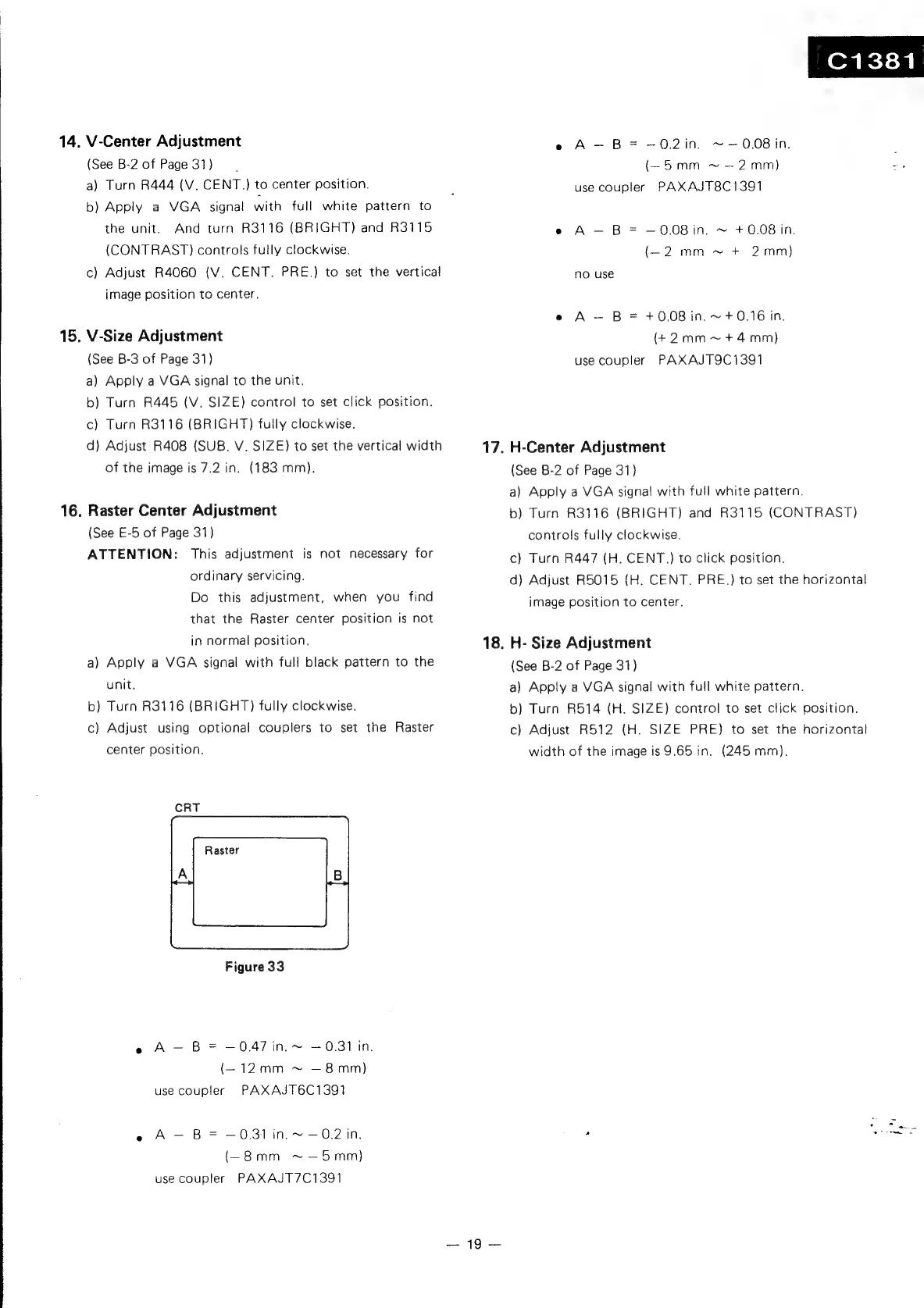
CRT
Figure
33
e
A-—
B=
—047
in.
~
0.31
in.
(—12mm
~
—8mm)
use
coupler
PAXAJT6C1391
e
A
-—
B=
—0.31
in.
~
0.2
in.
(-_8mm
~—5mm)
use
coupler
PAXAJT7C1391
17.
18.
19
C1381
e
A-—
B=
—-0.2in.
~—0.08
in.
(~5
mm
~
2mm)
use
coupler
PAXAJT8C1391
e
A
B
=
0.08
in.
~
+
0.08
in.
(-_2
mm
~
+
2mm)
no
use
e
A
B
=
+0.08
in.
~
+
0.16
in.
(+2mm~+4mm)
use
coupler
PAXAJT9C1391
H-Center
Adjustment
(See
B-2
of
Page
31)
a)
Apply
a
VGA
signal
with
full
white
pattern.
b)
Turn
R3116
(BRIGHT)
and
R3115
(CONTRAST)
controls
fully
clockwise,
c)
Turn
R447
(H.
CENT.}
to
click
position.
d)
Adjust
R5015
(H.
CENT.
PRE.)
to
set
the
horizontal
image
position
to
center.
H-
Size
Adjustment
(See
B-2
of
Page
31)
a)
Apply
a
VGA
signal
with
full
white
pattern.
b)
Turn
R514
(H.
SIZE)
control
to
set
click
position.
c)
Adjust
R512
(H.
SIZE
PRE)
to
set
the
horizontal
width
of
the
image
is
9.65
in.
(245
mm),

Related product manuals