EasyManua.ls Logo

Panasonic C1381 - Page 4

Panasonic C1381
51 pages
Print Icon
To Next Page IconTo Next Page
To Previous Page IconTo Previous Page
Loading...
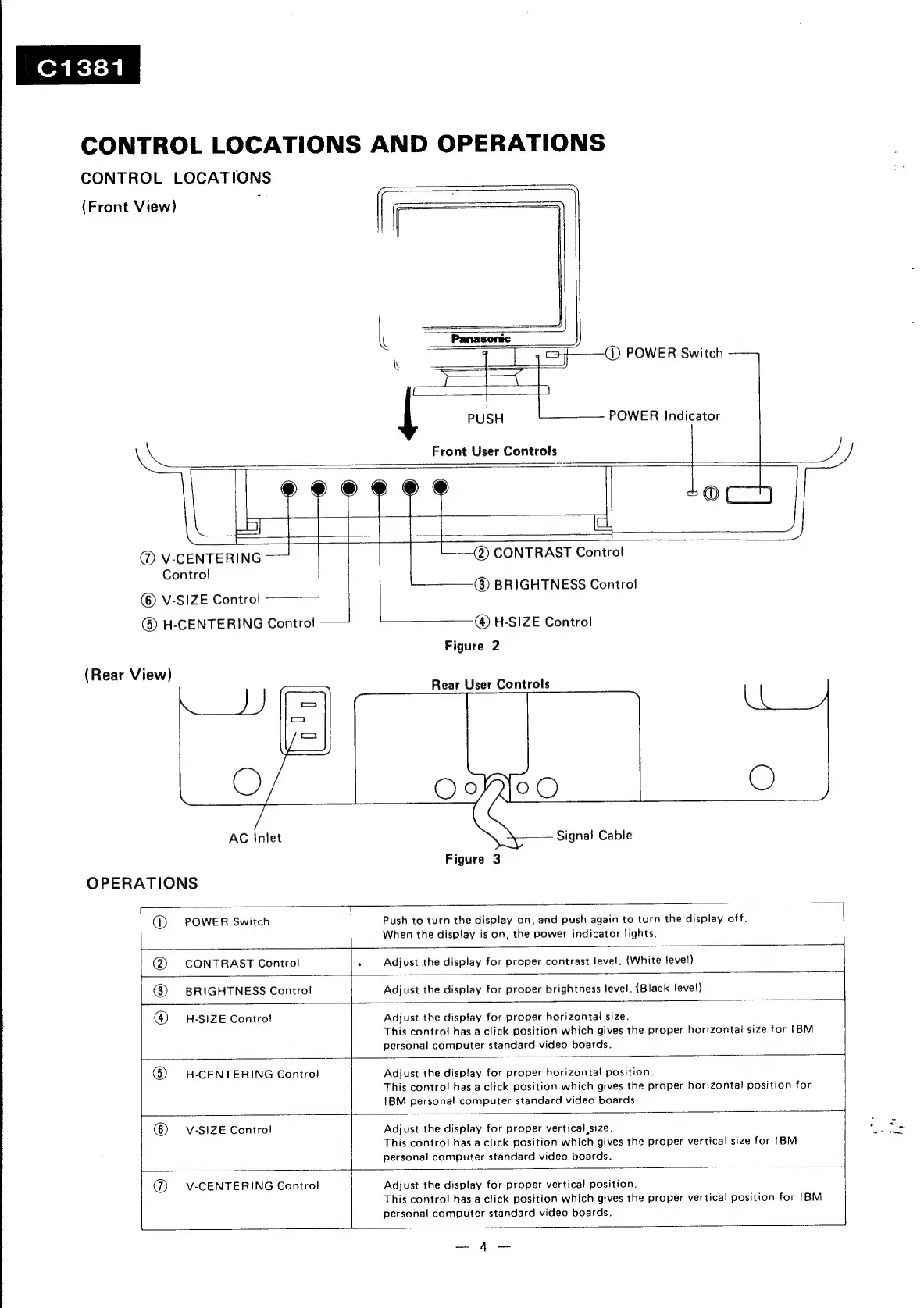
CONTROL
LOCATIONS
AND
OPERATIONS
CONTROL
LOCATIONS
(Front
View)
;
=<
|
==]
it
~
|
=i——O
POWER
Switch
PUSH
POWER
Indicator
Front
User
Controls
-
a
Contro!
©)
V-SIZE
Control
®
H-CENTERING
Control
(Rear
View)
AC
Inlet
OPERATIONS
@)
CONTRAST
Control
@
BRIGHTNESS
Control
@
H-SIZE
Control
Figure
2
Rear
User
Controls
Signal
Cable
Figure
3
@)
POWER
Switch
Push
to
turn
the
display
on,
and
push
again
to
turn
the
display
off.
When
the
display
is
on,
the
power
indicator
lights.
@
CONTRAST
Control
.
Adjust
the
display
for
proper
contrast
level.
(White
level)
®
BRIGHTNESS
Control
Adjust
the
display
for
proper
brightness
level.
{Black
level)
@
H-SIZE
Control
Adjust
the
display
for
proper
horizontal
size.
This
control
has
a
click
position
which
gives
the
proper
horizontal
size
for
[BM
personal
computer
standard
video
boards.
6)
H-CENTERING
Control
Adjust
the
display
for
proper
horizontal
position.
This
contro!
has
a
click
position
which
gives
the
proper
horizontal
position
for
1BM
personal
computer
standard
video
boards.
©)
v-SIZE
Control
Adjust
the
display
for
proper
vertical
size.
This
control
has
a
click
position
which
gives
the
proper
vertical
size
for
IBM
personal
computer
standard
video
boards.
@_
V-CENTERING
Control
Adjust
the
display
for
proper
vertical
position.
This
contro!
has
a
click
position
which
gives
the
proper
vertical
position
for
[BM
personal
computer
standard
video
boards.
4
i,

Related product manuals