7
E
Names and Functions of Parts
The port replicator allows your peripheral devices to function exactly as if they were con-
nected directly to the computer. (Refer to “Description of Parts” in the “Operating Instruc-
tions” accompanying the computer.)
Rear
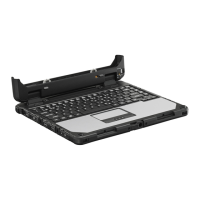
Slide the lever all the way
back to release the computer.
This operates identically to the
power switch on the computer.
This connects to the
expansion bus con-
nector on the bottom
of the computer.
Expansion Bus Connector
Lever
Power Switch
CAUTION
Do not touch the expansion bus connector, pins or springs of the port replicator.
Front/Right Side
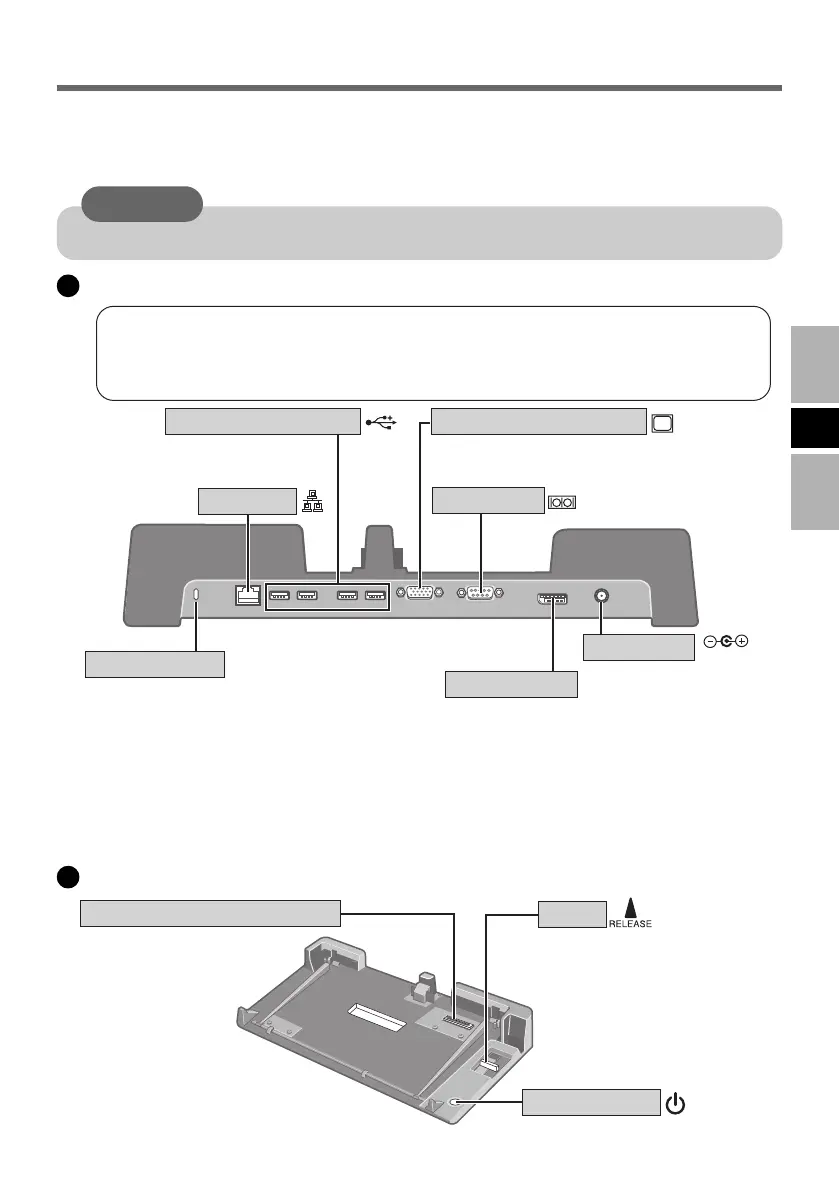
LAN Port
Serial Port
Security Lock
USB Ports (4 ports)
DC-IN Jack
DC IN 15.6V
External Display Port *
1
DisplayPort
LOCK
DisplayPort *
1
*
2
A Kensington cable can be connected.
For more information, read the manual
that comes with the cable.
Connect the external display
compatible with analog interface.
Connect the external display
compatible with DisplayPort.
When using the LAN function with the computer attached to the port replicator,
use the port replicator’s LAN Port.
Do not use the computer’s LAN Port although it is visible when opening the
cover of the rear of the computer and using the Modem Port.
*
1
Display may be impossible using some connected external displays. For display switching when an
external display compatible with analog interface and external display compatible with DisplayPort
are connected at the same time, refer to “Switching the Display” (
Ä
page 10).
*
2
Not applicable to <CF-52A/B/C/D series>.
VEB522EGFOIP05-E.p65 2008/06/04, 13:42Page 7 AdobePageMaker6.5J/Win



 To Next Page