9
E
While connecting the computer to the port replicator:
Do not attempt to move the port replicator.
Do not open the display wider than necessary (180° or more).
It is impossible to remove the battery pack and the hard disk drive.
If the computer malfunctions while the port replicator is attached, disconnect the port
replicator and check to see if the computer operates normally. If the computer oper-
ates normally, the port replicator may be malfunctioning. Contact Panasonic Techni-
cal Support.
CAUTION
Disconnecting
CAUTION
After sliding the lever, do not release it suddenly. The lever may be locked
again.
Do not slide the lever while pressing against the computer from above. Do-
ing so could damage the computer.
1
Power off the computer and close the display.
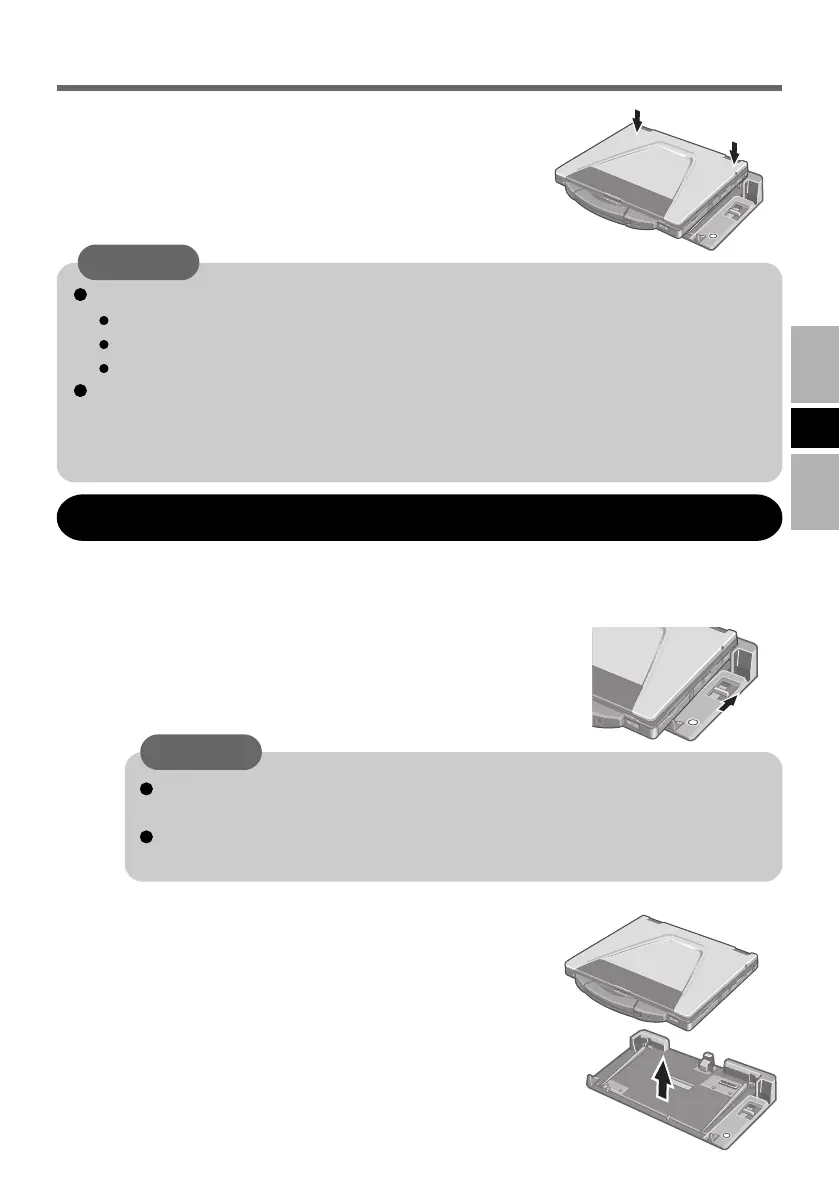
Slide the lever all the way back. The computer's con-
nector disengages the expansion bus connector of the
port replicator.
2
Lift up the computer to remove it from the port
replicator.
3
Press the computer firmly against the port replicator.
This will cause the expansion bus connector on the
bottom of the computer to connect to the expansion
bus connector of the port replicator.
4
VEB522EGFOIP05-E.p65 2008/06/04, 13:42Page 9 AdobePageMaker6.5J/Win



 To Next Page