EasyManua.ls Logo

Panasonic CQ-RD545LEN - Page 10

Panasonic CQ-RD545LEN
69 pages
Print Icon
To Next Page IconTo Next Page
To Previous Page IconTo Previous Page
Loading...
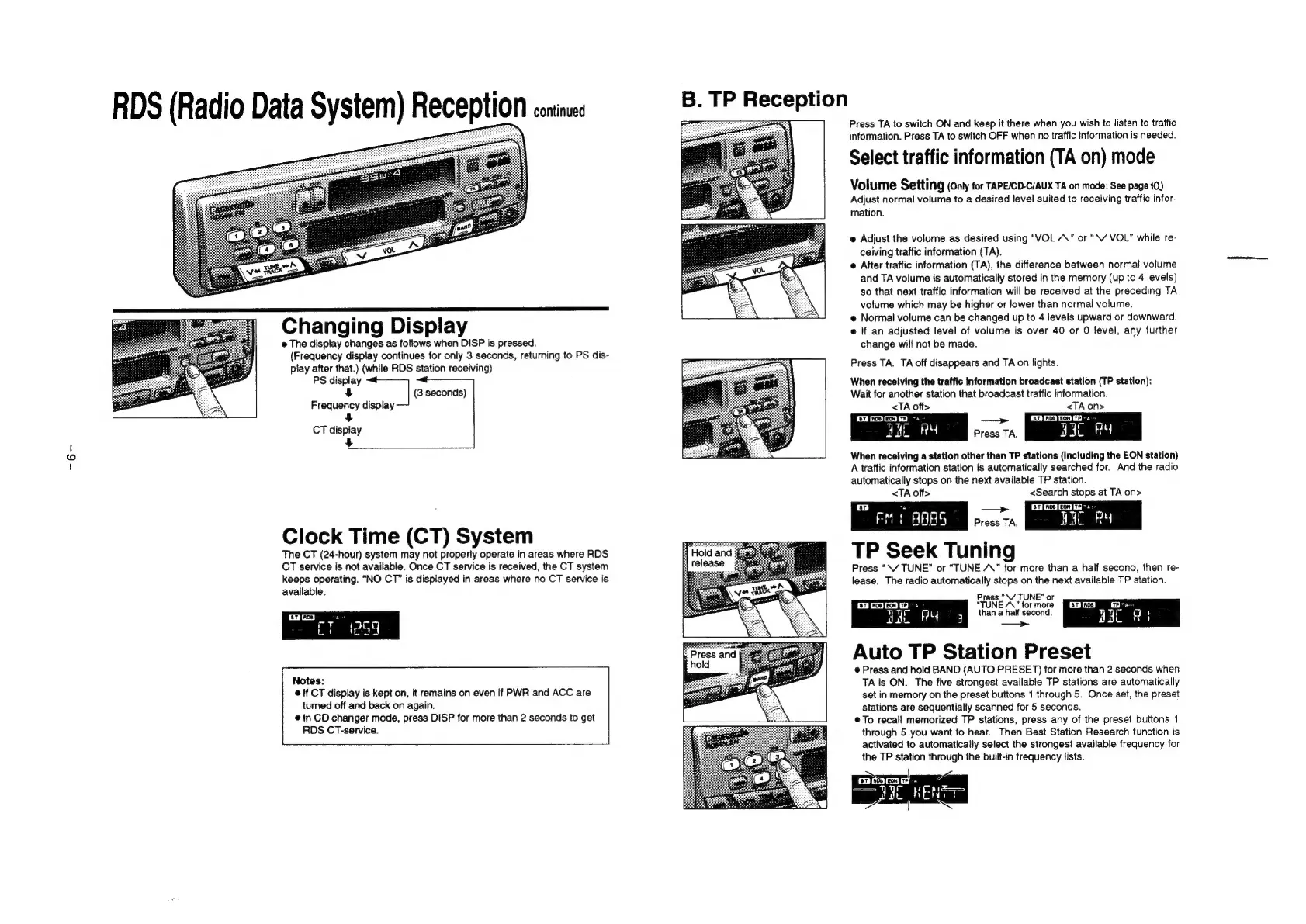
RDS
(Radio
Data
System)
Reception
coninxs
Changing
Display
@
The
display
changes
as
follows
when
DISP
is
pressed.
(Frequency
display
continues
for
only
3
seconds,
returning
to
PS
dis-
play
after
that.)
(while
RDS
station
receiving)
PS
display
4
{3
seconds)
Frequency
display
+
CT
display
5
Clock
Time
(CT)
System
The
CT
(24-hour)
system
may
not
properly
operate
in
areas
where
RDS
CT
service
is
not
available.
Once
CT
service
is
received,
the
CT
system
keeps
operating.
“NO
CT”
is
displayed
in
areas
where
no
CT
service
is
available.
©
If
CT
display
is
kept
on,
it
remains
on
even
if
PWR
and
ACC
are
tumed
off
and
back
on
again.
@
in
CD
changer
mode,
press
DISP
for
more
than
2
seconds
to
get
RDS
CT-service.
B.
TP
Reception
Press
TA
to
switch
ON
and
keep
it
there
when
you
wish
to
listen
to
traffic
information.
Press
TA
to
switch
OFF
when
no
traffic
information
is
needed.
Select
traffic
information
(TA
on)
mode
Volume
Setting
(Onty
for
TAPE/CD-C/AUX
TA
on
mode:
See
page
10)
Adjust
normal
volume
to
a
desired
level
suited
to
receiving
traffic
infor-
mation.
e
Adjust
the
volume
as
desired
using
“VOL
A”
or
“\V
VOL”
while
re-
ceiving
traffic
information
(TA).
©
After
traffic
information
(TA),
the
difference
between
normal
volume
and
TA
volume
is
automatically
stored
in
the
memory
(up
to
4
levels)
so
that
next
traffic
information
will
be
received
at
the
preceding
TA
volume
which
may
be
higher
or
lower
than
normal
volume.
e
Normal
volume
can
be
changed
up
to
4
levels
upward
or
downward.
e
If
an
adjusted
level
of
volume
is
over
40
or
0
level,
any
further
change
will
not
be
made.
;
Press
TA.
TA
off
disappears
and
TA
on
lights.
When
receiving
the
traffic
Information
broadcast
station
(TP
station):
Wait
for
another
station
that
broadcast
traffic
information.
<TA
off>
<TA
on>
mmc
--
pear
er]
nos] eon]
Thay
gat
RY
Press
TA.
Bae
FY
When
receiving
a
station
other
than
TP
stations
(Including
the
EON
station)
A
traffic
information
station
is
automatically
searched
for.
And
the
radio
automatically
stops
on
the
next
available
TP
station.
<TA
off>
<Search
stops
at
TA
on>
Press
TA.
at
RY
TP
Seek
Tuning
Press
“\/
TUNE”
or
“TUNE
AA”
for
more
than
a
half
second,
then
re-
lease,
The
radio
automatically
stops
on
the
next
available
TP
station.
Press
“\/
TUNE”
or
mew
va
Ron
for
hong
oS
mM.
Wat
FeLy
3
than
a
half
second.
Hae
R
i
Auto
TP
Station
Preset
@
Press
and
hold
BAND
(AUTO
PRESET)
for
more
than
2
seconds
when
TA
is
ON.
The
five
strongest
available
TP
stations
are
automatically
set
in
memory
on
the
preset
buttons
1
through
5.
Once
set,
the
preset
stations
are
sequentially
scanned
for
5
seconds.
©
To
recall
memorized
TP
stations,
press
any
of
the
preset
buttons
1
through
5
you
want
to
hear.
Then
Best
Station
Research
function
is
activated
to
automatically
select
the
strongest
available
frequency
for
the
TP
station
through
the
built-in
frequency
lists.

Related product manuals