EasyManua.ls Logo

Panasonic CQ-RD545LEN - Page 9

Panasonic CQ-RD545LEN
69 pages
Print Icon
To Next Page IconTo Next Page
To Previous Page IconTo Previous Page
Loading...
RDS
(Radio
Data
System)
Reception
continue
Hold
and
:
release
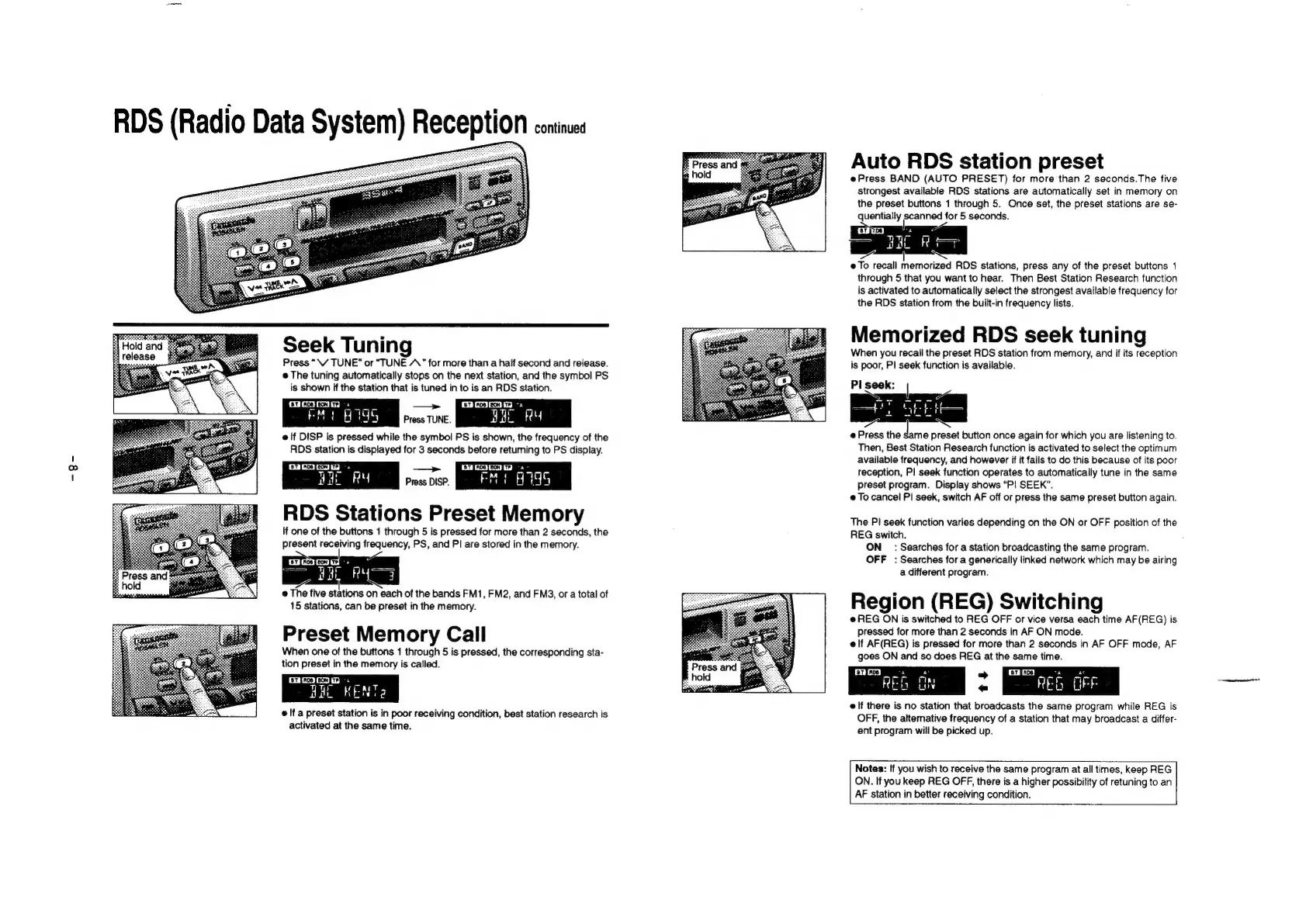
Seek
Tuning
Press
“\V
TUNE”
or
“TUNE
A.”
for
more
than
a
half
second
and
release.
@
The
tuning
automatically
stops
on
the
next
station,
and
the
symbol
PS
is
shown
if
the
station
that
is
tuned
in
to
is
an
RDS
station.
ist
[noe]
eon
|
>
a
—>
tne
[eon
Jr?
Jag
MEER
Pross
TUNE.
Bat
ORY
elf
DISP
is
pressed
while
the
symbol
PS
is
shown,
the
frequency
of
the
RDS
station
is
displayed
for
3
seconds
before
retuming
to
PS
display.
Press
DISP.
RDS
Stations
Preset
Memory
It
one
of
the
buttons
1
through
5
is
pressed
for
more
than
2
seconds,
the
present
receiving
frequency,
PS,
and
PI
are
stored
in
the
memory.
cl)
@
The
five
cians
on
each
of
the
bands
FM1,
FM2,
and
FM3,
or
a
total
of
15
stations,
can
be
preset
in
the
memory.
Preset
Memory
Call
When
one
of
the
buttons
1
through
5
is
pressed,
the
corresponding
sta-
tion
preset
in
the
memory
is
called.
[er
[roe
fron]
rey
HHL
KENT
e
If
a
preset
station
is
in
poor
receiving
condition,
best
station
research
is
activated
at
the
same
time.
Fe
Press
and
ks
hol
Auto
RDS
station
preset
ePress
BAND
(AUTO
PRESET)
for
more
than
2
seconds.The
five
strongest
available
RDS
stations
are
automatically
set
in
memory
on
the
preset
buttons
1
through
5.
Once
set,
the
preset
stations
are
se-
quentially
scanned
for
5
seconds.
ones
ay)
a
nk
@
To
recall
memorized
RDS
stations,
press
any
of
the
preset
buttons
1
through
5
that
you
want
to
hear.
Then
Best
Station
Research
function
is
activated
to
automatically
select
the
strongest
available
frequency
for
the
RDS
station
from
the
built-in
frequency
lists.
Memorized
RDS
seek
tuning
When
you
recail
the
preset
RDS
station
from
memory,
and
if
its
reception
is
poor,
PI
seek
function
is
available.
PI
seek:
7
7
L
R=
@
Press
the
‘ae
preset
button
once
again
for
which
you
are
listening
to.
Then,
Best
Station
Research
function
is
activated
to
select
the
optimum
available
frequency,
and
however
if it
fails
to
do
this
because
of
its
poor
reception,
P|
seek
function
operates
to
automatically
tune
in
the
same
preset
program.
Display
shows
“P!
SEEK”.
e
To
cancel
PI
seek,
switch
AF
off
or
press
the
same
preset
button
again.
The
P!
seek
function
varies
depending
on
the
ON
or
OFF
position
of
the
REG
switch.
ON
_
:
Searches
for
a
station
broadcasting
the
same
program.
OFF
:
Searches
for
a
generically
linked
network
which
may
be
airing
a
different
program.
Region
(REG)
Switching
e
REG
ON
is
switched
to
REG
OFF
or
vice
versa
each
time
AF(REG)
is
pressed
for
more
than
2
seconds
in
AF
ON
mode.
elf
AF(REG)
is
pressed
for
more
than
2
seconds
in
AF
OFF
mode,
AF
goes
ON
and
so
does
REG
at
the
same
time.
137
[R08
|
A
a
>
187
FACS]
a
ac
REG
ON
«
REG
OFF
e
If
there
is
no
station
that
broadcasts
the
same
program
while
REG
is
OFF,
the
altemative
frequency
of
a
station
that
may
broadcast
a
differ-
ent
program
will
be
picked
up.
Notes:
If
you
wish
to
receive
the
same
program
at
all
times,
keep
REG
ON.
If
you
keep
REG
OFF,
there
is
a
higher
possibility
of
retuning
to
an
AF
station
in
better
receiving
condition.

Related product manuals