EasyManua.ls Logo

Panasonic CQ-RD545LEN - Page 8

Panasonic CQ-RD545LEN
69 pages
Print Icon
To Next Page IconTo Next Page
To Previous Page IconTo Previous Page
Loading...
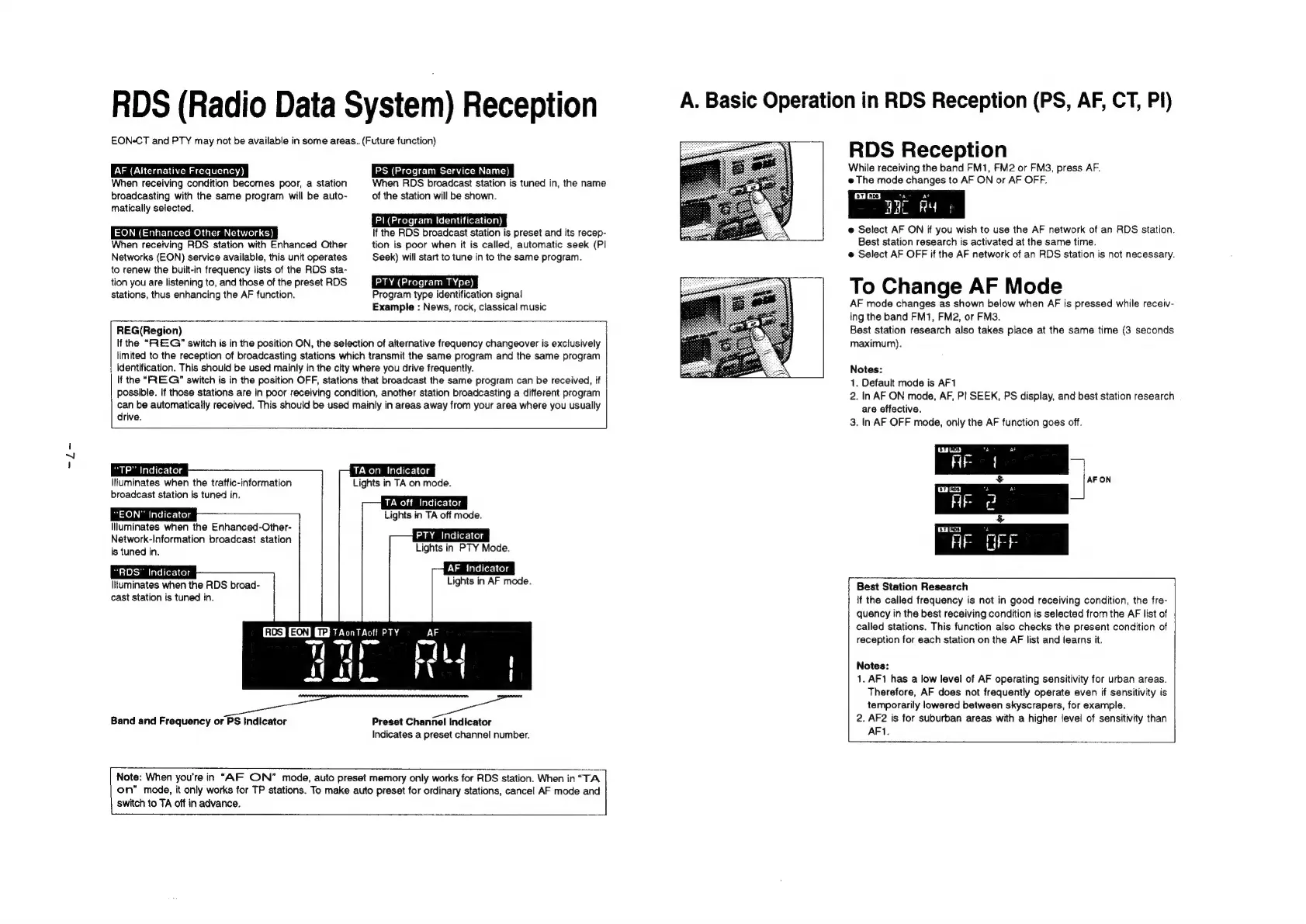
RDS
(Radio
Data
System)
Reception
EON-CT
and
PTY
may
not
be
available
in
some
areas.
(Future
function)
AF
(Alternative
Frequency)
When
receiving
condition
becomes
poor,
a
station
broadcasting
with
the
same
program
will
be
auto-
matically
selected.
EON
(Enhanced
Other
Networks)
When
receiving
RDS
station
with
Enhanced
Other
Networks
(EON)
service
available,
this unit
operates
to
renew
the
built-in
frequency
lists
of
the
RDS
sta-
tion
you
are
listening
to,
and
those
of
the
preset
RDS
stations,
thus
enhancing
the
AF
function.
PS
(Program
Service
Name)
When
RDS
broadcast
station
is
tuned
in,
the
name
of
the
station
will
be
snown.
P|
(Program
Identification)
If
the
RDS
broadcast
station
is
preset
and
its
recep-
tion
is
poor
when
it
is
called,
automatic
seek
(PI
Seek)
will
start
to
tune
in
to
the
same
program.
PTY
(Program
TYpe)
Program
type
identification
signal
Example
:
News,
rock,
classical
music
REG(Region)
Ifthe
“REG”
switch
is
in
the
position
ON,
the
selection
of
alternative
frequency
changeover
is
exclusively
limited
to
the
reception
of
broadcasting
stations
which
transmit
the
same
program
and
the
same
program
identification.
This
should
be
used
mainly
in
the
city
where
you
drive
frequently.
If
the
“RREG”
switch
is
in
the
position
OFF,
stations
that
broadcast
the
same
program
can
be
received,
if
possible.
If
those
stations
are
in
poor
receiving
condition,
another
station
broadcasting
a
different
program
can
be
automatically
received.
This
should
be
used
mainly
in
areas
away
from
your
area
where
you
usually
drive.
“TP”
Indicator
IIluminates
when
the
traffic-information
broadcast
station
is
tuned
in.
“EON”
Indicator
Iluminates
when
the
Enhanced-Other-
Network-Information
broadcast
station
is
tuned
in.
“RDS"
Indicator
Ituminates
when
the
RDS
broad-
cast
station
is
tuned
in.
Band
and
Frequency
or
PS
Indicator
TA
on
Indicator
Lights
in
TA
on
mode.
TA
oft
Indicator
Lights
in
TA
off
mode.
PTY
Indicator
Lights
in
PTY
Mode.
AF
Indicator
Lights
in
AF
mode.
Preset
Channel
Indicator
Indicates
a
preset
channel
number.
Note:
When
you're
in
“AF
ON”
mode,
auto
preset
memory
only
works
for
RDS
station.
When
in
“TA
on”
mode,
it
only
works
for
TP
stations.
To
make
auto
preset
for
ordinary
stations,
cancel
AF
mode
and
switch
to
TA
off
in
advance.
A.
Basic
Operation
in
RDS
Reception
(PS,
AF,
CT,
Pi)
RDS
Reception
While
receiving
the
band
FM1,
FM2
or
FM3,
press
AF.
e
The
mode
changes
to
AF
ON
or
AF
OFF.
7"
EE
WAC
RM:
e
Select
AF
ON
if
you
wish
to
use
the
AF
network
of
an
RDS
station.
Best
station
research
is
activated
at
the
same
time.
e
Select
AF
OFF
if
the
AF
network
of
an
RDS
station
is
not
necessary.
To
Change
AF
Mode
AF
mode
changes
as
shown
below
when
AF
is
pressed
while
receiv-
ing
the
band
FM1,
FM2,
or
FM3.
Best
station
research
also
takes
place
at
the
same
time
(3
seconds
maximum).
Notes:
1.
Default
mode
is
AF1
2.
In
AF
ON
mode,
AF,
P!
SEEK,
PS
display,
and
best
station
research
are
effective.
3.
In
AF
OFF
mode,
only
the
AF
function
goes
off.
Best
Station
Research
{f
the
called
frequency
is
not
in
good
receiving
condition,
the
fre-
quency
in
the
best
receiving
condition
is
selected
from
the
AF
list
of
called
stations.
This
function
also
checks
the
present
condition
of
reception
for
each
station
on
the
AF
list
and
learns
it.
Notes:
1.
AF1
has
a
low
level
of
AF
operating
sensitivity
for
urban
areas.
Therefore,
AF
does
not
frequently
operate
even
if
sensitivity
is
temporarily
lowered
between
skyscrapers,
for
example.
2.
AF2
is
for
suburban
areas
with
a
higher
{evel
of
sensitivity
than
AF1.

Related product manuals