EasyManua.ls Logo

Panasonic CQ-RD545LEN - Page 14

Panasonic CQ-RD545LEN
69 pages
Print Icon
To Next Page IconTo Next Page
To Previous Page IconTo Previous Page
Loading...
Cassette
Tape
Player
Basics
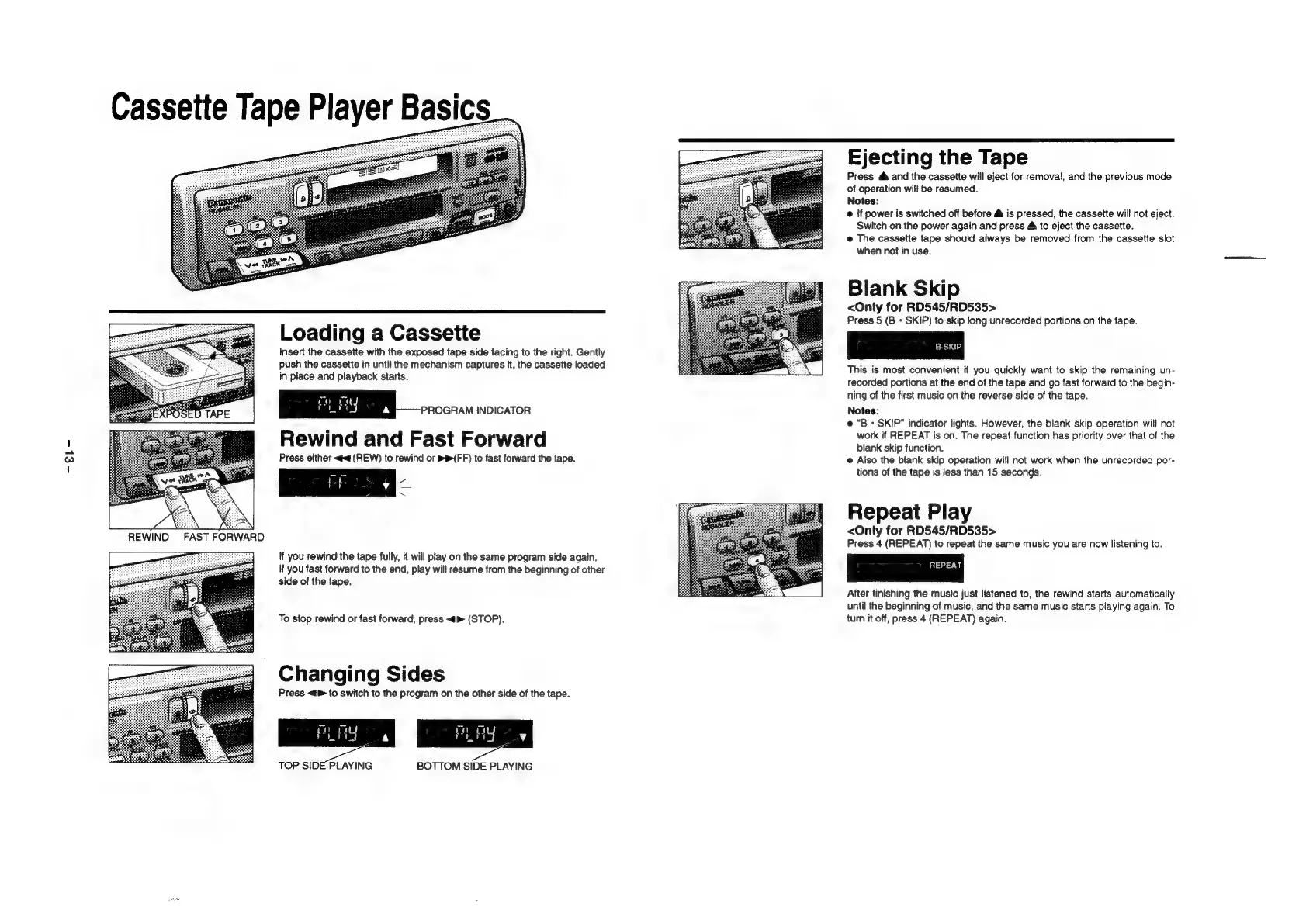
Loading
a
Cassette
Insert
the
cassette
with
the
exposed
tape
side
facing
to
the
right.
Gently
push
the
cassette
in
until
the
mechanism
captures
it,
the
cassette
loaded
in
place
and
playback
starts.
I
2
osennorcaron
Rewind
and
Fast
Forward
Press
either
«d
(REW)
to
rewind
or
bt(FF)
to
fast
forward
the
tape.
oe
a
as
tf
you
rewind
the
tape
fully,
it
will
play
on
the
same
program
side
again.
If
you
fast
forward
to
the
end,
play
will
resume
from
the
beginning
of
other
side
of
the
tape.
To
stop
rewind
or
fast
forward,
press
<m
(STOP).
Changing
Sides
Press
<d
to
switch
to
the
program
on
the
other
side
of
the
tape.
TOP
SIDE
PLAYING
BOTTOM
SIDE
PLAYING
Ejecting
the
Tape
Press
@
and
the
cassette
will
eject
for
removal,
and
the
previous
mode
of
operation
will
be
resumed.
Notes:
@
‘f
power
is
switched
off
before
@
is
pressed,
the
cassette
will
not
eject.
Switch
on
the
power
again
and
press
&
to
eject
the
cassette.
@
The
cassette
tape
should
always
be
removed
from
the
cassette
slot
when
not
in
use.
Blank
Skip
<Only
for
RD545/RD535>
Press
5
(B
+
SKIP)
to
skip
long
unrecorded
portions
on
the
tape.
This
is
most
convenient
if
you
quickly
want
to
skip
the
remaining
un-
recorded
portions
at
the
end
of
the
tape
and
go
fast
forward
to
the
begin-
ning
of
the
first
music
on
the
reverse
side
of
the
tape.
Notes:
e
“B
-
SKIP”
indicator
lights.
However,
the
blank
skip
operation
will
not
work
if
REPEAT
is
on.
The
repeat
function
has
priority
over
that
of
the
blank
skip
function.
@
Also
the
blank
skip
operation
will
not
work
when
the
unrecorded
por-
tions
of
the
tape
is
less
than
15
seconds.
Repeat
Play
<Only
for
RD545/RD535>
Press
4
(REPEAT)
to
repeat
the
same
music
you
are
now
listening
to.
After
finishing
the
music
just
listened
to,
the
rewind
starts
automatically
until
the
beginning
of
music,
and
the
same
music
starts
playing
again.
To
turn
it
off,
press
4
(REPEAT)
again.

Related product manuals