EasyManua.ls Logo

Panasonic CQ-RD545LEN - Page 15

Panasonic CQ-RD545LEN
69 pages
Print Icon
To Next Page IconTo Next Page
To Previous Page IconTo Previous Page
Loading...
Cassette
Tape
Player
Basics
coninec
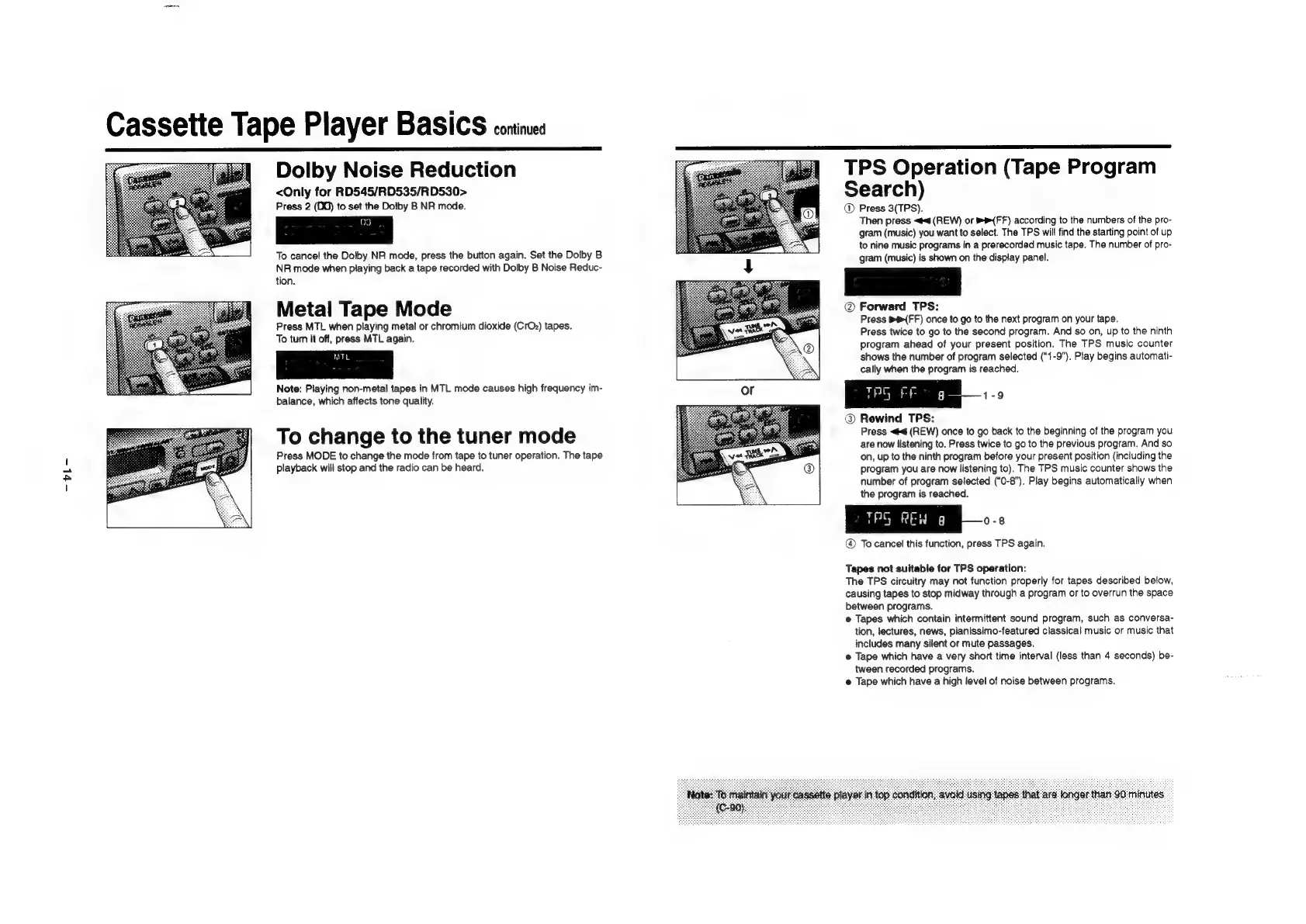
Dolby
Noise
Reduction
<Only
for
RD545/RD535/RD530>
Press
2
(D0)
to
set
the
Dolby
B
NR
mode.
a3
To
cancel
the
Dolby
NR
mode,
press
the
button
again.
Set
the
Dolby
B
NR
mode
when
playing
back
a
tape
recorded
with
Dolby
B
Noise
Reduc-
tion.
Metal
Tape
Mode
Press
MTL
when
playing
metal
or
chromium
dioxide
(CrOz)
tapes.
To
tum
it
off,
press
MTL
again.
Note:
Playing
non-metal
tapes
in
MTL
mode
causes
high
frequency
im-
balance,
which
affects
tone
quality.
To
change
to
the
tuner
mode
Press
MODE
to
change
the
mode
from
tape
to
tuner
operation.
The
tape
playback
will
stop
and
the
radio
can
be
heard.
TPS
Operation
(Tape
Program
Search)
@
Press
3(TPS).
Then
press
<4
(REW)
or
{FF)
according
to
the
numbers
of
the
pro-
gram
(music)
you
want
to
select.
The
TPS
will
find
the
starting
point
of
up
to
nine
music
programs
in
a
prerecorded
music
tape.
The
number
of
pro-
gram
(music)
is
shown
on
the
display
panel.
@
Forward
TPS:
Press
BFF)
once
to
go
to
the
next
program
on
your
tape.
Press
twice
to
go
to
the
second
program.
And
so
on,
up
to
the
ninth
program
ahead
of
your
present
position.
The
TPS
music
counter
shows
the
number
of
program
selected
(“1-9”).
Play
begins
automati-
cally
when
the
program
is
reached.
Rewind
TPS:
Press
<<
(REW)
once
to
go
back
to
the
beginning
of
the
program
you
are
now
listening
to.
Press
twice
to
go
to
the
previous
program.
And
so
on,
up
to
the
ninth
program
before
your
present
position
(including
the
program
you
are
now
listening
to).
The
TPS
music
counter
shows
the
number
of
program
selected
(“0-8”).
Play
begins
automatically
when
the
program
is
reached.
@
To
cancel
this
function,
press
TPS
again.
Tapes
not
suitable
for
TPS
operation:
The
TPS
circuitry
may
not
function
properly
for
tapes
described
below,
causing
tapes
to
stop
midway
through
a
program
or
to
overrun
the
space
between
programs.
e
Tapes
which
contain
intermittent
sound
program,
such
as
conversa-
tion,
lectures,
news,
pianissimo-featured
classical
music
or
music
that
includes
many
silent
or
mute
passages.
@
Tape
which
have
a
very
short
time
interval
(less
than
4
seconds)
be-
tween
recorded
programs.
e
Tape
which
have
a
high
level
of
noise
between
programs.

Related product manuals