EasyManua.ls Logo

Panasonic CQ-RD545LEN - Page 16

Panasonic CQ-RD545LEN
69 pages
Print Icon
To Next Page IconTo Next Page
To Previous Page IconTo Previous Page
Loading...
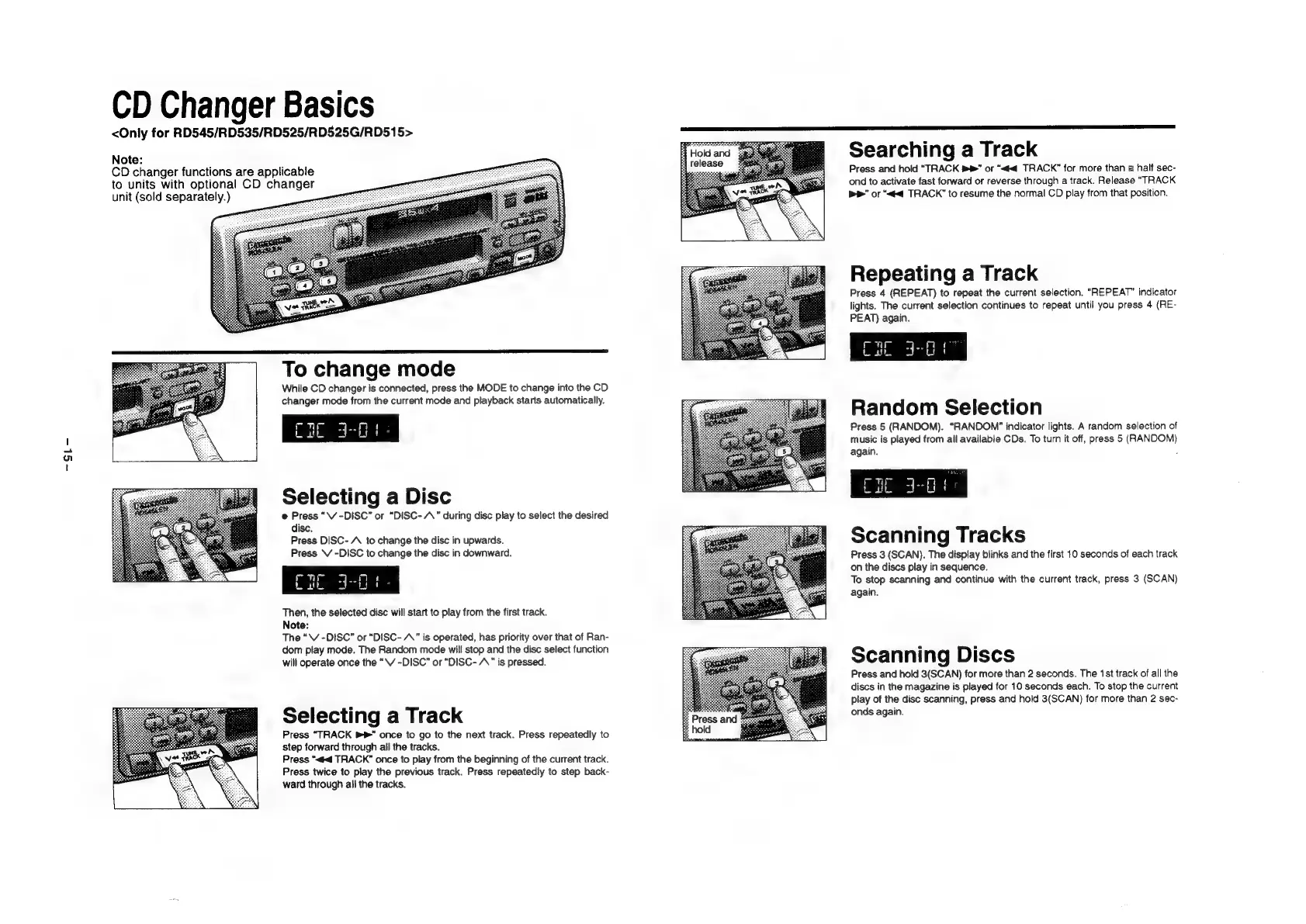
CD
Changer
Basics
<Only
for
RD545/RD535/RD525/RD525G/RD515>
Note:
CD
changer
functions
are
applicable
to
units
with
optional
CD
changer
unit
(sold
separately.)
To
change
mode
While
CD
changer
is
connected,
press
the
MODE
to
change
into
the
CD
changer
mode
from
the
current
mode
and
playback
starts
automatically.
cre
Lath
Selecting
a
Disc
@
Press
“\V
-DISC”
or
“DISC-
A”
during
disc
play
to
select
the
desired
disc.
Press
DISC-
A
to
change
the
disc
in
upwards.
Press
V
-DISC
to
change
the
disc
in
downward.
fl
ai
wy!
Then,
the
selected
disc
will
start
to
play
from
the
first
track.
Note:
The
“V
-DISC”
or
“DISC-
AA”
is
operated,
has
priority
over
that
of
Ran-
dom
play
mode.
The
Random
mode
will
stop
and
the
disc
select
function
will
operate
once
the
“VV
-DISC”
or
“DISC-
A.”
is
pressed.
Selecting
a
Track
Press
“TRACK
®"
once
to
go
to
the
next
track.
Press
repeatedly
to
step
forward
through
all
the
tracks.
Press
“<<
TRACK”
once
to
play
from
the
beginning
of
the
current
track.
Press
twice
to
play
the
previous
track.
Press
repeatedly
to
step
back-
ward
through
all
the
tracks.
Searching
a
Track
Press
and
hold
“TRACK
b®”
or
“<<
TRACK”
for
more
than
a
half
sec-
ond
to
activate
fast
forward
or
reverse
through
a
track.
Release
“TRACK
bP"
or
“<td
TRACK”
to
resume
the
normal
CD
play
from
that
position.
Repeating
a
Track
Press
4
(REPEAT)
to
repeat
the
current
selection.
“REPEAT”
indicator
lights.
The
current
selection
continues
to
repeat
until
you
press
4
(RE-
PEAT)
again.
J
"
us
Random
Selection
Press
5
(RANDOM).
“RANDOM”
indicator
lights.
A
random
selection
of
music
is
played
from
all
available
CDs.
To
turn
it
off,
press
5
(RANDOM)
again.
.
Cit
deus
Scanning
Tracks
Press
3
(SCAN).
The
display
blinks
and
the
first
10
seconds
of
each
track
on
the
discs
play
in
sequence.
To
stop
scanning
and
continue
with
the
current
track,
press
3
(SCAN)
again.
Scanning
Discs
Press
and
hold
3(SCAN)
for
more
than
2
seconds.
The
1st
track
of
all
the
discs
in
the
magazine
is
played
for
10
seconds
each.
To
stop
the
current
play
of
the
disc
scanning,
press
and
hold
3(SCAN)
for
more
than
2
sec-
onds
again.

Related product manuals