EasyManua.ls Logo

Panasonic CQ-RD545LEN - Page 17

Panasonic CQ-RD545LEN
69 pages
Print Icon
To Next Page IconTo Next Page
To Previous Page IconTo Previous Page
Loading...
CD
Changer
Basics
continued
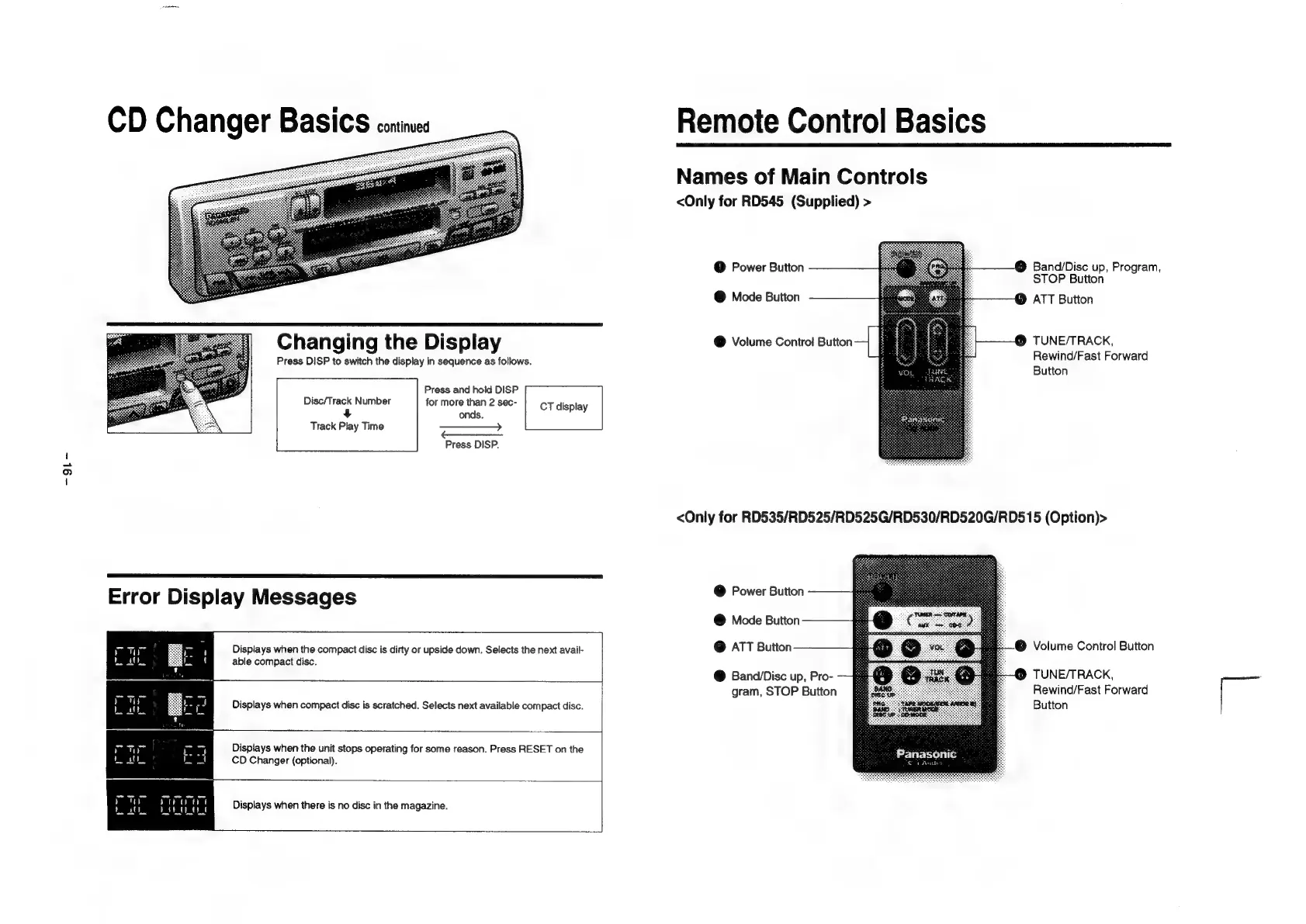
Changing
the
Display
Press
DISP
to
switch
the
display
in
sequence
as
follows.
Press
and
hold
DISP
Disc/Track
Number
for
more
than
2
sec-
CT
display
+
onds.
Track
Play
Time
———->>
Press
DISP.
Error
Display
Messages
Displays
when
the
compact
disc
is
dirty
or
upside
down.
Selects
the
next
avail-
able
compact
disc.
Displays
when
compact
disc
is
scratched.
Selects
next
available
compact
disc.
Displays
when
the
unit
stops
operating
for
some
reason.
Press
RESET
on
the
CD
Changer
(optional).
Displays
when
there
is
no
disc
in
the
magazine.
Remote
Control
Basics
Names
of
Main
Controls
<Only
for
RD545
(Supplied)
>
@
Power
Button
Band/Disc
up,
Program,
STOP
Button
@
Mode
Button
ATT
Button
@
Volume
Control
Button
TUNE/TRACK,
Rewind/Fast
Forward
Lant
Button
TRACK
<Only
for
RD535/RD525/RD525G/RD530/RD520G/RD515
(Option)>
@
Power
Button
@
Mode
Button
@
ATT
Button
@
Volume
Control
Button
@
Band/Disc
up,
Pro-
9
TUNE/TRACK,
gram,
STOP
Button
Rewind/Fast
Forward
Button
-

Related product manuals