EasyManua.ls Logo

Panasonic CQ-RD545LEN - Page 18

Panasonic CQ-RD545LEN
69 pages
Print Icon
To Next Page IconTo Next Page
To Previous Page IconTo Previous Page
Loading...
Remote
Control
Basics
continued
Operating
Procedures
Aim
the
remote
controller
toward
the
sensor
of
the
main
unit.
If
the
car
is
not
already
running,
turn
the
key
in
the
ignition
until
the
accessory
indicator
lights.
Set
a
new
battery.
(Refer
to
page
18.)
|
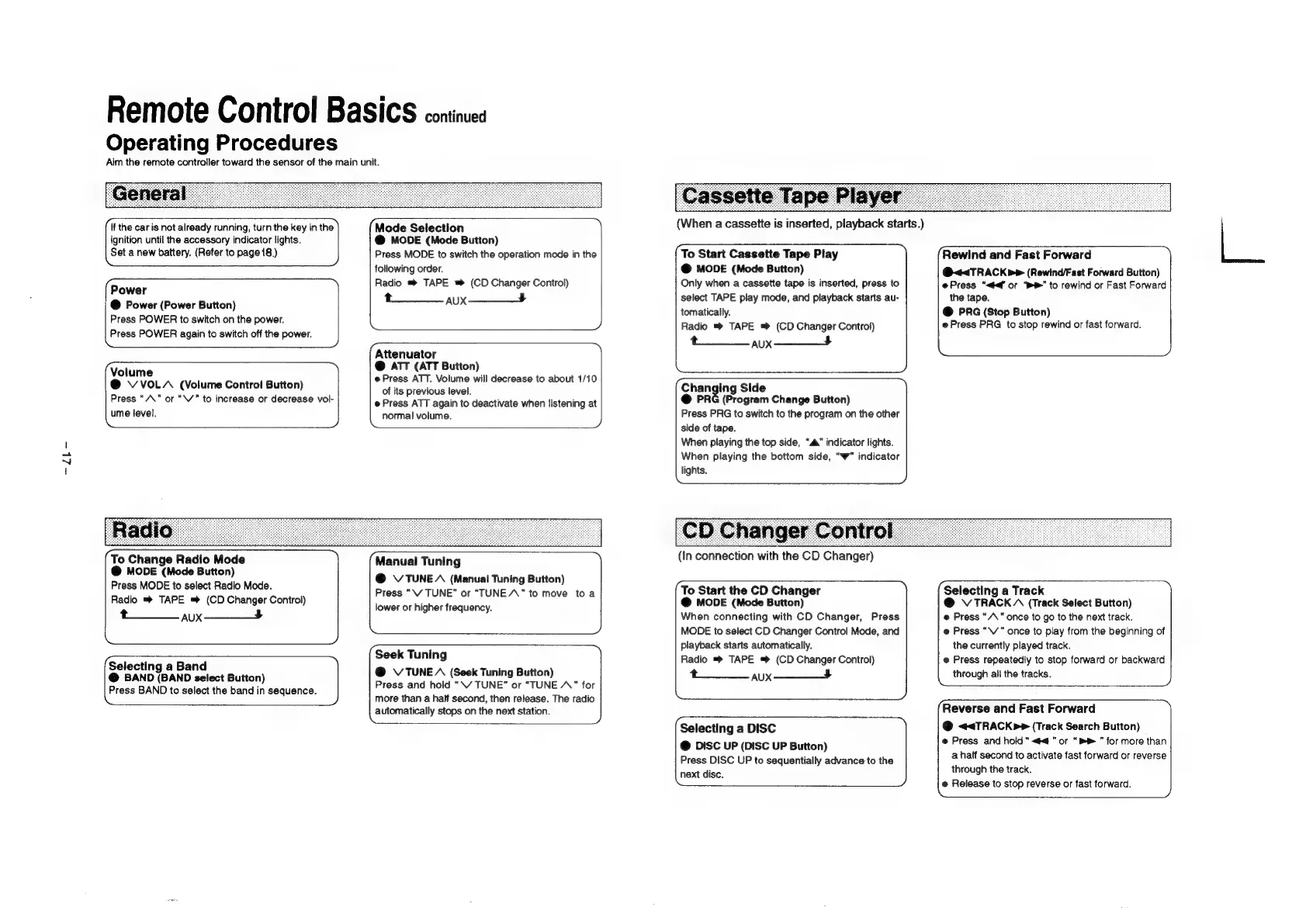
Mode
Selection
@
MODE
(Mode
Button)
Press
MODE
to
switch
the
operation
mode
in
the
following
order.
Power
Radio
®
TAPE
(CD
Changer
Control)
@
Power
(Power
Button)
taux
—___4
Press
POWER
to
switch
on
the
power.
e
Press
POWER
again
to
switch
off
the
power.
XY
|
Attenuator
(Volume
@
ATT
(ATT
Button)
@
Press
ATT.
Volume
will
decrease
to
about
1/10
of
its
previous
level.
@
Press
ATT
again
to
deactivate
when
listening
at
normal
volume.
@
VVOLA
(Volume
Control
Button)
Press
“/\"
or
“\V”
to
increase
or
decrease
vol-
ume
level.
To
Change
Radio
Mode
@
MODE
(Mode
Button)
Press
MODE
to
select
Radio
Mode.
Radio
®»
TAPE
=
(CD
Changer
Control)
t—_____
aux
—__4
Manual
Tuning
@
\VTUNEA
(Manual
Tuning
Button)
Press
“\V
TUNE”
or
“TUNE
A”
to
move
toa
lower
or
higher
frequency.
Ne
Seek
Tuning
@
V
TUNE
A
(Seek
Tuning
Button)
Press
and
hold
“\W
TUNE”
or
“TUNE
A”
for
more
than
a
half
second,
then
release.
The
radio
automatically
stops
on
the
next
station.
(Selecting
a
Band
@
BAND
(BAND
select
Button)
Press
BAND
to
select
the
band
in
sequence.
XQ
(When
a
cassette
is
inserted,
playback
starts.)
To
Start
Cassette
Tape
Play
@
MODE
(Mode
Button)
Only
when
a
cassette
tape
is
inserted,
press
to
select
TAPE
play
mode,
and
playback
starts
au-
tomatically.
Radio
TAPE
™®
(CD
Changer
Control)
taux
——__4
Se.
~
hanging
Side
@
PRG
(Program
Change
Button)
Press
PRG
to
switch
to
the
program
on
the
other
side
of
tape.
When
playing
the
top
side,
“a”
indicator
lights.
When
playing
the
bottom
side,
“w”
indicator
lights.
(In
connection
with
the
CD
Changer)
To
Start
the
CD
Changer
@
MODE
(Mode
Button)
When
connecting
with
CD
Changer,
Press
MODE
to
select
CD
Changer
Control
Mode,
and
playback
starts
automatically.
Radio
TAPE
(CD
Changer
Control)
t______
aux
——__5
Selecting
a
DISC
@
DISC
UP
(DISC
UP
Button)
Press
DISC
UP
to
sequentially
advance
to
the
next
disc.
Rewind
and
Fast
Forward
@<<TRACK
>
(Rewind/Fast
Forward
Button)
e@Press
“<f’
or
“bP”
to
rewind
or
Fast
Forward
the
tape.
@
PRG
(Stop
Button)
@
Press
PRG
to
stop
rewind
or
fast
forward.
Selecting
a
Track
@
VTRACKA
(Track
Select
Button)
e
Press
“/\"
once
to
go
to
the
next
track.
e
Press
“\/”
once
to
play
from
the
beginning
of
the
currently
played
track.
@
Press
repeatedly
to
stop
forward
or
backward
through
all
the
tracks.
ee
)
{Reverse
and
Fast
Forward
@
<<TRACKP>
(Track
Search
Button)
e@
Press
and
hold
“<¢”
or
“b
for
more
than
a
half
second
to
activate
fast
forward
or
reverse
through
the
track.
bg
Release
to
stop
reverse
or
fast
forward.

Related product manuals