EasyManua.ls Logo

Panasonic CQ-RD545LEN - Page 19

Panasonic CQ-RD545LEN
69 pages
Print Icon
To Next Page IconTo Next Page
To Previous Page IconTo Previous Page
Loading...
Remote
Control
Basics
continues
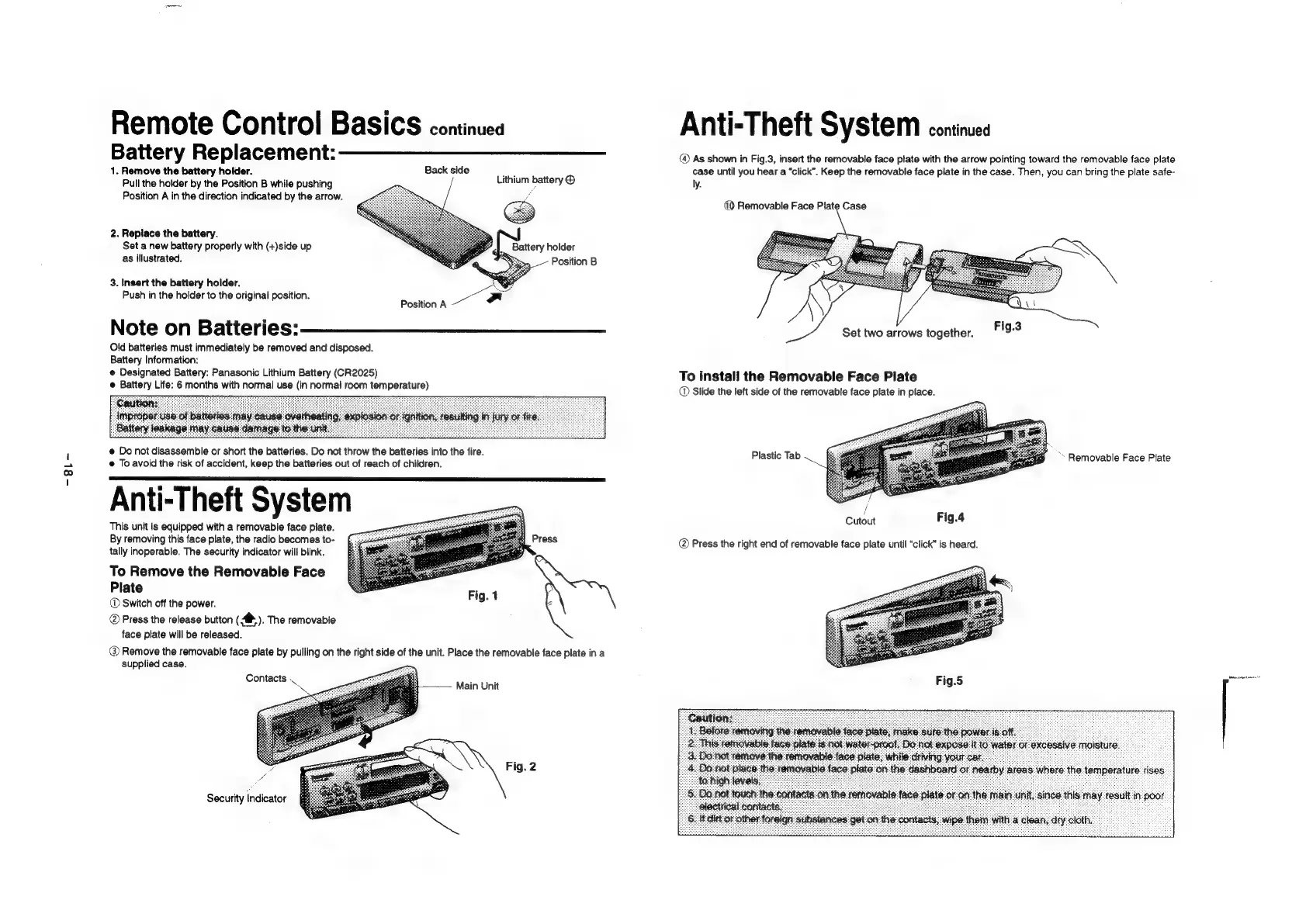
Battery
Replacement:
1.
Remove
the
battery
holder.
Back
side
Pull
the
holder
by
the
Position
B
while
pushing
Position
A
in
the
direction
indicated
by
the
arrow.
Lithium
battery
©
2.
Replace
the
battery.
Set
a
new
battery
properly
with
(+)side
up
S
ttery
holder
as
illustrated.
x
3.
Insert
the
battery
holder.
Push
in
the
holder
to
the
original
position.
Position
A
~~
Note
on
Batteries:
Old
batteries
must
immediately
be
removed
and
disposed.
Battery
Information:
@
Designated
Battery:
Panasonic
Lithium
Battery
(CR2025)
e
Battery
Life:
6
months
with
normal
use
(in
normal
room
temperature)
@
Do
not
disassemble
or
short
the
batteries.
Do
not
throw
the
batteries
into
the
fire.
@
To
avoid
the
risk
of
accident,
keep
the
batteries
out
of
reach
of
children.
Anti-Theft
System
This
unit
is
equipped
with
a
removable
face
plate.
By
removing
this
face
plate,
the
radio
becomes
to-
tally
inoperable.
The
security
indicator
will
blink.
To
Remove
the
Removable
Face
Plate
®D
Switch
off
the
power.
@
Press
the
release
button
(
>).
The
removable
face
plate
will
be
released.
@
Remove
the
removable
face
plate
by
pulling
on
the
right
side
of
the
unit.
Place
the
removable
face
plate
ina
supplied
case.
4
Press
Fig.
1
Contacts
.
ne
Main
Unit
Fig.
2
Security
indicator
Anti-Theft
System
continued
@
As
shown
in
Fig.3,
insert
the
removable
face
plate
with
the
arrow
pointing
toward
the
removable
face
plate
case
until
you
hear
a
“click”.
Keep
the
removable
face
plate
in
the
case.
Then,
you
can
bring
the
plate
safe-
ly.
(
Removable
Face
Plate
Case
To
install
the
Removable
Face
Plate
Slide
the
left
side
of
the
removable
face
plate
in
place.
Plastic
Tab
*
Removable
Face
Plate
j
Cutout
Fig.4
@
Press
the
right
end
of
removable
face
plate
until
“click”
is
heard.
Fig.5

Related product manuals