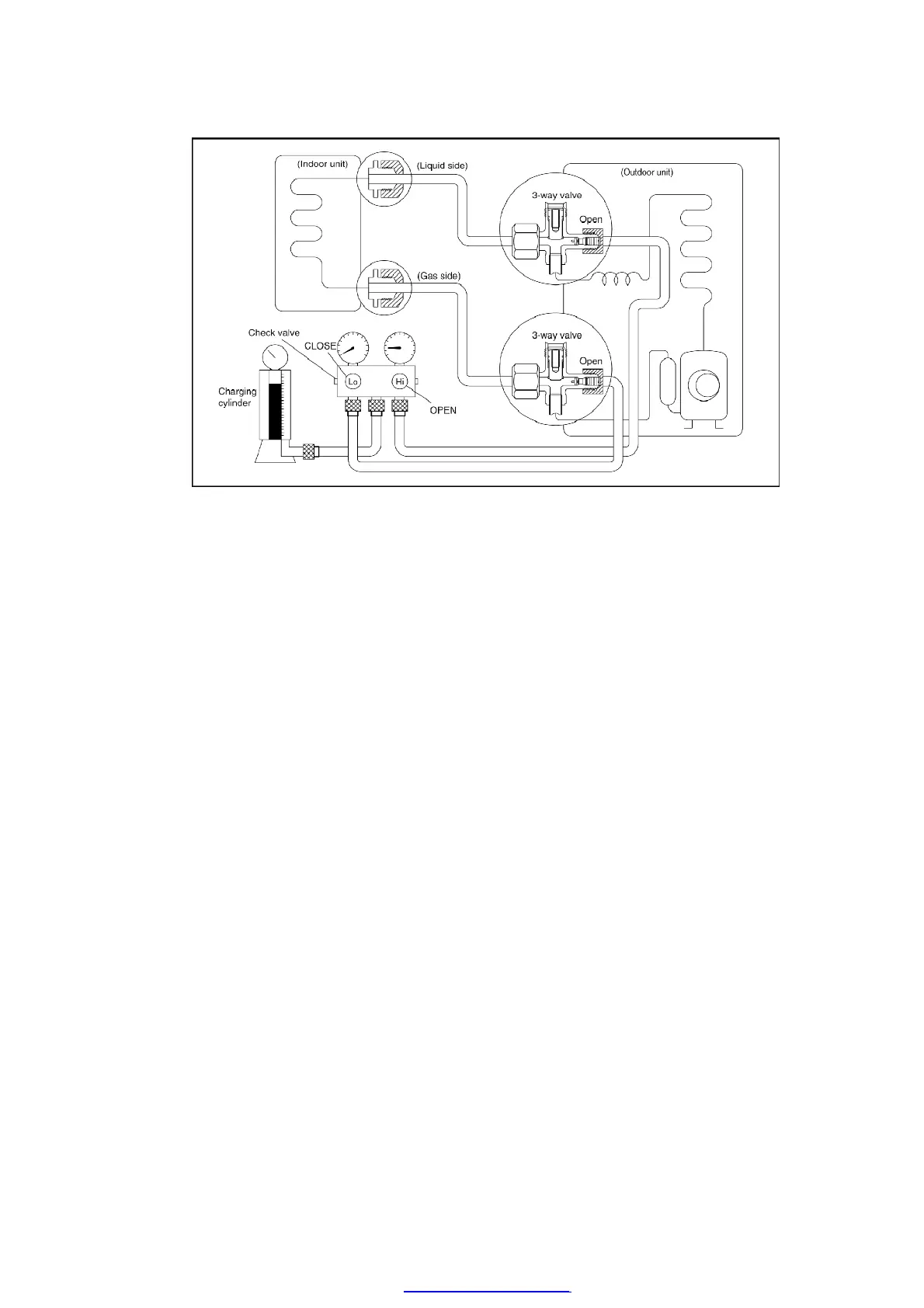
Procedure:
1. Connect the charge hose to the charging cylinder.
- Connect the charge hose which was disconnected from the
vacuum pump to the valve at the bottom of the cylinder.
2. Purge the air from the charge hose.
- Open the valve at the bottom of the cylinder and use a
screwdriver to press the check valve on the charge set to
purge the air (be careful of the liquid refrigerant).
3. Open the High side on the charge set and charge the refrigerant
to the unit.
- Be sure to open only the High side valve on the charge set to
charge the system from the liquid-side (high-presure) pipe. (If
the system cannot be charged with the specified amount of
refrigerant, operate the compressor until the specified amount
can be charged, and then close the valve at the bottom of the
charge cylinder.)
4. Immediately disconnect the charge hose from both the 3-way
valve service ports.
5. Mount the valve stem nuts and the service port caps onto the 3-
way valves.
55
PDF created with pdfFactory Pro trial version www.pdffactory.com



 To Next Page