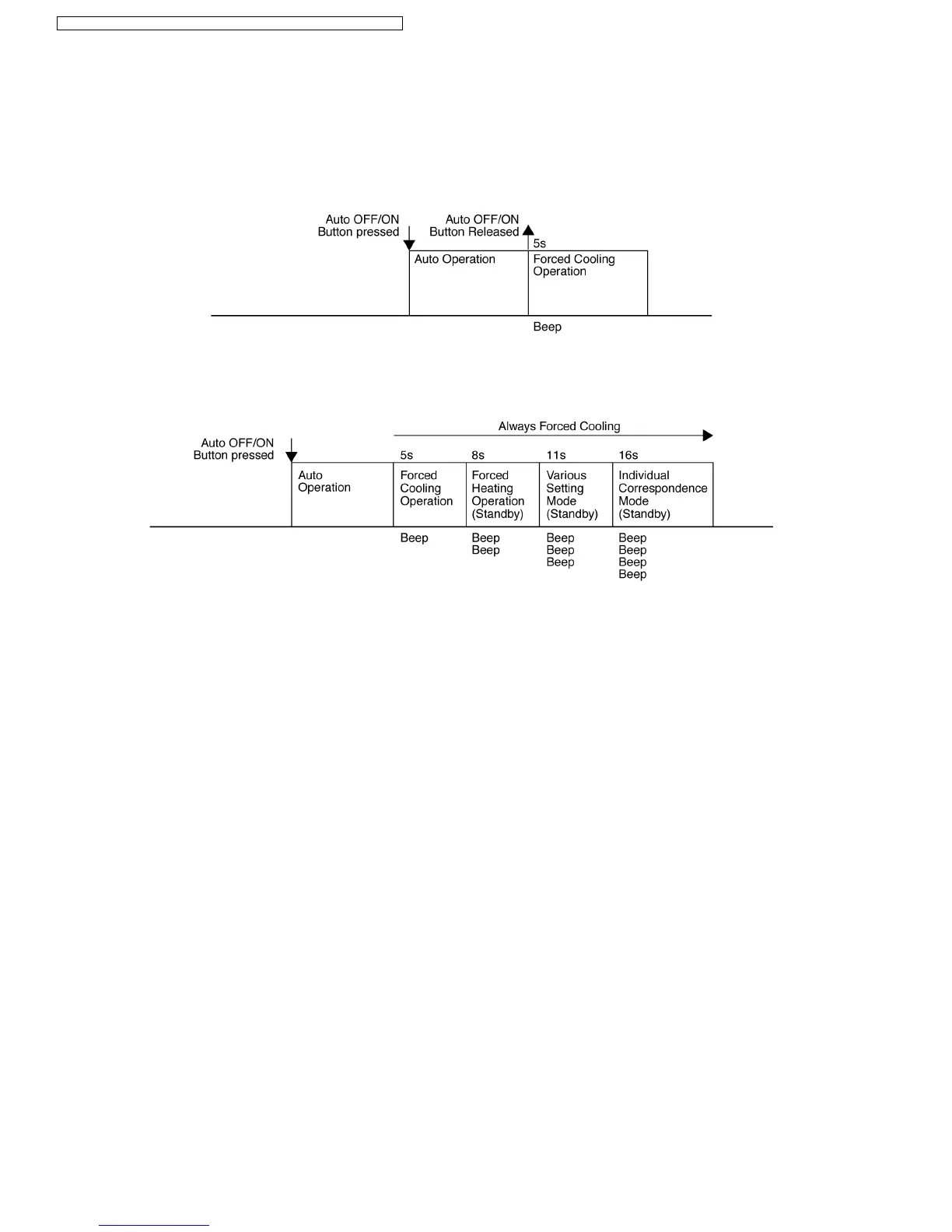
12.4. Auto OFF/ON Button
•
The “Auto OFF/ON” button is used to operate the air conditioner if remote control is misplaced or malfunctioning.
•
Auto operation is started once “Auto OFF/ON” button is pressed.
•
Forced cooling operation is possible by pressing the “Auto OFF/ON” button for more than 5 seconds where “beep” sound is
heard, then release the button.
•
By continuously pressing the “Auto OFF/ON” button, it will enable standby states for Forced Heating Operation, Various Setting
Mode and Individual Correspondence Mode. At standby state, the unit still operates with Forced Cooling Operation.
•
Press “Timer Decrement” button of remote control for 5 seconds to activate the standby mode, where “beep” sound is heard.
•
In Various Setting Mode, the unit captures remote control transmission code when “Check” button is pressed.
•
In Individual Correspondence Mode, press “Check” button at remote control to enter remote control signal receiving sound
selection mode.
Press “Auto OFF/ON” button to trigger the remote control signal receiving sound.
−
Short “Beep”: Turn OFF remote control signal receiving sound
−
Long “Beep”: Turn ON remote control signal receiving sound
•
After signal is received, the unit returns to normal operation.
68
CS-E15DTEW CU-E15DBE / CS-E18DTEW CU-E18DBE / CS-E21DTES CU-E21DBE



 To Next Page