4
REMOTE CONTROL
5
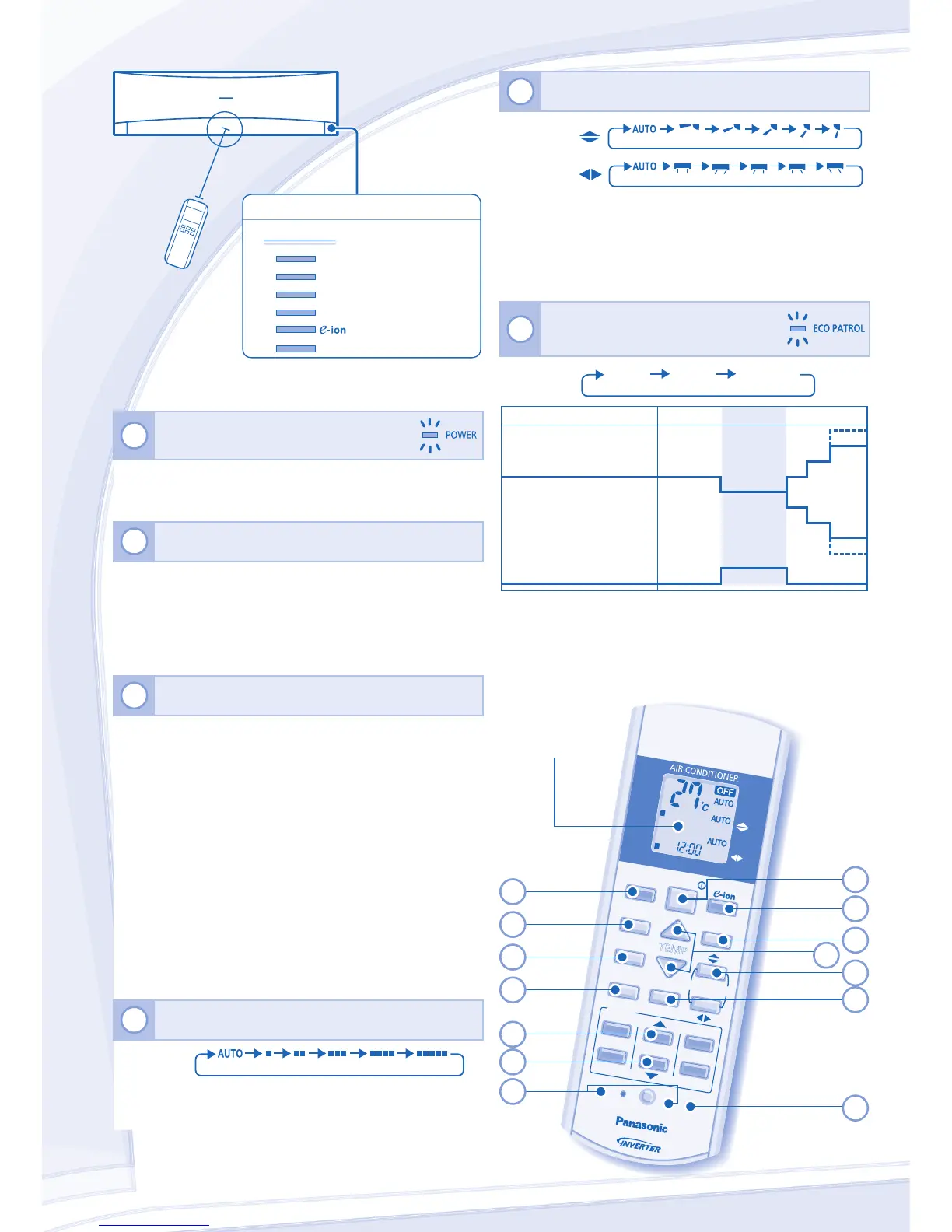
TO ADJUST AIRFLOW DIRECTION (5 OPTIONS)
AIR SWING
• Keeps the room ventilated.
• In COOL/DRY mode, if AUTO is set, the louver swing
left/right and up/down automatically.
• In HEAT mode, if AUTO is set, the horizontal louver fi x at
predetermined position. The vertical louver swing left/right
after the temperature rises.
6
TO MONITOR HUMAN PRESENCE
& ACTIVITY FOR ENERGY SAVING
ECO
PATROL
ECO 1 ECO 2 ECO OFF
+3°C
-3°C
Heat Source & Movement
Low
High
+2°C
-2°C
Set Temperature
None
-1°C
Set Fan Speed
COOL/
DRY Mode
HEAT Mode
*≤ Medium
Fan
+1 tap
• — ECO 1 - To optimize comfort and energy saving.
• --- ECO 2 - To maximize energy saving.
* Applicable during COOL/DRY Mode only.
Press the remote control’s button
1
TO TURN ON OR OFF THE UNIT
• Please be aware of the OFF indication on the remote
control display to prevent the unit from starting/stopping
improperly.
2
TO SET TEMPERATURE
• Selection range: 16˚C ~ 30˚C.
• Operating the unit within the recommended temperature
could induce energy saving.
HEAT mode : 20˚C ~ 24˚C.
COOL mode : 26˚C ~ 28˚C.
DRY mode : 1˚C ~ 2˚C lower than room temperature.
3
TO SELECT OPERATION MODE
AUTO mode - For your convenience
• During operation mode selection the power indicator
blinks.
• Unit selects operation mode every 10 minutes according
to temperature setting and room temperature.
HEAT mode - To enjoy warm air
• Unit takes a while to warm up. The power indicator blinks
during this operation.
COOL mode - To enjoy cool air
• Use curtains to screen off sunlight and outdoor heat to
reduce power consumption during cool mode.
DRY mode - To dehumidify the environment
• Unit operates at low fan speed to give a gentle cooling
operation.
4
TO SELECT FAN SPEED (5 OPTIONS)
FAN



 To Next Page