Auto Restart Control
• If power is resumed after a power failure, the
operation will restart automatically after a period
of time with previous operation mode and airflow
direction.
• This control is not applicable when TIMER is
set.
6
How to use
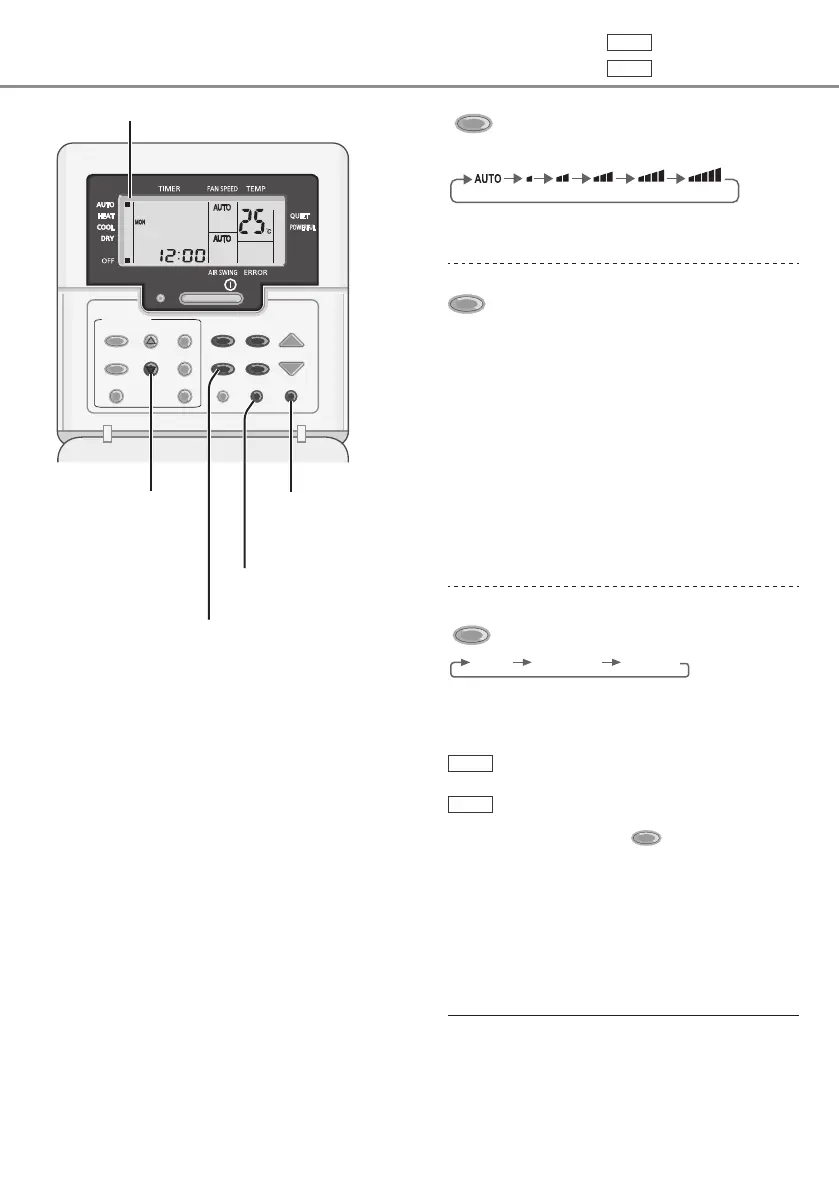
FAN SPEED
To select fan speed
(Remote control display)
• For AUTO, the indoor fan speed is automatically
adjusted according to the operation mode.
MODE
To select operation mode
AUTO - For your convenience
• Unit selects operation mode every 10 minutes
according to setting temperature and room
temperature.
HEAT - To enjoy warm air
• Unit takes a while to warm up.
COOL - To enjoy cool air
• Use curtains to screen off sunlight and outdoor
heat to reduce power consumption during
COOL mode.
DRY - To dehumidify the environment
• Unit operates at low fan speed to give a gentle
cooling operation.
QUIET/
POWERFU
To switch between
quiet & powerful
QUIET POWERFUL NORMAL
QUIET: To enjoy quiet operation
• This operation reduces airflow noise.
POWERFUL: To reach temperature quickly
Single
• This operation stops automatically after
20 minutes.
Multi
• This operation continuous until
pressing again
QUIET/
POWERFU
button.
Can be activated in all modes and can be
cancelled by pressing the respective button
again.
OFF
/
ON
TEMP
TIMER/CLOCK
MODE
QUIET/
POWERFUL
FAN SPEED
MODE
CHECK RESET
AIR SWING
OFF/ON
CANCELCLOCK
SET
SELECTUP
DOWN
AC RC
Remote control display
Press and hold
for approximately
10 seconds to show
temperature setting
in °C or °F.
Press to restore the
remote control to
previous setting.
Not used in normal
operations.
Not applicable
Single
Single split system
Multi
Multi split system



 To Next Page