7
English
To set the timer
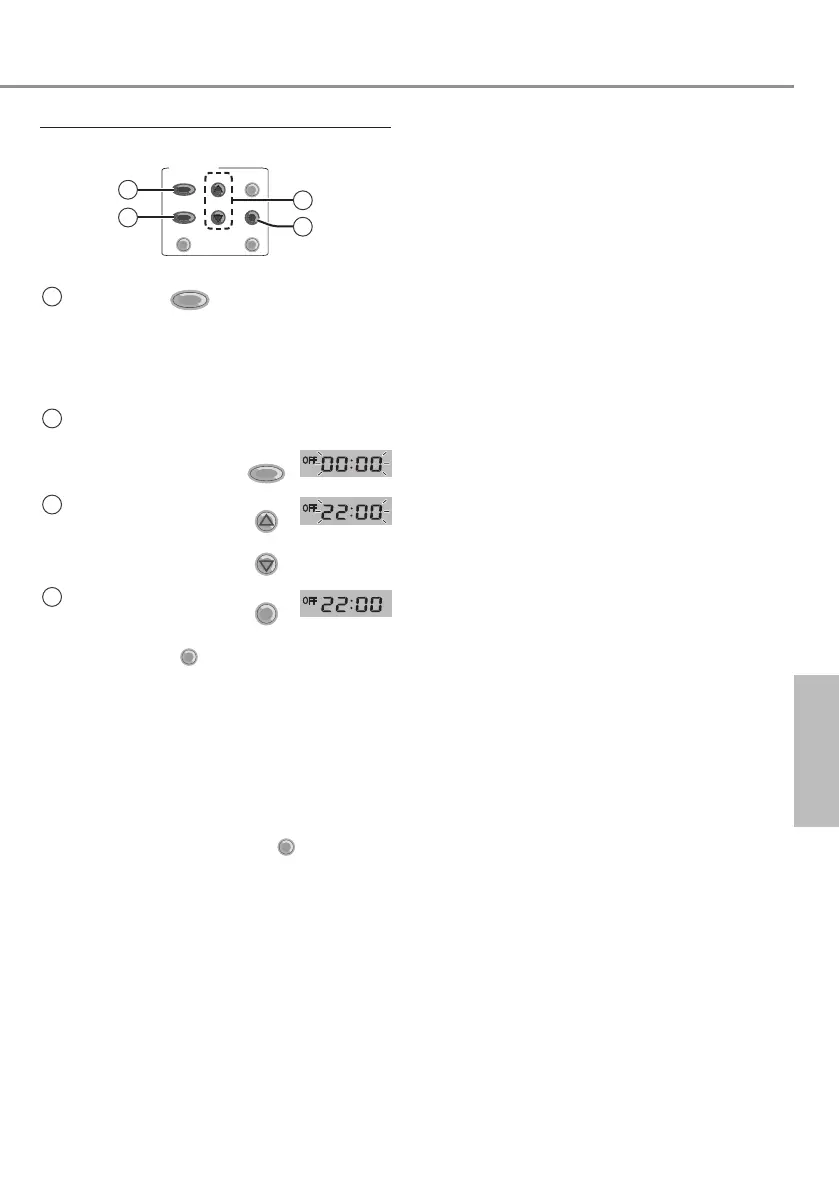
Daily timer setting
To turn ON or OFF the unit at a preset time.
TIMER/CLOCK
CANCELCLOCK
SELECT
D
FF
E
P
D
W
3
4
1
2
1
Press TIMER
MODE
to enter timer mode
• Press once to change the display from clock
to timer or vice-versa.
• Press for 4 seconds to change the display
from daily timer to weekly timer or vice-
versa.
2
Select ON or OFF
timer
Example:
OFF at 22:00
OFF/ON
3
Set the time
UP
DOWN
4
Confirm
SET
• To cancel, press
CANCE
.
• When ON timer is set, the unit may start early
before the actual set time in order to achieve
the desired temperature on time.
• Timer operation is based on the clock set in the
remote control and repeats daily once set.
• The timer closest to the current time will be
activated first.
• If timer is cancelled manually, you can restore
the previous setting by pressing
SET
.
How to use / To set the timer



 To Next Page