17
English
See "To learn more..." for details.
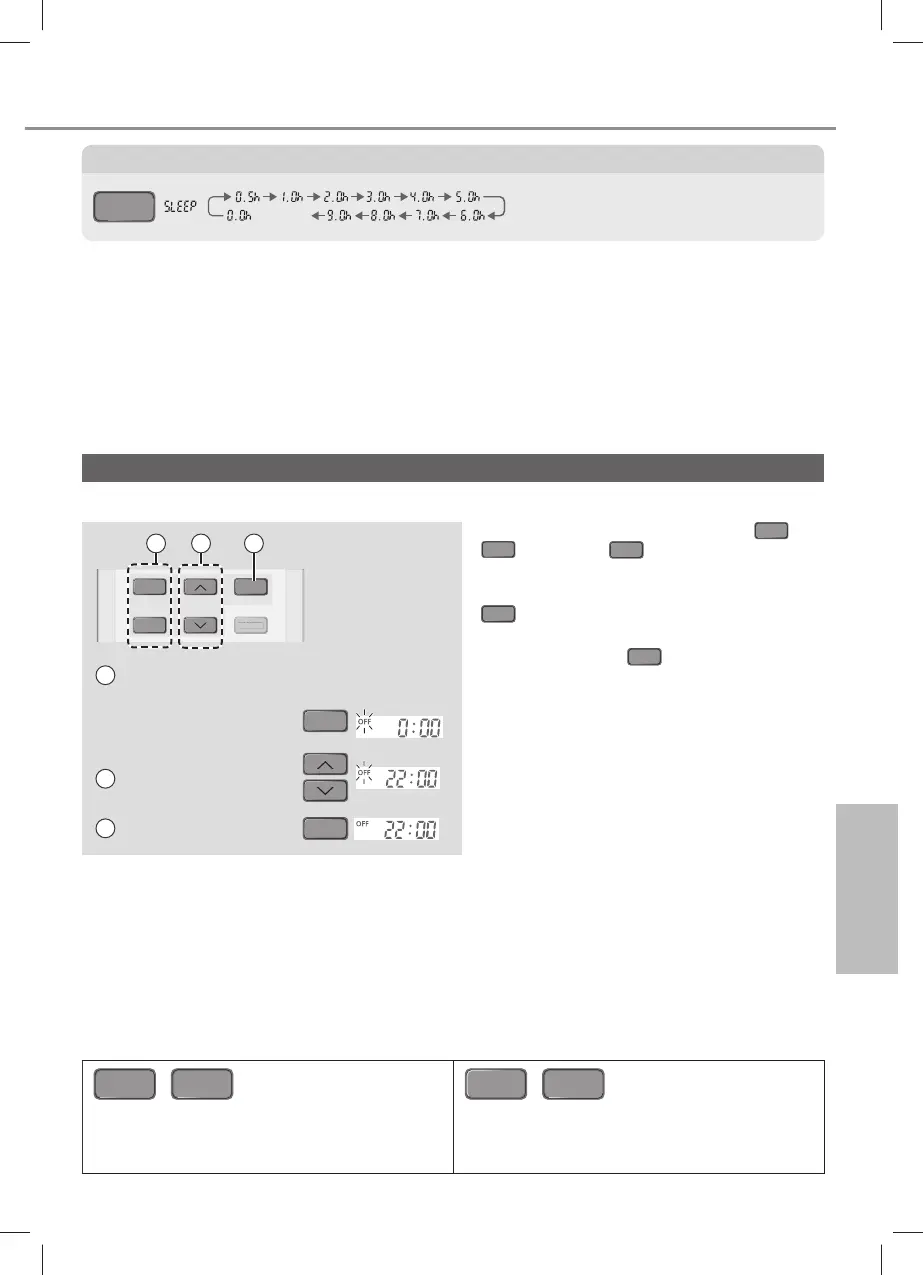
To set the timer
Note
SLEEP
,
QUIET
JET
STREAM
,
QUIET
• Can be activated in all modes and can be
cancelled by pressing the respective button
again.
• Cannot be selected at the same time.
ON
OFF
SET
TIMER
CANCEL
AN
E
21 3
1
Select ON or OFF
timer
Example:
OFF at 22:00
OFF
2 Set the time
3 Confirm
SET
• To cancel ON or OFF timer, press
ON
or
OFF
then press
CANCEL
.
• If timer is cancelled manually, you can
restore the previous setting by pressing
SET
.
• If power failure, you can restore the timer
again by pressing
SET
.
• Timer operation is based on the clock set
in the remote control and repeats daily
once set. For clock setting, please refer to
Quick Guide.
To turn ON or OFF the unit at different preset time.
To maximise comfort while sleeping
SLEEP
(CANCEL)
• This operation provides you with a comfortable environment while sleeping. It will
automatically adjust the sleep pattern temperature during the activation period.
• The indoor unit indicator will dim when this operation is activated. This is not applicable if
the indicator brightness has been manually dimmed.
• This operation is incorporated with the activation timer (0.5, 1, 2, 3, 4, 5, 6, 7, 8 or 9 hours).
• This operation can be set together with timer. Sleep operation has the priority over OFF
timer.
• This operation can be cancelled by pressing the respective button until the sleep timer
reaches 0.0h.
How to use
ACXF55-24440_FZ0319-0.indb 17ACXF55-24440_FZ0319-0.indb 17 2/27/2019 3:22:20 PM2/27/2019 3:22:20 PM



 To Next Page