6
How to use
i AUTO-X
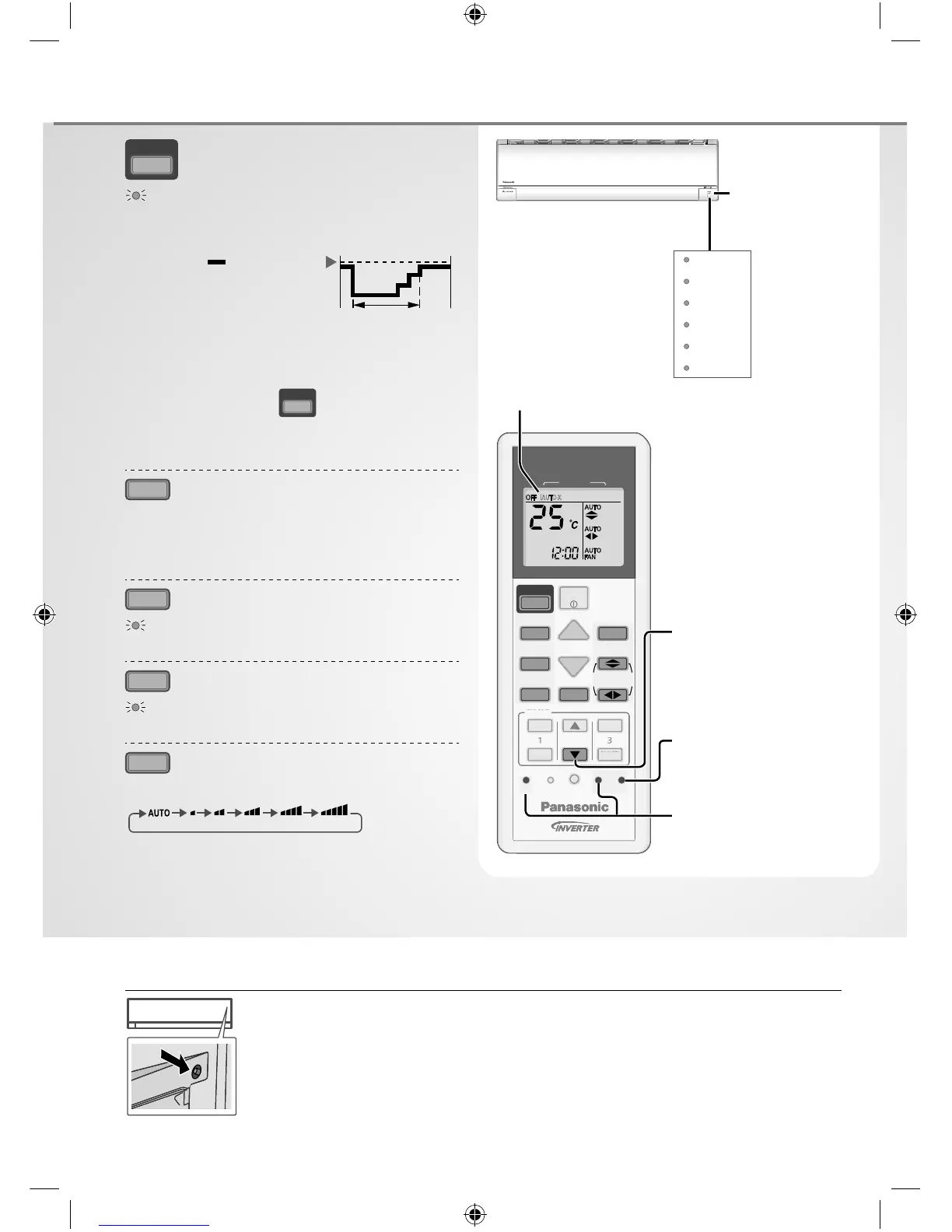
To reach temperature quickly
i AUTO-X
•
The unit controls set temperature according to room
temperature to accelerate room cooling.
Set
temperature
i AUTO-X
-1°C
Max = 4 hours
•
After max 4 hours, the set temperature follows the
last set temperature setting.
•
Fan speed is fi xed at AUTO, fan speed selection is
prohibited.
•
During unit is off, press
i AUTO-X
will turn on the unit
with i AUTO-X mode.
•
i AUTO-X mode can be cancelled by pressing the
respective button again.
MODE
To select operation mode
i AUTO-X - To reach temperature quickly
COOL - To enjoy cool air
DRY - To dehumidify the environment
FAN - To circulate air in the room
POWERFUL
To reach temperature quickly
POWERFUL
•
This operation stops automatically after 20 minutes.
QUIET
To enjoy quiet operation
QUIET
•
This operation reduces airfl ow noise.
FAN SPEED
To select fan speed
(Remote control display)
•
For AUTO, the indoor fan speed is automatically
adjusted according to the operation mode.
•
If i AUTO-X mode is set, fan speed is fi xed to AUTO.
To adjust fan speed, cancel i AUTO-X mode.
CLOCK
MODE
AIR CONDITIONER
OFF/ON
SET CHECK RESET
AC
RC
ON
OFF
SET
CANCEL
123
TIMER
QUIET
MODE
TEMP
FAN SPEED
ECONOMY
POWERFUL
i AUTO-X
AIR SWING
iAUTO-X
CL
Press and hold for
approximately
10 seconds to show
temperature setting in
°C or °F.
Press to restore the
remote control to
default setting.
Not used in normal
operations.
Remote control display
Auto OFF/ON button
Use when remote control is misplaced or a malfunction occurs. Raise the front panel:
• To use in
i AUTO-X
mode, press the button once.
• To use in COOL mode, press and hold the button until 1 beep is heard, then
release.
• Press the button again to turn off.
POWERFUL
ECONOMY
i AUTO-X
Indicator
POWER
TIMER
i AUTO-X
ECONOMY
POWERFUL
QUIET
(Green)
(Orange)
(Orange)
(Orange)
(Orange)
(Orange)
Remote control
receiver
F570022-SA0815-2_EN.indd 6F570022-SA0815-2_EN.indd 6 17/08/2015 2:46:03 PM17/08/2015 2:46:03 PM
Process BlackProcess Black



 To Next Page