7
English
How to use
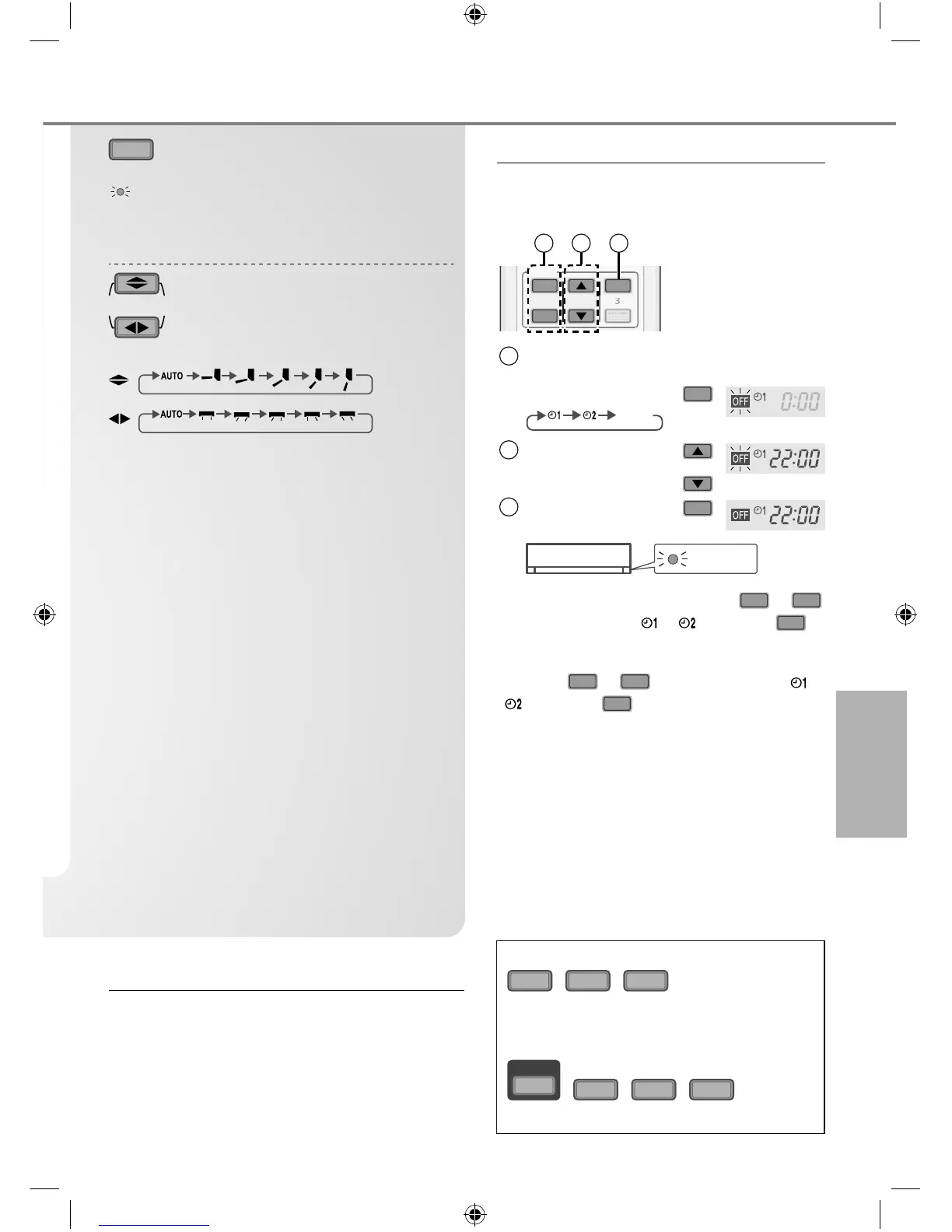
ECONOMY
To save electrical power
consumption
ECONOMY
•
Save power consumption at unoccupied room by
adjust set temperature up to 3°C automatically.
•
Brightness of all indicators will be dimmed.
AIR SWING
To adjust airfl ow direction
(Remote control display)
•
Keeps the room ventilated.
•
In COOL/DRY mode, if AUTO is set, the fl aps swings
left/right and up/down automatically.
•
In i AUTO-X mode, if AUTO is set, the horizontal fl ap
is fi xed at the lower position and shift to the upper
position after reaches set temperature. The vertical
fl ap movement will fi xed at predetermined position.
•
If manual is set, the horizontal and vertical fl ap are
fi xed at the predetermined position.
•
Do not adjust the fl ap by hand.
Note
QUIET
,
POWERFUL
,
ECONOMY
• Can be activated in COOL and DRY mode
and can be cancelled by pressing the
respective button again.
i AUTO-X
,
QUIET
,
POWERFUL
,
ECONOMY
• Cannot be selected at the same time.
Auto Restart Control
• If power is resumed after a power failure, the
operation will restart automatically after a period
of time with previous operation mode and airfl ow
direction.
• This control is not applicable when TIMER is set.
To set the timer
2 sets of ON and OFF timers are available
to turn ON or OFF the unit at different preset
times.
ON
OFF
SET
CANCEL
123
TIMER
1 2 3
1
Select ON or OFF
timer
Example:
OFF at 22:00
• Each time pressed:
OFF
Cancel
2
Set the time
2
3
Confi rm
SET
TIMER
• To cancel ON or OFF timer, press
ON
or
OFF
to select respective or then press
CANCEL
.
• If timer is cancelled manually or due to power
failure, you can restore the timer again by
pressing
ON
or
OFF
to select respective or
then press
SET
.
• The nearest timer setting will be displayed and
will activate in sequence.
• When ON Timer is set, the unit may start
earlier (up to 15 minutes) before the actual
set time in order to achieve the desired
temperature on time.
• Timer operation is based on the clock set in
the remote control and repeats daily once set.
For clock setting, please refer to Quick guide.
F570022-SA0815-2_EN.indd 7F570022-SA0815-2_EN.indd 7 17/08/2015 2:46:07 PM17/08/2015 2:46:07 PM
Process BlackProcess Black



 To Next Page